4

I want to get sth like:

enter image description here

I have produced the vector images in Adobe Illustrator. I could do the labels (X_3, X_2,..) in there too, but after importing them in latex they wouldn't be consistent with the whole document.

So I am wondering how can I do that.

I thought Tikz could help me. But it produces a new area which whould be under the image, not near it, like: (I am not so familiar with it)
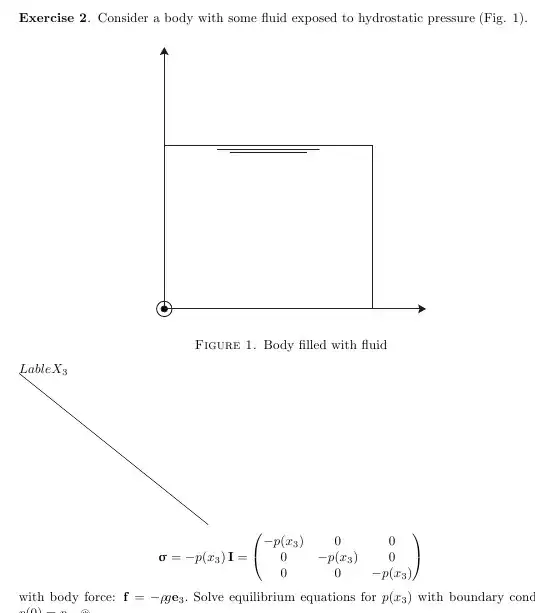
enter image description here

The code:

\documentclass[a4paper,10pt, reqno]{amsbook}
\usepackage{tikz}
\usetikzlibrary{arrows,shapes,trees}
\usepackage{graphicx}
\graphicspath{F:/(some path here)/pdfs/}
\begin{figure}[!htb]
\centering
\includegraphics[width=0.5\textwidth]{fig1c.pdf}
\caption{Body filled with fluid}
\label{fig:digraph}
\end{figure}
\begin{tikzpicture}

%\draw (0,0)--(5,-4);
node[pos=0,above] {$X_3$} 
\end{tikzpicture}
\end{document}

So, any ideas?

cmhughes
  • 100,947
Vahid
  • 475
  • 1
    May be this could help you. – Manuel Nov 20 '12 at 22:15
  • Textpos is also an option, using overlay package option :-) – Vahid Nov 20 '12 at 22:21
  • The link @Manuel referred to is probably what you are looking for in the short term. However, if that image is representative of the type of images you need to do, I would highly recommend learning tikz. Basically, as cmhughes illustrates in his answer. – Peter Grill Nov 20 '12 at 22:24

2 Answers2

4

Well, this is the full code which I was referring to. But I think @cmhughes is right, it would be nice if you do all in TikZ.

\documentclass[a4paper,10pt, reqno]{amsbook}
\usepackage{tikz}
\usetikzlibrary{arrows,shapes,trees}
\usepackage{graphicx}
\begin{document}
\begin{figure}
\centering  
\begin{tikzpicture}
    \node[anchor = south west, inner sep = 0] (image) at (0,0) {\includegraphics[width = 0.5\textwidth]{fig1c.pdf}};
    \begin{scope}[x = {(image.south east)}, y = {(image.north west)}]
        \draw (0,1) node [left] {$X_3$}; 
        \draw (0,0) node [below left] {${X_1}$};
        \draw (1,0) node [below] {$X_1$};
    \end{scope}
\end{tikzpicture}
\caption{Body filled with fluid} \label{fig:digraph}
\end{figure}
\end{document}

image

Manuel
  • 27,118
  • I think you should clarify that \rule{4.5cm}{4.5cm} is in place of \includegraphics. May not be obvious to new users. Or even better, I would suggest using \includegraphics[width=0.5\textwidth]{fig1c.pdf} and add the [demo] option to the graphicx package. – Peter Grill Nov 20 '12 at 22:41
  • I didn't know about that. Feel free to edit if you want (I will se now how it works). – Manuel Nov 20 '12 at 22:49
  • No need anymore, as your updated version is even better than my suggestions. – Peter Grill Nov 20 '12 at 23:05
3

How about redrawing the whole thing in tikz

screenshot

\documentclass[a4paper,10pt, reqno]{amsbook}
\usepackage{tikz}
\usetikzlibrary{positioning}
\usetikzlibrary{calc}

\begin{document}

\begin{figure}[!htb]
\centering
\begin{tikzpicture}[every node/.style={node distance=3cm},>=stealth]
% set up the nodes
\node[label=left:$X_1$,circle,fill=black] (X1) at (0,0){};
\node[right=of  X1,label=below:$X_2$](X2){};
\node[above=of X1,label=left:$X_3$](X3){};
% draw the arrows
\draw[->] (X1)--(X2);
\draw[->] (X1)--(X3);
% draw the rectangle
\draw (0,0) -- (0,2.5)--node[pos=0.5](topline){}(2.5,2.5)--(2.5,0);
% draw the horizontal lines
\draw ($(topline.south west)-(0.5,0)$)--($(topline.south east)+(0.5,0)$);
\draw ($(topline.south west)-(0.25,0.1)$)--($(topline.south east)+(0.25,-0.1)$);
% additional circle at X1
\draw (0,0) circle (7pt);
\end{tikzpicture}
\caption{Body filled with fluid}
\label{fig:digraph}
\end{figure}


\end{document}
cmhughes
  • 100,947