15

Tremendous benefits can accrue, if TeX-like mark-up could be used in lieu of html and its variants, where a requirement exists to have a document both as (All)TeX mark-up and html format.

There are benefits both ways. For (All)TeX a browser interface is unquestionably the best means of providing a flexible and user friendly User Interface and requiring minimal programming. One could program settings to be captured via interactive screens to manage packages and variable settings. On last count a complicated document might need over 700 variable settings, and although most of us solve the problem with class selection the difficulties remain. Another benefit is the organization of the document data and managing files and directories through a visual interface, rather than a console and lastly and perhaps one of the most important consideration is the possibility of using server and scripting languages for calculations and access to web documents and databases, where (All)TeX is limited.

For html a macro language could be used to generate complicated html patterns such as code-blocks, complicated visual displays of images (that require a lot of divs) and similar. Additionally, if the mark-up was in (All)TeX, documents could be generated on the fly.

Here is the question, before I give a bit more background to satisfy the rules and to keep the closure squad happy.

What are your views? Is TeX-like mark-up a good way of structuring documents? I personally think the answer is yes with the exception of tables. What would be a suitable mark-up for tables?

Some more background. I have a personal CMS build with CodeIgniter that I use to keep a lot of documents and personal notes, especially on programming.

enter image description here

Any code in code-blocks can be run interactively and see the results within the browser. I have code for quite a few languages, such as javascript, lua, php, haskell, perl etc. Mark-up was originally based on using hard-coded html, markdown and wiki-style mark-up. I have now added a filter where it parses LaTeX code and produces the relevant html with simple environments, such as \begin{jscodeblock}..\end{jscodeblock}. I have also added code for most common LaTeX commands and a few for images.

enter image description here

Pressing the "texify" button sends the document through a filter that parses any markdown and wiki-like tags and produces the pdf, which can be viewed directly in the browser.

enter image description here

A major advantage for me, and possibly for anyone used to breaking up long documents in different files, is that the system can be used within the browser to "collate" all the files and produce the full document pdf. The menu on the left represents all the individual files and a main file is used, if the full document is required, otherwise it only prints the page. An automated 'menuing' system helps with the nightmare of managing hundreds of files. (On the left in first image).

enter image description here

I have been using, markdown and its variants and I am familiar with pandoc and LaTeX2html packages. They all have their limitations and usages. So far marking through LaTeX only commands have improved my workflow and productivity. I have managed to provide filters for most macros to display well in browsers - except tables. There is no problem parsing and translating simple table mark-up such as the one provided by mark-down, however anything more complicated and parsing is next to impossible.

I believe that the answer may lie in redefining the way we mark tables in LaTeX and I invite your ideas.

Maths mark-up, was solved with MathJax and a small filter. There is much more in the system that I can describe in a question, such as managing settings, cover-images, styles and the like.

As we lack an experimental tag, I have tagged the post as mark-up.

Edit: Similar idea in practice authorea give it spin.

yannisl
  • 117,160
  • 2
    Maybe it would be better to discuss this on meta. – Guido Nov 20 '12 at 23:24
  • 5
    TeX is the worst way to structure a document. Apart from all the other ways that have been tried. – Andrew Stacey Nov 20 '12 at 23:31
  • TeX table (and alignment generally) isn't brilliant but mathjax manages to parse the ams math alignments so probably parsing normal latex tabular and friends with javscript is not out of the question. However for a web oriented markup it would probably be better to use a tex syntax to html tables rather than try to convert standard latex tabular markup. html table column calculations are far more fluid, TeX has difficulty with that tabularx X columns are not really a substitute for html column heuristics. – David Carlisle Nov 20 '12 at 23:32
  • @Guido This requires a LaTeX answer, for example a proposal could be as shown in http://tex.stackexchange.com/a/19761/963. – yannisl Nov 20 '12 at 23:33
  • 1
    From a professional point of view, I have a lot of experience with different formalisms for document description. I'm afraid between the more markup-type ones like HTML or FO and the more script-type ones like (La)TeX and DTP scripting there is a similar borderline as between complexity classes like context-free languages (good for formalizing things) and recursively enumerable languages (good for computing things). It would be great to specify the mathematical classes behind this and prove some separation results... – Stephan Lehmke Nov 20 '12 at 23:35
  • @AndrewStacey Agreed on TeX alone, but once you have it translated as html the tree structure is there as a bonus! You can do it server side or client side very easily. – yannisl Nov 20 '12 at 23:37
  • @DavidCarlisle Currently I am parsing server side so I can save the results and cache them. It is not impossible to parse tabular, but table markup can get very complicated. I agree on you on TeX syntax. An example I experimented was to use something closer to html: \row |x |x |x |x |x etc. but run out of ideas for \multicolumns:) MathJaX gave me the basic idea for the system. If I can have the maths (which was the difficult part always), to have a \begin{figure} was very easy. – yannisl Nov 20 '12 at 23:49
  • @StephanLehmke I personally believe - that the document description language for tables is still an unanswered question, except perhaps for a method similar to excel where each cell has all the relevant properties, but then again is not mark-up. Building a JavaScript interface and then translating the table and inputting it might be the ultimate answer from a practical point of view. – yannisl Nov 20 '12 at 23:55
  • @AndrewStacey: TeX != LaTeX. Providing a good structure in TeX is upto the macro package. – Aditya Nov 21 '12 at 01:20
  • @YiannisLazarides: Can you elaborate on the types of tables you have in mind. For simple tables, ConTeXt TABLE mechanism captures the structure nicely. – Aditya Nov 21 '12 at 02:22
  • @Aditya I would like to have it as general as possible, my main concern is to capture the structure of the table and not the presentation details. ConTeXt's way - and I don't know it very well is very near to what I am looking. Reasoning behind the presentation issue is I will use CSS for the styling in the browser. I can also pick out the cell properties via JS and hoping to pass onto a \tablehead macro for the (All)TeX processing. Once the structure is captured the possibilities are endless. Main concern, is to keep the marking as clean as possible. – yannisl Nov 21 '12 at 05:06
  • 1
    (In case it is unclear, my comment earlier was a veiled reference to Churchill's quote about democracy.) – Andrew Stacey Nov 21 '12 at 21:12
  • @YiannisLazarides: I have a hard time understanding your question. – Aditya Nov 21 '12 at 21:17
  • @Aditya Clarified a bit with an answer below to keep comments shorter. – yannisl Nov 22 '12 at 21:41
  • @YiannisLazarides Are you somehow involved in authorea ? – percusse Mar 08 '13 at 21:03
  • @percusse I am not involved, but it seems we had similar ideas. Saw the link at HN the other day and thought of posting it here. – yannisl Mar 09 '13 at 13:58

2 Answers2

3

I feel that as the point of all this is to have as human-friendly input as possible, it would make sense to use markdown or its derivatives (sidenote: I’ve pursued this idea previously).

Out of that format I would like to raise tables as an example of kramdowns markdown extensions:

| city     | age_range | gender | marketing_target |
|----------|-----------|--------|------------------|
| New York | < 30      | M      | Y                |
| Chicago  | < 30      | M      | Y                |
| Chicago  | < 30      | F      | Y                |
| New York | < 30      | M      | Y                |
| New York | < 30      | M      | Y                |

It does look like a table, right?

morbusg
  • 25,490
  • 4
  • 81
  • 162
  • Markdown is a great method and works for 95% of the cases. It fails for complex situations (i.e., where there are multirows and multicolumns). Also when you start formatting numbers on decimal places, having complex column definitions and the like. I got everything working up to this point. So far I found it next to impossible to capture the expressiveness of TeX/LaTeX in a markdown-like markup. – yannisl Mar 07 '13 at 20:18
2

A bit of a description of my attempts so far to provide some answers and to expand a bit on the topic.

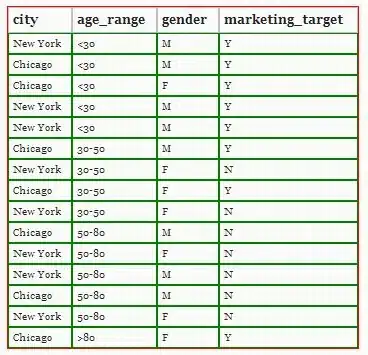
Consider the structure of a table irrespective of how and where it is displayed or printed. A simple table would normally contain some form of a dataset. For example,

 DATA_LABELS = ['city', 'age_range', 'gender', 'marketing_target'];

 DATA_SET = [
  ['New York', '<30', 'M', 'Y'],
  ['Chicago', '<30', 'M', 'Y'],
  ['Chicago', '<30', 'F', 'Y'],
  ['New York', '<30', 'M', 'Y'],
  ['New York', '<30', 'M', 'Y'],
  ...
  ['Chicago', '>80', 'F', 'Y']];

This is of course very similar to a csv file. To those familiar with JavaScript the above is valid code once you add a var in front of the variables and with some short code you can produce a table that would for example look like:

enter image description here

A pure html table uses the familiar code of a jumble of tags, with the advantage of having a good 'structure' enabling the separation of presentation from mark-up. The problem with html is verbosity leading to some solutions such as the various versions of markdown.

As TeX based systems provide powerful mechanisms an in-between mark-up language can help. For example,

\begin{table}
\tablecaption{\captionlorem}
\begin{tabular}{lllp{2.5cm} };
 \tr
   \th heading 1
   \th heading 2
   \th heading 3
   \th heading 3
\tr
   \td test
   \td test
   \td test
   \td test
\tr
   \td test
   \td test
   \td test
   \td test
\end{tabular}
\end{table}

This can easily be transformed within the browser and in pdfLaTeX and we get:

enter image description here

The table head can be simplified to:

\begin{Table}[class= \simple_table]
 ...
\end{Table}

where the class defines some css and the same name is used for LaTeX code that defines table head definitions. At the cost of further complicating parsing one could say:

\begin{Table}[class= \simpletable]
   \datalabels{...,...,...,}
   \dataset{...,...,...,}
\end{Table}

and be done with it. Data lives where it should live and the styling is left with the class. Multi-row and multi-column is still an issue; one point of view is that a multi-column refers to presentational details and should be added to the class and not to the data mark-up. A different point of view would be that data marked as [...,'F' + 'F',] means the two adjacent cells share the same value and they should be parsed as a multi-column spanning two cells.

ConTeXt coding of tables is very similar to my example above using \td,\tr etc, but it still has the drawback of mixing data, presentation and tags.

yannisl
  • 117,160
  • This is similar to what I am planning to say in part 2 of my blog post on separating content and presentation for tables. In my workflow, I store data in lua tables rather than JS arrays. A more flexible approach (part 3 of my blog post series, if I ever get to that), is to store data in an XML file and then convert it to a lua table. The advantage of using XML is that there are tools to verify XML data (RNC etc). I am actually thinking of more complicated data (to be presented in multirow and multicolumn format, so it cannot be stored in a CSV file) where the presentation depends on the data. – Aditya Nov 22 '12 at 22:35
  • To conclude the point, such a separation is already possible with LuaTeX. Store data in Lua table/XML file and write lua code to format the data. – Aditya Nov 22 '12 at 22:37
  • @Aditya Thanks. I am trying a slightly different approach. The whole interface is within a browser. In a way I have extended the markdown concept. No html; added macros ala TeX style. So in a way is a generic mark-up language. You type \begin{jscodeblock}... the browser displays the code and you can run the example in the browser. Press TeXify it sends to server runs pdfLaTeX or LuaTeX and produces a .pdf as well. Since I can run lua/perl/haskell/javascript/php etc... in the browser, one can use his favourite language to generate data if need be. – yannisl Nov 22 '12 at 23:02
  • @Aditya Actually the lua table structure or json style mark-up, would also be a very suitable alternative as table mark-up. – yannisl Nov 22 '12 at 23:04
  • Why use TeX style macros? I prefer to use XML markup in such situation because there are well tested libraries in all programming languages to manipulate XML data. When you use TeX markup, you have to write a tex parser, which is non-trivial (even if you ignore the catcode changes) – Aditya Nov 22 '12 at 23:22
  • @Aditya Expecting someone writing a book to type XML is punishment from hell. I don't need a full parser only for the allowable macros. Also laziness... I like to type \lorem and can have 5 paragraphs of text in the browser for mock-ups. Wikipedia will probably say {{lorem}}. If you've used wiki-markup it is a very similar idea + plus the bonus of the pdf. – yannisl Nov 22 '12 at 23:44
  • If you want properly structured text, you need to mark it up. For example, if you want a section with a short title in the headers and a different string in the table of contents and a different string in the bookmarks, you need to indicate those. For such cases, ConTeXt uses \startsection[title=..., marking=..., bookmark=..., list=...] .... \stopsection which is not too different from <section title=... marking=... bookmark=... list=...> ... </section>. Of course, if your input is simpler, then you may use a light weight markup language, but any such approach will always be restrictive. – Aditya Nov 23 '12 at 00:54