2

i am trying to create a command for a matching type of question. left column are the questions and on the right column are the choices. My problem is how will I do this, especially on the right column. How can I make a column of choices corresponding with the length of the total questions?

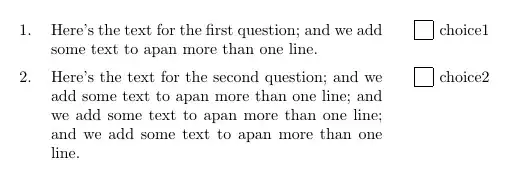
example output is:

enter image description here

follow up question. If inspite of writing a. choice1, is changing letter a to a small box possible?

better if could use the command like this:

  \documentclass{exam}
  \usepackage{longtable,tabu}
  \begin{document}
  \begin{mytabu}\boxedcolchoice
  \question{text text text text text}{choice1}\\
  \question{text text text text text here text here}{choice2}\\
  \end{mytabu}
  \end{document}
David Carlisle
  • 757,742
Kayla
  • 1,655

1 Answers1

4

Here's one possible solution using the tabu and longtable packages. The command \myquestion is in charge of typesetting the entries; it has two mandatory arguments: the first one contains the text for the question, and the second one, for the corresponding text for the choice. The row numbering and the boxes are automatically included:

\documentclass{article}
\usepackage{longtable}
\usepackage{tabu}

\newcounter{myrow}
\newcommand\mybox{%
  \raisebox{0.25ex}{\fbox{\rule{0.5em}{0pt}\rule{0pt}{0.5em}}}}
\newcommand\myquestion[2]{& #1 & & #2}

\begin{document}

\tabulinesep=3pt
\begin{longtabu} to \textwidth{
  >{\stepcounter{myrow}\themyrow.}l
  X[3]
  @{\hspace*{2em}}
  >{\mybox}l
  @{\hspace*{4pt}}X
}
\myquestion{Here's the text for the first question; and we add some text to apan more than one line.}{choice1}  \\
\myquestion{Here's the text for the second question; and we add some text to apan more than one line; and we add some text to apan more than one line; and we add some text to apan more than one line.}{choice2}  \\
\end{longtabu}

\end{document}

enter image description here

A new requirement has been made in a comment; to be able to have the longtabu width and format specification as parameters; this can be done defining a new mytabu environment with two mandatory arguments (the first one could be also defined as optional with a default value): the first argument is the width of the longtabu, and the second one, gives the format specification. The code:

\documentclass{article}
\usepackage{longtable}
\usepackage{tabu}

\newcounter{myrow}
\newcommand\mybox{%
  \raisebox{0.25ex}{\fbox{\rule{0.5em}{0pt}\rule{0pt}{0.5em}}}}
\newcommand\myquestion[2]{& #1 & & #2}
\newenvironment{mytabu}[2]
  {\tabulinesep=3pt
    \begin{longtabu} to #1{#2}
  }
  {\end{longtabu}}

\begin{document}

\begin{mytabu}{\textwidth}{
  >{\stepcounter{myrow}\themyrow.}l
  X[3]
  @{\hspace*{2em}}
  >{\mybox}l
  @{\hspace*{4pt}}X
}
\myquestion{Here's the text for the first question; and we add some text to apan more than one line.}{choice1}  \\
\myquestion{Here's the text for the second question; and we add some text to apan more than one line; and we add some text to apan more than one line; and we add some text to apan more than one line.}{choice2}  \\
\end{mytabu}

\end{document}
Now a new requirement made in an edit to the original question:

\documentclass{article}
\usepackage{longtable}
\usepackage{tabu}

\newcounter{myrow}
\newcommand\mybox{%
  \raisebox{0.25ex}{\fbox{\rule{0.5em}{0pt}\rule{0pt}{0.5em}}}}
\newcommand\myquestion[2]{& #1 & & #2}
\newenvironment{mytabu}
  {\tabulinesep=3pt
    \begin{longtabu} to \textwidth{>{\stepcounter{myrow}\themyrow.}l
  X[3]
  @{\hspace*{2em}}
  >{\mybox}l
  @{\hspace*{4pt}}X}
  }
  {\end{longtabu}}

\begin{document}

\begin{mytabu}
\myquestion{Here's the text for the first question; and we add some text to apan more than one line.}{choice1}  \\
\myquestion{Here's the text for the second question; and we add some text to apan more than one line; and we add some text to apan more than one line; and we add some text to apan more than one line.}{choice2}  \\
\end{mytabu}

\end{document}

enter image description here

Moriambar
  • 11,466
Gonzalo Medina
  • 505,128
  • i tried to install the tabu.sty for it is not found. But, it prompt no tlmgr found. I made to install this two but i failed for it says ubuntu version i think cant support it? i guess. So is there other way to solve my problem? – Kayla Dec 06 '12 at 01:28
  • i encountered this kind of problem in my ubuntu and it says no way to fix it. – Kayla Dec 06 '12 at 01:32
  • @kayla Perhaps this post can help you with your installation problem: http://tex.stackexchange.com/questions/73016/how-do-i-install-an-individual-package-on-a-linux-system. My crystal ball says you are using Ubuntu 12.04 and you are still probably using TeXLive 2009. Install TeXLive 2012 instead. If you want to install the package manually, then you can follow the directions in the link. But creating a folder texmf in your home directory and unziping the package to ~/texmf/tex/latex usually works. – hpesoj626 Dec 08 '12 at 16:01
  • previously i tried to place my mdframed package in the home directly. I copy it so I can paste it. But what happened when is i can't paste the folder in ~/texmf/tex/latex. In short, the system doesn't allow me to do so. – Kayla Dec 09 '12 at 09:09
  • @gonzalo .. this code :`\textwidth{

    {\stepcounter{myrow}\themyrow.}l

    X[3] @{\hspace*{2em}}

    {\mybox}l

    @{\hspace*{4pt}}X }after the\begin{longtabu}` is this possible to define as a variable also? i will be putting the code probably in my class if it can possibly make as variable.

    – Kayla Dec 09 '12 at 12:59
  • @kayla of course you can do that. What do you want to be variable, the lengths used or the whole format specification?. – Gonzalo Medina Dec 09 '12 at 15:33
  • It be better if its the whole format specification so that it can be more appropriate and consistent. – Kayla Dec 11 '12 at 16:08
  • @kayla please see my updated answer. – Gonzalo Medina Dec 11 '12 at 20:58
  • @GonzaloMedina: Is there possible way to eliminate this `{\textwidth}{

    {\stepcounter{myrow}\themyrow.}l

    X[3] @{\hspace*{2em}}

    {\mybox}l

    @{\hspace*{4pt}}X }in the\begin{mytabu}`?

    – Kayla Dec 12 '12 at 03:12
  • please see my updated question which i am hoping to have created – Kayla Dec 12 '12 at 03:18
  • 1
    @kayla please see my updated answer; the third code does what you want. – Gonzalo Medina Dec 12 '12 at 03:22
  • @GonzaloMedina: I included the commands into myownclass. So what I am using now is \documentclass{myownclass} instead of documentclass{article} But it always provides me an error that \begin{longtabu} is undefined though I already require the Packages longtable annd tabu. Is there solution for this? I have updated my question for you to see what I think would make the file function using myownclass. – Kayla Dec 12 '12 at 04:27
  • @kayla without seeing the code you are using in your class is hard to tell; anyways, this seems to be a new problem so I think it's better for you to open a new question for it (after all, the original problem has now been solved) providing all necessary background information and (if you consider so) mark this answer as accepted. – Gonzalo Medina Dec 12 '12 at 13:53