The plot
Using tikz, I have a main node containing several (three) lines of text, and three "legend" nodes that point to them.
If I use a rectangle node, then I can't access the positions of the individual lines, so I can only attach my legends to the main node itself, and can't vertically align them with their respective line:

If I use a matrix node, with each line in an individual cell, then the inter-line spacing is wrong. I could add row sep=42pt, but I don't know which value to put in place of 42:

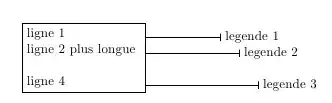
As a last ressort, I added an invisible rule with a height of \baselineskip to each line (cell) except the first one, which seems to give a result identical to the rectangular node, except I can access the position of individual lines:

However, this won't work well if the line contains equations or anything that makes it higher than a regular line. This TeX.sx answer shows that the inter-line space in that case is given by \lineskip and \lineskiplimit, but I woul really fancy the idea of re-implementing that using tikz -- I wouldn't even know where to start I must admit.
The question
Is there any simpler/more robust way to access each individual line in a tikz node as if the line was a rectangle node?
The code
Preamble
\documentclass{article}
\usepackage{tikz}
\usetikzlibrary{positioning, matrix}
\def\legendlines#1#2{
  \draw (#1) -- (#2);
  \draw (#2.north west) -- (#2.south west);
}
\begin{document}
\tikzset{
  mynode/.style={draw,fill=blue!30,align=center},
  mylegend/.style={align=left, font=\scriptsize, inner sep=1pt}
}
Rectangle node
% I can't access the position of each line using a rectangle node
\begin{tikzpicture}
  \node[mynode] (N123) {Node line one\\Node line two\\Node line three};
  \node[mylegend, xshift=1cm, at=(N123.east), anchor=west] (L123) {Legend 1\\Legend 2\\Legend 3};
  \legendlines{N123}{L123}
\end{tikzpicture}
Matrix node
% Using a matrix, the inter-line space is wrong. I can add row sep=42pt, but I don't know what is the correct value.
\begin{tikzpicture}
  \node[mynode, matrix, matrix of nodes, nodes={inner sep=0pt}] (N123) {Node line one\\Node line two\\Node line three\\};
  % Coordinates along the east side of N123
  \coordinate (N1east) at (N123-1-1.east -| N123.east);
  \coordinate (N2east) at (N123-2-1.east -| N123.east);
  \coordinate (N3east) at (N123-3-1.east -| N123.east);
  % Legend texts
  \node[mylegend, right=1.0cm of N1east] (L1) {Legend 1};
  \node[mylegend, right=1.2cm of N2east] (L2) {Legend 2};
  \node[mylegend, right=1.4cm of N3east] (L3) {Legend 3};
  % Legend lines
  \legendlines{N1east}{L1}
  \legendlines{N2east}{L2}
  \legendlines{N3east}{L3}
\end{tikzpicture}
Invisible rule
% Using an invisible rule
\begin{tikzpicture}
  \node[mynode, matrix, matrix of nodes, nodes={inner sep=0pt}] (N123) {Node line one\\\rule{0cm}{\baselineskip}Node line two\\\rule{0cm}{\baselineskip}Node line three\\};
  % Coordinates along the east side of N123
  \coordinate (N1east) at (N123-1-1.east -| N123.east);
  \coordinate (N2east) at (N123-2-1.east -| N123.east);
  \coordinate (N3east) at (N123-3-1.east -| N123.east);
  % Legend texts
  \node[mylegend, right=1.0cm of N1east] (L1) {Legend 1};
  \node[mylegend, right=1.2cm of N2east] (L2) {Legend 2};
  \node[mylegend, right=1.4cm of N3east] (L3) {Legend 3};
  % Legend lines
  \legendlines{N1east}{L1}
  \legendlines{N2east}{L2}
  \legendlines{N3east}{L3}
\end{tikzpicture}
Epilogue
\end{document}
Whole code
\documentclass{article}
\usepackage{tikz}
\usetikzlibrary{positioning, matrix}
\def\legendlines#1#2{
  \draw (#1) -- (#2);
  \draw (#2.north west) -- (#2.south west);
}
\begin{document}
\tikzset{
  mynode/.style={draw,fill=blue!30,align=center},
  mylegend/.style={align=left, font=\scriptsize, inner sep=1pt}
}

% I can't access the position of each line using a rectangle node
\begin{tikzpicture}
  \node[mynode] (N123) {Node line one\\Node line two\\Node line three};
  \node[mylegend, xshift=1cm, at=(N123.east), anchor=west] (L123) {Legend 1\\Legend 2\\Legend 3};
  \legendlines{N123}{L123}
\end{tikzpicture}

% Using a matrix, the inter-line space is wrong. I can add row sep=42pt, but I don't know what is the correct value.
\begin{tikzpicture}
  \node[mynode, matrix, matrix of nodes, nodes={inner sep=0pt}] (N123) {Node line one\\Node line two\\Node line three\\};
  % Coordinates along the east side of N123
  \coordinate (N1east) at (N123-1-1.east -| N123.east);
  \coordinate (N2east) at (N123-2-1.east -| N123.east);
  \coordinate (N3east) at (N123-3-1.east -| N123.east);
  % Legend texts
  \node[mylegend, right=1.0cm of N1east] (L1) {Legend 1};
  \node[mylegend, right=1.2cm of N2east] (L2) {Legend 2};
  \node[mylegend, right=1.4cm of N3east] (L3) {Legend 3};
  % Legend lines
  \legendlines{N1east}{L1}
  \legendlines{N2east}{L2}
  \legendlines{N3east}{L3}
\end{tikzpicture}

% Using an invisible rule
\begin{tikzpicture}
  \node[mynode, matrix, matrix of nodes, nodes={inner sep=0pt}] (N123) {Node line one\\\rule{0cm}{\baselineskip}Node line two\\\rule{0cm}{\baselineskip}Node line three\\};
  % Coordinates along the east side of N123
  \coordinate (N1east) at (N123-1-1.east -| N123.east);
  \coordinate (N2east) at (N123-2-1.east -| N123.east);
  \coordinate (N3east) at (N123-3-1.east -| N123.east);
  % Legend texts
  \node[mylegend, right=1.0cm of N1east] (L1) {Legend 1};
  \node[mylegend, right=1.2cm of N2east] (L2) {Legend 2};
  \node[mylegend, right=1.4cm of N3east] (L3) {Legend 3};
  % Legend lines
  \legendlines{N1east}{L1}
  \legendlines{N2east}{L2}
  \legendlines{N3east}{L3}
\end{tikzpicture}
\end{document}




\subnodecommand from the experimentaltikzmarkpackage, would that be an acceptable solution? Then each line could be treated as a separate node while the line positioning and spacing are set by the container node. – Andrew Stacey Dec 10 '12 at 22:18\tikz[remember picture]{ \coordinate (Line1) {};}at the end of each line, but that resulted in coordinates that were shifted from where they should have been. Hopefullytikzmarkwill give a better result than this brutal approach :) I don't have it installed, so I'll test that later. I also tried using multipart nodes, with the same inter-line spacing problems that the matrix solution has, only more difficult to solve. Please do post\subnodeas a solution if you can do a quick check that it works. – Suzanne Soy Dec 10 '12 at 22:25row sep=1exseems sufficient for the matrix. – percusse Dec 10 '12 at 22:47