10

What is the best way to split an overlong formula such as the following one to multiple lines:

\documentclass{scrartcl}
\usepackage{amsmath}

\begin{document}

\begin{eqnarray}
P2‘‘ &=& 
\begin{pmatrix}
(1-\cos \alpha) \times x\times x + \cos \alpha (1-\cos \alpha) \times  x\times  y -\sin \alpha \times  z  (1-\cos \alpha) \times x\times z +\sin \alpha \times  y \\
(1-\cos \alpha) \times  x\times y + \sin \alpha \times  z (1-\cos \alpha) \times y\times y + \cos \alpha  (1-\cos \alpha) \times y\times z - \sin \alpha \times  x  \\
(1-\cos \alpha) \times  x\times z - \sin \alpha \times  y (1-\cos \alpha) \times y\times z + \sin \alpha \times  x  (1-\cos \alpha) \times z\times z + \cos \alpha  
 \end{pmatrix} \\ 
&\times & 
 \begin{pmatrix}
  p2‘_X \\
  p2‘_Y \\
  p2‘_Z
 \end{pmatrix}
\end{eqnarray}

\end{document}

long formula

Uwe Ziegenhagen
  • 13,168
  • 5
  • 53
  • 93
  • I recommend using \cdot instead of \times. – azetina Dec 15 '12 at 16:32
  • Is it a cross product with everything else being vectors? Otherwise the expression is not a valid multiplication. And if it is so, can you split them up into individual steps? – percusse Dec 15 '12 at 16:44
  • The align environment is the preferred replacement for eqnarray. (Note when you switch that it requires fewer & symbols for alignment.) See http://tex.stackexchange.com/questions/196/eqnarray-vs-align – Ethan Bolker Dec 15 '12 at 16:49
  • 1
    get rid of the X for times, use . (or nothing) which will reduce the width of your formula by about 25-50% – Nicholas Hamilton Dec 15 '12 at 16:52

4 Answers4

10

I think this is one of those problems where some local redefinitions could be very useful.

I've defined matrices A and p in the below, and used \cdot instead of \times (assuming that this doesn't change the meaning drastically- if it does, let me know)

screenshot

I've also used align instead of eqnarray as detailed in eqnarray vs align

\documentclass{scrartcl}
\usepackage{amsmath}

\begin{document}

We have the matrix equation
\begin{align}
P2'' &= A \cdot  p
\end{align}
where
\[
A=\begin{pmatrix}
(1-\cos \alpha) \cdot x\cdot x + \cos \alpha (1-\cos \alpha) \cdot  x\cdot  y -\sin \alpha \cdot  z  (1-\cos \alpha) \cdot x\cdot z +\sin \alpha \cdot  y \\
(1-\cos \alpha) \cdot  x\cdot y + \sin \alpha \cdot  z (1-\cos \alpha) \cdot y\cdot y + \cos \alpha  (1-\cos \alpha) \cdot y\cdot z - \sin \alpha \cdot  x  \\
(1-\cos \alpha) \cdot  x\cdot z - \sin \alpha \cdot  y (1-\cos \alpha) \cdot y\cdot z + \sin \alpha \cdot  x  (1-\cos \alpha) \cdot z\cdot z + \cos \alpha  
 \end{pmatrix} 
 \]
 and
 \[
 p=\begin{pmatrix}
  p2‘_X \\
  p2‘_Y \\
  p2‘_Z
 \end{pmatrix}
 \]

\end{document}
cmhughes
  • 100,947
  • 1
    +1 Too complicated formulas are simply too complicated. As my fav teacher says: simplify, simplify, simplify. It is much easier to understand couple simple equations than one very complex one. – yo' Dec 16 '12 at 00:05
7

here's a different approach.

major changes:

  • eqnarray is replaced by align;
  • i've replaced \times by \cdot as suggested by azetina;
  • the multiple lines of the first pmatrix have been packed into a minipage and within the box, multlined from mathtools has been used, with alternate "middle" lines shoved left or right as appropriate;
  • math has to be specified explicitly within the minipage;
  • multlined doesn't seem to want to use the entire specified width of the minipage so some extra space had to be added to the right-adjusted lines; pmatrix doesn't like just a single line (the minipage), so it was replaced with \left( ... \right); minipage width was adjusted by experiment, and a small \vspace added at the top for better appearance.

output of example code

\documentclass{scrartcl}
\usepackage{mathtools}

\begin{document}
\begin{align}
P2 &=
\left(
 {\begin{minipage}{.72\textwidth}
  \vspace{2pt}
  \abovedisplayskip=2pt \abovedisplayshortskip=2pt
  $\begin{multlined}
(1-\cos \alpha) \cdot x\cdot x + \cos \alpha (1-\cos \alpha)\\
 \shoveright{\kern8em
  \cdot  x\cdot  y -\sin \alpha \cdot  z  (1-\cos \alpha)
   \cdot x\cdot z +\sin \alpha \cdot  y } \\
 \shoveleft{
(1-\cos \alpha) \cdot  x\cdot y + \sin \alpha \cdot  z (1-\cos \alpha) } \\
 \shoveright{\kern8em
  \cdot y\cdot y + \cos \alpha  (1-\cos \alpha)
   \cdot y\cdot z - \sin \alpha \cdot  x } \\
 \shoveleft{
(1-\cos \alpha) \cdot  x\cdot z - \sin \alpha \cdot  y (1-\cos \alpha) } \\
  \kern8em
  \cdot y\cdot z + \sin \alpha \cdot  x  (1-\cos \alpha)
   \cdot z\cdot z + \cos \alpha 
  \end{multlined}$
 \end{minipage}}
\right) \\
&\quad\cdot
 \begin{pmatrix}
  p2_X \\
  p2_Y \\
  p2_Z
 \end{pmatrix}
\end{align}

\end{document}
  • If you switch the last two terms in each row of the wide matrix then the long term is on a line by itself (rather than split), which makes the algebra much more readable. – Ethan Bolker Dec 15 '12 at 20:31
  • @EthanBolker -- you're right. that's what egreg has done, and his answer is better in other ways too. – barbara beeton Dec 15 '12 at 20:34
7

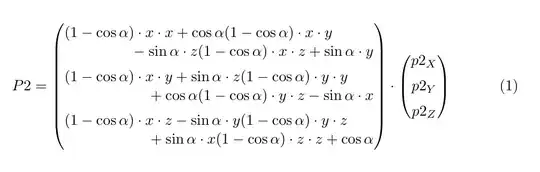
A variation of barbara's idea, but without the added complications. Just use \hfill in suitable places in order to shove left or right the entry. To one of them I add a fixed space, to give more room. Also some vertical spacings are used to separate each "cell" from the next.

\documentclass{scrartcl}
\usepackage{amsmath}

\begin{document}
\begin{equation}
P2 =
\begin{pmatrix}
  (1-\cos\alpha) \cdot x\cdot x + \cos\alpha (1-\cos\alpha) \cdot x\cdot y \hfill
\hspace{2.5pc} %%% space added to a wide half line, adjust visually
\\
  \hfill{}-\sin\alpha \cdot z (1-\cos\alpha) \cdot x\cdot z +\sin\alpha \cdot y
\\[1ex]
  (1-\cos\alpha) \cdot x\cdot y + \sin\alpha \cdot z (1-\cos\alpha) \cdot y\cdot y \hfill\\
  \hfill{}+ \cos\alpha (1-\cos\alpha) \cdot y\cdot z - \sin\alpha \cdot x
\\[1ex]
  (1-\cos\alpha) \cdot x\cdot z - \sin\alpha \cdot y (1-\cos\alpha) \cdot y\cdot z \hfill\\
  \hfill{}+ \sin\alpha \cdot x (1-\cos\alpha) \cdot z\cdot z + \cos\alpha
\end{pmatrix}
\cdot
\begin{pmatrix}
  p2_X \\[1ex]
  p2_Y \\[1ex]
  p2_Z
\end{pmatrix}
\end{equation}
\end{document}

enter image description here

David Carlisle
  • 757,742
egreg
  • 1,121,712
2
  1. \begin{small}\begin{eqnarray}...\end{eqnarray}\end{small}

  2. read this: https://tex.stackexchange.com/questions/87142/avoid-eqnarray-lars-madsen

Hadi Safi aghdam
  • 1,978
  • 2
  • 14
  • 14
  • Please note that small is not a LaTeX environment. Hence, \begin{small} ... \end{small} is an error. It should be {\small ...}. – Mico Jun 11 '17 at 20:40