14

How can I use pgfgantt to typeset a calendar for 2013? I would like to have calendar that displays the day-dates of the corresponding months; instead of the number 1 to 365 it should give 1,...,31,1,...,28,1,...31 and so on.

Also it would be great if Saturdays and Sundays among these dates could be highlighted with a different background. So far I have the following:

\documentclass{article}

\usepackage[paperwidth=300cm, paperheight=50cm,left=1cm,right=1cm,top=5cm,bottom=5cm]{geometry}
\usepackage[utf8]{inputenc}
\usepackage[T1]{fontenc}
\usepackage{pgfgantt}
\usepackage{pgfcalendar}

\begin{document}

\begin{ganttchart}[hgrid, vgrid, x unit=0.8cm]{365}
\gantttitle{Projektplan}{365} \\
\gantttitlelist{1,...,365}{1} \\
\ganttbar{Task 1}{2}{5} \\
\end{ganttchart}

\end{document}
David Carlisle
  • 757,742
Uwe Ziegenhagen
  • 13,168
  • 5
  • 53
  • 93

2 Answers2

13

A small shortcut to what David has provided (which is fantastic considering he doesn't even use PGF :D ).

\documentclass{article}
\usepackage[paperwidth=300cm, paperheight=50cm,
            left=1cm,right=1cm,top=5cm,bottom=5cm]{geometry}
\usepackage[utf8]{inputenc}
\usepackage[T1]{fontenc}
\usepackage{pgfgantt}
\usetikzlibrary{calendar}

\protected\def\zzz#1{%
\pgfcalendarifdate{2012-12-31+#1}{weekend}% Test if it's a weekend
{\textcolor{red}{\pgfcalendarifdateday}}% Typeset with red color
{\pgfcalendarifdateday}% Or just the number
}


\begin{document}


\begin{ganttchart}[hgrid, vgrid, x unit=0.8cm]{365}
\gantttitle{Projektplan}{365} \\
\gantttitlelist[
title list options={var=\y, evaluate=\y as \x using {"\zzz{\y}"}}
]{1,...,365}{1} \\
\ganttbar{Task 1}{2}{5} \\
\end{ganttchart}

\end{document}

enter image description here

David Carlisle
  • 757,742
percusse
  • 157,807
12

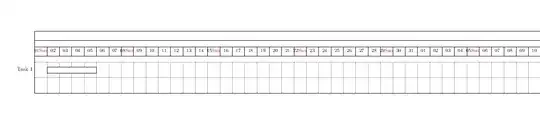
enter image description here

\documentclass{article}

\usepackage[paperwidth=300cm, paperheight=50cm,left=1cm,right=1cm,top=5cm,bottom=5cm]{geometry}
\usepackage[utf8]{inputenc}
\usepackage[T1]{fontenc}
\usepackage{pgfgantt}
\usepackage{pgfcalendar}


\newcount\startdate
\newcount\daynum
\pgfcalendardatetojulian{2012-01-01}{\startdate}

\protected\def\zzz{%
\pgfcalendarjuliantodate{\numexpr\startdate\relax}{\year}{\month}{\day}%
\pgfcalendarjuliantoweekday\startdate\daynum
\day
{\ifnum\daynum=6\color{red}%
\pgfcalendarweekdayshortname{\daynum}%
\fi}%
\global\advance\startdate1}

\begin{document}

\begin{ganttchart}[hgrid, vgrid, x unit=0.8cm]{365}
\gantttitle{Projektplan}{365} \\
\gantttitlelist[
title list options={var=\y,evaluate=\y  as \x using 
"{\zzz}"}
]{1,...,365}{1} \\
\ganttbar{Task 1}{2}{5} \\
\end{ganttchart}

\end{document}
David Carlisle
  • 757,742
  • want to reproduce the code for my PhD Thesis Time Schedule. http://tex.stackexchange.com/questions/185865/how-to-reproduce-the-following-code-for-phd-thesis-time-schedule – Micky K Jun 21 '14 at 06:36