2

I'm trying to include a figure that I made in MATLAB. I want to change the font using \psfrag, however there seems to be a problem when scaling the figure down. It keeps the font the same size as the text, which is fine, but the tick labels keep their position (they are overlapping the axes!), which looks bad. See the figure below. MWE follows below.

\documentclass[11pt,a4paper]{article}
\usepackage[latin1]{inputenc}
\usepackage{amsmath}
\usepackage{amsfonts}
\usepackage{amssymb}
\usepackage{graphicx}
\usepackage{psfrag}

\begin{document}
\begin{figure}
\psfrag{0}{$ 0 $}
\psfrag{5}{$ 5 $}
\psfrag{10}{$ 10 $}
\psfrag{15}{$ 15 $}
\psfrag{20}{$ 20 $}
\psfrag{25}{$ 25 $}
\psfrag{30}{$ 30 $}
\psfrag{358}{$ 358 $}
\psfrag{360}{$ 360 $}
\psfrag{362}{$ 362 $}
\psfrag{364}{$ 364 $}
\psfrag{366}{$ 366 $}
\psfrag{368}{$ 368 $}
\psfrag{370}{$ 370 $}
\psfrag{xtitle}{$ d_{c}\, \mathrm{[\mu m]} $}
\psfrag{ytitle}{$ t_{i}\, \mathrm{[nm]} $}
\begin{centering}
\includegraphics[scale=0.7]{layer_thickness.eps}
\par\end{centering}
\caption{Insert caption}
\label{fig: layer thickness}
\end{figure}
\end{document}
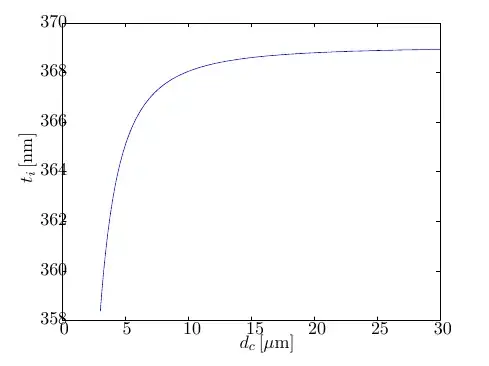
The font of the tick labels are changed using <code>\psfrag</code>, but the positioning is bad.

3 Answers3

1

You can adjust the horizontal position using \rlap and \kern, and the vertical position using \strut, \smash and \raisebox. I cannot show it on your example, but the following might give a hint:

\documentclass{article}

\begin{document}

\newcommand*\ytick[1]{\rlap{\small\kern-0.2em\relax#1}}
\newcommand*\ylabel[1]{\strut\smash{\small\raisebox{0.5ex}{#1}}}

A\ytick{x}B

X\ylabel{a}Y

\end{document}

Meaning of the macros:

  • \rlap{#1} typesets #1 on the right from the current position, occupying no space. There are macros \llap and \clap as well.
  • \kern#1\relax inserts a space of size #1, in this case horizontal (\rlap's content is in horizontal mode) and negative.
  • \strut typesets an invisible box of zero width and height+depth of a "maximal size of a letter without accents".
  • \smash{#1} typesets #1 as if it had no height at all. We use \strut\smash to ensure that \raisebox has the desired effect.
  • \raisebox{#1}{#2} takes #2 and moves it vertically by #1.

Now, you should be able to write something like \psfrag{358}{\ytick{$358$}}, and if you play with the value -0.2em for a while, you get the desired result. In a similar way you can move the axis label to the left (which means vertically since it's 90 degrees rotated).

yo'
  • 51,322
0

Check out the psfrag documentation, section 5 "Commands and Environments": Using optional arguments, you can control the horizontal and vertical alignment of the replacement text with respect to the original object. For example, in my own documents I commonly use something like this:

\psfrag{ylabel}[cc][cc][0.85]{Message error rate}
\psfrag{LegendLine1}[lc][lc][0.85]{My Stuff}

I don't know if I remember it correctly. In doubt, check out the psfrag doc. But the first argument should be the latex reference point, the second the postscript reference point and the third the scale (so you can additionally scale the font size, which maybe you don't need, but I usually do). So, the first line above should align the horizontal and vertical center of the replacement text ("Message error rate") with the horizontal and vertical center of the placeholder I entered in Matlab ("ylabel"). The second line aligns the replacement centered vertically, but to the left horizontally, which is typically what you want in the case of a legend in your figure.

Nico
  • 21
0

It is as simple as:

\psfrag{Your stuff}[][][scale]{$Hello$}

you have to replace "scale" with a value from 0 to 1