8

I'm using cmake to compile a document. For a clean, built-from-scratch compile, this outputs around 1800 lines in my terminal. The Document.log file is just over 1000 lines long. Scrolling back over this output is a little tedious.

Is there a way to highlight bits of the output (such as errors, warnings, etc)? Neither pdflatex, latex or bibtex seem to have a --color option or similar mentioned in the man pages.

I can't find any references to doing this. Is the correct (or easiest) method to use a parser for the Document.log file the way this question does, rather than the terminal output?

simont
  • 2,740
  • 3
  • 22
  • 32
  • 2
    You can look at the texloganalyser script that's present in TeX Live (and on CTAN, of course). – egreg Jan 14 '13 at 11:26

1 Answers1

4

I'm not sure if this exactly what you need, but with help of grep you can do something. Let's say I want to compile my tex file via terminal. pdflatex Untitled.tex does the job. However, I can pipe the output of this into grep and use color feature of grep to highlight a word (in this example "pdf")

pdflatex Untitled.tex | grep -E --color "pdf|$"

The result of this line is something like this:

enter image description here

You can easily do the same for the log file using following code:

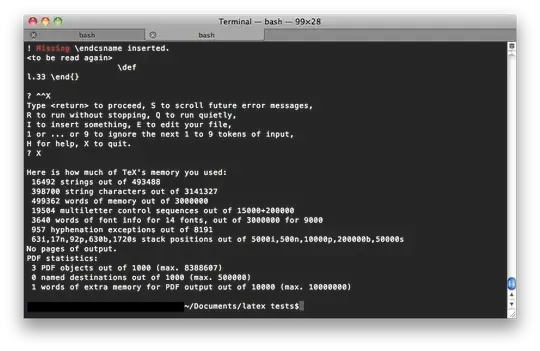
grep --color -E "Missing|$" Untitled.log

In this case I'm highlighting the word "Missing" and of course you can do this for "error" or any other words:

enter image description here

What is done here, is simply piping the output (of the log file or pdflatex) to grep, highlighting a key word, and printing mismatched words as well (by the use of "$").

I'm not a cmake guy but if you can pipe it's our put to grep, it probably will work as well.

Pouya
  • 7,269