29

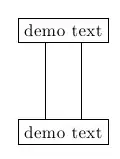
Consider these squared nodes:

\begin{tikzpicture}
\node [draw] (A) at (0,0) {demo text};
\node [draw] (B) at (0,-2) {demo text};
\end{tikzpicture}

I'd like to link them with two offset lines. If A and B were two numeric coordinates, I could do it as simply as that:

\draw [xshift=1em]  (0,0) -- (0,-2);
\draw [xshift=-1em] (0,0) -- (0,-2);

Unfortunately this code doesn't shift the line at all:

\draw [xshift=1em] (A) --(B);

After trial and error, I found I can to do this like so:

\begin{tikzpicture}
\node [draw] (A) at (0,0) {demo text};
\node [draw] (B) at (0,-2) {demo text};
\draw ([xshift=1em]A.south) -- ([xshift=1em]B.north);
\draw ([xshift=-1em]A.south) -- ([xshift=-1em]B.north);
\end{tikzpicture}

I have to set the anchor and shift every point. It seems to much for such a simple task.

Can you suggest a better way?

Cheers.

antonio
  • 1,446

3 Answers3

28

The problem comes from the fact that the fixed node or coordinate values are immune to later transformations. For example, scale=3 would also not work. Hence, the xshift works if the given coordinates are not fixed to a node or a coordinate i.e. something like (3,4) would work.

If the path that you draw is not related to the bounding box of the figure you can enforce the shift at the low level drawing because the following does not influence the bounding box.

\begin{tikzpicture}
\node [draw] (A) at (0,0) {demo text};
\node [draw] (B) at (0,-2) {demo text};
\draw[transform canvas={xshift=1em}] (A) -- (B);
\end{tikzpicture}

enter image description here

percusse
  • 157,807
17

One possibility:

\documentclass{article}
\usepackage{tikz}

\begin{document}

\begin{tikzpicture}
\node [draw] (A) at (0,0) {demo text};
\node [draw] (B) at (0,-2) {demo text};
\draw (A.215) -- (B.145);
\draw (A.325) -- (B.35);
\end{tikzpicture}

\end{document}

enter image description here

And another one, using this time the perpendicular coordinate system, so only two angles are necessary:

\documentclass{article}
\usepackage{tikz}

\begin{document}

\begin{tikzpicture}
\node [draw] (A) at (0,0) {demo text};
\node [draw] (B) at (0,-2) {demo text};
\draw (A.215) -- (A.215|-B.north);
\draw (A.325) -- (A.325|-B.north);
\end{tikzpicture}

\end{document}
Gonzalo Medina
  • 505,128
  • 9
    I could not find any coordinate system in the manual that uses this syntax. Maybe you could briefly state what (A.215) means here? – Alexander Jan 15 '13 at 12:17
  • 1
    For squared nodes I prefer the "transform canvas" of percusse, but for circle-like ones this makes a lot of sense. @Alexander: read "13.2.3 Node Coordinate System" on manual v.2.10 ("/tikz/cs/angle=" and the shortcuts at the end of section). – antonio Jan 15 '13 at 13:04
  • 2
    @antonio topologically, a circle, a square, a rectangle, are basically "the same thing" (they are homeomorphic), so for a mathematician using the same approach for all of them is natural :) – Gonzalo Medina Mar 01 '15 at 02:10
  • 2
    For anyone else who stumbles upon this: (A.215) means 215 degrees as seen from A. (A.north) is the same as (A.90), (A.west) is the same as (A.180), so on and so forth. – Birjolaxew Nov 09 '20 at 10:44
12

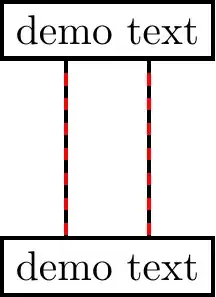
Here is a solution via double. I superimposed dashed lines to compare your solution (black) to mine (red).

enter image description here

\documentclass[tikz]{standalone}
\begin{document}
\begin{tikzpicture}[line width=1pt]
\node [draw] (A) at (0,0) {demo text};
\node [draw] (B) at (0,-2) {demo text};
% method via double
\draw[red,double=white,double distance=2em-\pgflinewidth] (A) -- (B);
% your method
\draw[dashed] ([xshift=1em]A.south) -- ([xshift=1em]B.north);
\draw[dashed] ([xshift=-1em]A.south) -- ([xshift=-1em]B.north);
\end{tikzpicture}
\end{document}

Triple variation

enter image description here

\documentclass[tikz]{standalone}

\tikzset{
  triple/.style={
    double=white,double distance=2em-\pgflinewidth,
    postaction={draw},
  },
}

\begin{document}
\begin{tikzpicture}[line width=1pt]
\node [draw] (A) at (0,0) {demo text};
\node [draw] (B) at (0,-2) {demo text};
% method via triple
\draw[red,triple] (A) -- (B);
% your method (triple variation)
\draw[dashed] ([xshift=1em]A.south) -- ([xshift=1em]B.north);
\draw[dashed] ([xshift=-1em]A.south) -- ([xshift=-1em]B.north);
\draw[dashed] (A) -- (B);
\end{tikzpicture}
\end{document}
Paul Gaborit
  • 70,770
  • 10
  • 176
  • 283