5

I'm trying to replicate, in LaTeX, InDesign's align and distribute tools. This is a snapshot of ID's toolbar:
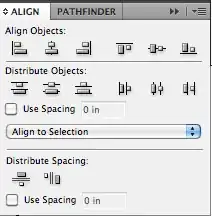
indesign toolbar

Say I want first to align vertically two objects (texts, graphics, boxes,...), and then align them horizontally, so that they become superimposed and completely centred. So, if the first object were [ ] and the second x, the first step would give me [ ]x and the second [x].

Of course, I can do this with the centre environment and a negative hspace command and a bit of math.

What I would like to get is a more or less generalized (set of) command(s).

I believe this might be easily accomplished in Tikz, but I don't know how to. Or perhaps with the adjustbox package. Although this question is obviously wide, I wonder if someone has already inquired into this issue and can give me some ideas on it.


OK. As requested, this is more or less what I would like to systematise:

\documentclass{article}
\usepackage{graphicx, xcolor, calc}

\newcommand*{\FirstObject}{\colorbox{black!20}{\quad}}
\newcommand*{\SecondObject}{x}

\begin{document}
\thispagestyle{empty}
\parindent=0pt

\section{First Step}
\newlength{\wone}
  \setlength{\wone}{\widthof{\FirstObject{}}}
\newlength{\wtwo}
  \setlength{\wtwo}{\widthof{\SecondObject{}}}
\newlength{\wthree}
  \setlength{\wthree}{\wone + \wtwo}

\FirstObject{}\hspace*{-.5\wthree}\SecondObject{}


\section{Second Step}
\newlength{\hone}
  \setlength{\hone}{\heightof{\FirstObject{}}}
\newlength{\htwo}
  \setlength{\htwo}{\heightof{\SecondObject{}}}
\newlength{\hthree}
  \setlength{\hthree}{\hone + \htwo}

\FirstObject{}\hspace*{-.5\wthree}%
\raisebox{-.25\hthree}{\SecondObject{}}  % Don't know why .5 won't work here...

\end{document}

myexample

lockstep
  • 250,273
NVaughan
  • 8,175
  • This definitely needs a explanatory drawing/image. – yo' Feb 01 '13 at 15:59
  • 1
    You probably want \ooalign; see this answer – egreg Feb 01 '13 at 16:05
  • @egreg Just tried it. Although it takes care of horizontal alignment (my first step), it doesn't give me vertical alignment (my second step). Furthermore, I would have to calculate beforehand which is the widest object. – NVaughan Feb 01 '13 at 16:41
  • You don't need to compute any width with \ooalign. You're not taking into account that \colorbox descends below the baseline. Perhaps a better example is needed. – egreg Feb 01 '13 at 16:45
  • Yes, I didn't know that about \colorbox. That's why I want a more general solution that doesn't require me to know that, i.e., that works for any two (or more) objects, irrespective of their characteristics. – NVaughan Feb 01 '13 at 16:54
  • So you want them vertically centered? Or what? And what's the placement with respect to the baseline? – egreg Feb 01 '13 at 17:04
  • Yes, I want---in the example at hand---to have the two objects fully centred, both horizontally and vertically. – NVaughan Feb 01 '13 at 17:16
  • 1
    You can determine the center of the box that contains a character but there is no way to determine the "center" of an arbitrary character. See http://tex.stackexchange.com/a/61357/14500. – Paul Gaborit Feb 02 '13 at 23:17
  • @PaulGaborit So, using boxes, is there a way to do what I want with Tikz? – NVaughan Feb 02 '13 at 23:48
  • @NVaughan Using boxes, the answer below is a way... You can also use TikZ. – Paul Gaborit Feb 02 '13 at 23:55

1 Answers1

7

You might like the xcoffins package which has very handy ways to join different kinds of boxes (so-called coffins) with another or attach one to another. It is part of the l3experimental bundle which means syntax changes are still possible.

There already are some questions and answers on this site that deal with xcoffins, here's another small example:

\documentclass{article}

\usepackage{xcoffins}
\usepackage{xcolor}

\NewCoffin\FirstObject
\NewCoffin\SecondObject

\SetHorizontalCoffin\FirstObject{\colorbox{black!20}{\quad}}
\SetHorizontalCoffin\SecondObject{x}

\begin{document}

\TypesetCoffin\FirstObject

\TypesetCoffin\SecondObject

% join both coffins at their horizontal and vertical centers:
\JoinCoffins
  \FirstObject[hc,vc]%
  \SecondObject[hc,vc]%

% \FirstObject now holds the joined coffins:
\TypesetCoffin\FirstObject

\end{document}

enter image description here

cgnieder
  • 66,645