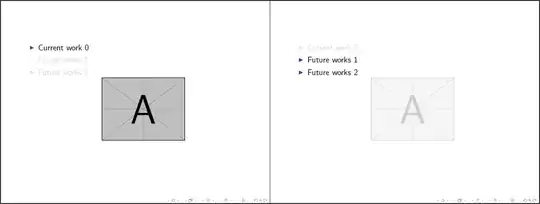
The following MWE provides \hidecontent[<transparency>]{<stuff>} that hides <stuff> with a white transparent box. Optional transparency is set as <transparency> (provided by Heiko's transparent package); default is 0.25 or 25%:
\documentclass{beamer}% http://ctan.org/pkg/beamer
\usepackage{transparent}% http://ctan.org/pkg/transparent
\setbeamercovered{transparent}
\newcommand{\hidecontent}[2][0.25]{{% \hidecontent[<transparency>]{<stuff>}
  \setbox9=\hbox{#2}% Store <stuff> in \box9 to obtain height/width
  \transparent{#1}\ooalign{\usebox9\cr\color{white}\rule{\wd9}{\ht9}\cr}}}
\begin{document}
\begin{frame}[plain]
  \begin{itemize}
    \item<1> Current work 0
    \item<2> Future works 1
    \item<2> Future works 2
    \begin{center}
      \mbox{\only<1>{\includegraphics[scale=0.35]{example-image-a.pdf}}}%
      \mbox{\only<2>{\hidecontent{\includegraphics[scale=0.35]{example-image-a.pdf}}}}%
    \end{center}
  \end{itemize}
\end{frame}
\end{document}
beamer doesn't adequately handle hiding of graphics, hence the use of \hidecontent. This works well with rectangular content. Other content (textual, for example), is best dealt with by beamer itself.


fixpauseincludegraphics.stylink is broken. – epsilone Dec 04 '14 at 09:19fixpauseincludegraphicsis a problem and the original\includegraphics’s positioning is needed (like in this question), the solution is to change\node[opacity=\transparent@value/100]to\node[opacity=\transparent@value/100, style={inner sep=0, outer sep=0}]within the STY file. – Peter Sep 15 '19 at 05:56