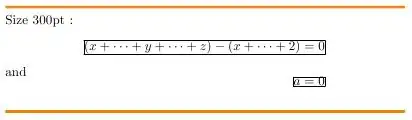
I am new to using the breqn package. It looks good, but I get an odd behaviour when an equation can almost fit in the page but not quite: the alignment gets completely wrong. Is there a way to fix this?
For the example, I used the minipage environment at various sizes. \fbox is only there to show the borders.
Compiling the example below gives good results for small sizes and big sizes, but for 15em, 16em and 17em,the second equation gets out of the box.
\documentclass{article}
\usepackage{breqn}

\newcommand{\myequation}[1]{
  \fbox{
    \begin{minipage}{#1}
      Size #1:
      \begin{dgroup*}
        \begin{dmath*}
          (x+\cdots+y+\cdots + z) - (x+\cdots + z) = 0
        \end{dmath*}
        \begin{dmath*}
          A = 0
        \end{dmath*}
      \end{dgroup*}
      Text
    \end{minipage}
  }
}

\begin{document}

\myequation{5em} \qquad \myequation{6em} \qquad \myequation{9em} \\
\myequation{13em} \qquad \myequation{15em} \\
\myequation{16em} \\
\myequation{17em} \\
\myequation{18em} \\
\myequation{30em}

\end{document}
With some versions of breqn and the expl3 bundle, the following code may need to be added to the preamble:
\ExplSyntaxOn
\cs_set_eq:NN \intexpr_eval:w \int_eval:w
\cs_set_eq:NN \intexpr_eval_end: \int_eval_end:
\ExplSyntaxOff




breqnon CTAN that is newer than this question. Does it fix the problem? – Seamus Jul 01 '11 at 14:45breqnversion. Have you tried contacting the author as pmav99 suggested? This could well be a bug... – Seamus Jul 28 '11 at 11:00