From the top of ~/.profile:
# ~/.profile: executed by the command interpreter for login shells.
# This file is not read by bash(1), if ~/.bash_profile or ~/.bash_login
# exists.
# see /usr/share/doc/bash/examples/startup-files for examples.
# the files are located in the bash-doc package.
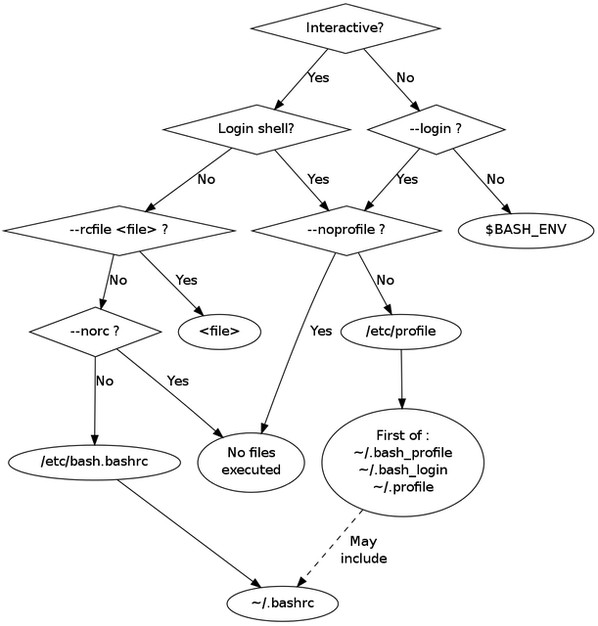
So (if you are using bash as your shell) I'm guessing either ~/.bash_profile or ~/.bash_login is on your system. Select one and edit it to include:
export PATH=$PATH:$HOME/bin
Then save and source ~/.bash_login or logout and log back in.
Edit:
You say that both ~/.bash_profile and ~/.bash_login are both missing from your $HOME. I think we need confirm a few things. Please post the results of the following in your original question:
echo $0
echo $HOME
whoami
less /etc/*-release
Edit 2:
Personally, I do not know why ~/.profile is not being included in your case based on the information provided and documentation. While testing I did notice that my ~/.profile is scanned when I ssh in but not when I launch a new terminal.
But, there is a simple solution to allow $HOME/bin to be included in your interactive shell. Edit (create if not present) ~/.bashrc and add the following line to it:
export PATH=$PATH:$HOME/bin
Save, logout and log back in, or source ~/.bashrc.
The export line could be expanded to check that $HOME/bin exists if you like with:
if [ -d "$HOME/bin" ]
then
    export PATH=$PATH:$HOME/bin
fi
Why ~/.bashrc instead of another file? Personally preference and seems to be more reliable too.


.profile, see https://askubuntu.com/questions/284640/ . – JdeBP Jul 23 '17 at 11:02-xflag passed to bash and seeing where the PATH is reset. Also, you need toexport PATH="$HOME/bin:$PATH"to provide it to subsequent processes. – Charles D Pantoga Jul 23 '17 at 22:35