What is the most appropriate image to indicate to users to swipe left or right? i am using http://cubiq.org/swipeview but i feel like it needs a swipe indicator in the background somewhere.
Edit: for iPhone and Android use only.
What is the most appropriate image to indicate to users to swipe left or right? i am using http://cubiq.org/swipeview but i feel like it needs a swipe indicator in the background somewhere.
Edit: for iPhone and Android use only.


Indicator dots below them. Part of the next image peaking in from the sides. Left / Right arrows. On load have the first image slide in from the right.
Or just use a picture of John Stamos, it fixes everything.

The biggest risk with these isn't that they won't figure out to swipe, it's that they won't realize there are other images.
Use a generic page count bubble, and trust them to figure out the rest.
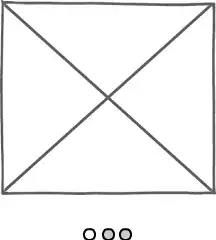
download bmml source – Wireframes created with Balsamiq Mockups

I guess you could overlay icon representing the gesture, e.g., those of P.J. Onori:

The overlay should fade away whenever the user swipes.

Is there a way you could indicate this without displaying a specific image?
One option is to position the content partially off the screen so that the users understand there is content to be scrolled to.
Another approach would be to build it into your content/visuals. So you could introduce the concept to the user and then they will be aware to swipe later.
You could indicate that there are further screens by displaying a page numbers (such as page x of y) or use page indicator (see example on the slider here: http://nivo.dev7studios.com/)
One approach we have used in the past that only works in a specific scenario is to fade in an image indicating that the user can swipe the content like: 
Take a look at the answers here: Symbol for "Swipe Left"
Android by convention now uses Scrollable Tabs for this.
Scrolling tab controls can contain a larger number of items than a standard tab control. To navigate to the next/previous view, swipe left or right.


If you want to be creative, i would suggest doing something like a hand movement over the image gallary after the gallary is loaded for the first time. I dont have any links as it is a creative idea and need to be implemented!. Otherwise a faint pulsating arrow indicator should do the trick!! :)


