138

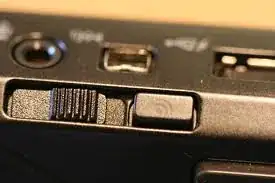
It puzzles me that there are Laptops which are shipped with external physical Wi-Fi buttons. I see no real use of it, but it might have a historical explanation?! The only time one notice the external button is when one accidentally pushes the switch off, resulting in no data connection and “the internet is lost”. So my question is simply “Who needs an external on/off Wi-Fi button?”

enter image description here enter image description here enter image description here enter image description here

JohnGB
  • 68,376
  • 26
  • 180
  • 294
Benny Skogberg
  • 54,996
  • 22
  • 140
  • 241
  • 28
    Call me stupid but I didn't realize that a laptop at work had one of these, but I had no idea why the internet wasn't working. It was switched of haha. – Matt Rockwell Feb 18 '13 at 21:14
  • @MattRockwell See what happens with that mysterious button! – Benny Skogberg Feb 18 '13 at 21:16
  • 2
    @MattRockwell same thing here. Spent a half hour with tech support before learning that "there's a switch". It's definitely a bizarre UX issues--though I have a hunch its corporate security policy related. – DA01 Feb 18 '13 at 23:02
  • 78
    I want one on my phone so bad. I want external, hardware-bound switches for all the stuff that uses battery. – kojiro Feb 18 '13 at 23:57
  • 55
    What I don't understand is when devices have these, but DON'T have a physical volume control. – Nico Burns Feb 19 '13 at 00:54
  • 1
    Perhaps for security, if you're in a wi-fi area you don't trust turn off the wi-fi and force the connection through wireless modem, which is more secure than wi-fi. – obelia Feb 19 '13 at 03:31
  • I never used this button and I dont know of anybody that has used it... Good question! – Koderground Feb 19 '13 at 01:13
  • 38
    I use the Wi-Fi switches on my laptops all the time... Sometimes, I want to save power, force my computer to use an Ethernet cord, or avoid connecting to a public network, and it happens often enough that I missed my switch on my Mac (which has no Wi-Fi button) when I first got it. – Kevin Feb 19 '13 at 07:13
  • 16
    Frankly the process of turning off the Wi-Fi radio on Windows is a pain in the ass. Most of my users don't (or don't want to, more like) know how to do it, and just stay connected to Wi-Fi while they're plugged in to the LAN. This causes weird behaviour with network shares sometimes. I find it way easier to tell them to turn the switch off than to show them where the settings are (because they always forget!) – Seyren Feb 19 '13 at 08:43
  • 3
    @DA01 I had to play tech support once and couldn't figure it out because I didn't know about that switch. – Alex Jasmin Feb 19 '13 at 09:47
  • 6
    this isn't just for WiFi it disables all radios in most situations; bluetooth, wifi, gps, etc. And it doesn't just turn off the service, it turns off the POWER to the hardware –  Feb 20 '13 at 01:48
  • 4
    I recently got my first Laptop and I like the switch. Don't take it away. – Alvin Wong Feb 20 '13 at 02:14
  • I often use external Wifi switch when Wifi tethering on public transport. Often I turned my laptop on first and after prancing around for some time, I realized that I needed internet to do something, so turned on my Wifi tethering. The laptop usually does not immediately found and connect to the Wifi hotspot that just sprung out of nowhere, so instead of going to settings to connect or waiting until it connects automatically, it's easier to reboot the Wifi using the external switch. My external switch is the Fn-key+F11 though, instead of a slide switch. – Lie Ryan Feb 20 '13 at 11:54
  • 2
    I don't think this warrants a full answer, but let's not forget the sales effect. As soon as a competitor adds a 'feature', regardless of its true utility, you will see a rash of copycat features so as not to lose points in the dreaded comparison chart... "No External WiFi switch?! Not for me!!" – Dancrumb Feb 21 '13 at 14:57
  • 2
    I'd even support a hardware grant root access ? button. – user117 Feb 22 '13 at 14:14
  • 1
    Me. I use it all the time. Why ? To turn on and off the Wi-Fi, simply. – Nicolas Barbulesco Feb 24 '13 at 11:55

15 Answers15

183

Besides the arguments others have listed (Aircraft requirements, power saving) we should not forget about security.

Before the tablet and smartphone era you had a great control over your computer in an emergency: if you pulled the UTP cable, you could guarantee that the computer is isolated from the network. If you pulled the power cord, you could guarantee that your computer is turned off.

With all these physical controls removed we arrive to a situation, where in case of a malware or hacking attack you have no option to stop your device from being remote controlled by the attacker, besides removing the battery (or smashing your device apart with a hammer if the battery is not removable).

With everything controlled by software, how can you be sure of your connection status? You might think you disabled wifi, but if your system is compromised, it can exchange data without you knowing it, while displaying that it's turned off. (Even if you turn your device off, it might just simulate it and darken the screen, and still run in the background.)

You might personally like thin clients and you might personally trust your software 100%, but there are people who don't, so why remove this option from them?

vsz
  • 2,895
  • 1
  • 15
  • 19
  • 4
    Security threats aren't so easy to detect. I can't imagine people constantly tailing their syslog while keeping a finger on the WiFi switch. – Alex Jasmin Feb 19 '13 at 09:57
  • 6
    @AlexandreJasmin This is more like the case where you already know your system is compromised and want to try & find out how it got hacked in the first place. – TC1 Feb 19 '13 at 11:47
  • 2
    +1 This is the main reason as far as I and everyone I know is concerned. It must be easy to reliably keep wifi off, considering how easy it is to attack wifi-clients these days. Most people I know rarely if ever turn on wifi radios but rely purely on mobile carrier add-on radios which require at least 10 times the investment in hardware to do man-in-the-middle attacks on, for now :) – Oskar Duveborn Feb 19 '13 at 15:24
  • 24
    I can't believe this answer has so many upvotes... I don't know of any security professional who would call this an important "security feature." The iPad, for example, does not have a switch for WiFi; but no reasonable security professional would call that a security bug. This answer is just plain wrong; the real reason is simply to make it easy for non-technical users to save battery life. – BlueRaja - Danny Pflughoeft Feb 19 '13 at 17:49
  • 4
    Security would be the primary reason here too -- all external access to a device should be easily disabled physically as logical 'switches' can lie once a device is compromised. – mikebabcock Feb 19 '13 at 22:57
  • 6
    @BlueRaja-DannyPflughoeft I tried to succinctly describe the error in your comment, but I disagree with every part of it. – Boann Feb 20 '13 at 13:33
  • 6
    Why don't desktop PC adapters for Wi-Fi (such as PCI cards) have switches on them, then? This type of security matters only for laptops? – Kaz Feb 20 '13 at 23:52
  • 1
    @Kaz - a desktop machine tends to stay in one place, and thus only have access to a few WIFI networks. A laptop is used in many different environments, and you want to prevent it from connecting to any open network. – DanBeale Feb 21 '13 at 01:56
  • But the behavior of connecting to any open network is something that is under software control. Operating systems don't do that by default; it's usually some third party apps for mobile devices that implement such behaviors. It doesn't rationalize a button on the case. – Kaz Feb 21 '13 at 02:02
  • Mobile devices containing sensitive data that as suspected of compromise should be placed inside afaraday cage (sealed metal pouch) until one is certain that control has been regained. – New Alexandria Feb 21 '13 at 05:12
  • 1
    @NewAlexandria : so what is more user-friendly? Carrying around a Faraday cage with you, or having an on/off switch? – vsz Feb 21 '13 at 05:40
  • 8
    @BlueRaja-DannyPflughoeft - Your comment says more about the lack of security considerations made in the design of the iPad than it does about the security professional who might like to carry some shiny. :) – James Snell Feb 21 '13 at 13:35
  • 2
    @BlueRaja-DannyPflughoeft, if the ipad lacks a feature it doesn't mean it is bugged. It means it lacks a feature. Besides, non technical users would be unaware of the power saving benefits of turning off wifi.

    With regards to PCi cards in desktop PCs, these are invariably sited at the back of the PC and out of reach, so an on/off switch would be pretty redundant. Besides, these days pretty much everything is USB, and can simply be unplugged.

    – Relaxing In Cyprus Feb 21 '13 at 17:55
  • This answer assumes that the wifi switch found on some laptops physically disengages the wireless circuitry, but it is not given - even one of the pictures in the question suggests this is not always the case. – Agos Feb 22 '13 at 07:54
  • 2
    @Kaz: You are plain wrong. A simple attack is for example to setup a mobile ad-hoc WLAN in a public place (say university cafeteria), name it 'public' (or whatever) and make sure its signal strength supersedes the strength of the official WLAN. All machines will connect to the "already known" network, making them route all traffic via the router controlled by YOU. – fgysin Feb 22 '13 at 15:00
  • 2
    @BlueRaja-DannyPflughoeft I actually know of many security professionals who actively use that feature. And I work in a security company. – fgysin Feb 22 '13 at 15:02
  • 2
    @fgysin If anyone cares (from a security standpoint) whether their public network is replaced by an impostor, then maybe they are placing an inappropriate amount of trust in the public network. Anyway, I don't see how the switch helps with this. Users are not going to instantly realize that they are on a rogue access point and then dive for their Wi-Fi switches. – Kaz Feb 22 '13 at 17:06
  • Is there a source somewhere that indicates that the wireless button directly controls the wireless hardware? The button state could be checked in software and then software enables/disables wireless. In this case the security benefit is weakened because the drivers that respond to the switch state could be compromised. – stardt Feb 22 '13 at 17:34
  • @vsz as many are saying, the concern is whether drivers for a software wifi switch are compromised. Normal people don't have to worry about this case. Are you the target for corp. espionage? Then maybe you consider a faraday bag for certain situations of using a mobile platform on the streets. – New Alexandria Feb 22 '13 at 19:40
  • @Kaz : it's not only about rogue access points. It can be about preventing a malware from "calling home" while you try to remove it. – vsz Feb 23 '13 at 13:42
  • I think we should ask a question about this on http://security.stackexchange.com/ by this point. – Kevin Feb 24 '13 at 01:53
  • 1
    @BlueRaja-DannyPflughoeft Turns out that there was an exploit where attackers could take over an iPad that had its WiFi on by just being nearby. "an attacker simply needs to be within Wi-Fi range to silently take over an at-risk Apple or Android device", source. – Nat Apr 20 '17 at 07:38
169

Security

A hardware radio switch has security benefits to it in that when it is off, you know for a fact that nothing is connected to your laptop wirelessly. The radio switch usually turns off all wireless communication, including Bluetooth and 3G.

I have heard that this is a requirement in certain military environments, but I have not seen any evidence that this drove the development of the feature on any laptops.

Battery life

The physical button is not just to disable the wifi, but it should actually power off the device hardware.

When you disable wifi in your settings, the device is still powered up and using some power. It may not be a lot of power, but when you are commuting, every little bit helps. If you really want to save maximum battery life, then you want it to be consuming zero power.

Not for aircraft safety

Contrary to a commonly held belief, it is not for travel on aircraft. The FAA regulations apply only during takeoff and landing (and even those are currently being reconsidered). If this were a requirement for safety, every device allowed on an aircraft would have to have a hardware button - including mobile phones, tablets, and ebook readers.

Additionally, the rules for takeoff and landing specify that the devices themselves have to be turned off, not that the transmitters have to be turned off. So a switch would not comply with the current FAA rules on takeoff and landing.

Update: An FAA safety panel have just ruled that Wi-Fi is safe to use on airplanes, and the changes will likely be adopted soon. This just goes to show that it has nothing to do with safety, and never did.


Source: I am an electronic engineer with specialist courses in communication and wireless transmission. I have also taken a graduate level course in safety and security specifically in air transportation.

JohnGB
  • 68,376
  • 26
  • 180
  • 294
  • OK, I got that. But in todays' connected world where everything is online, including my own content, the thin client isn't of much use without my Wi-Fi. It can't be only me who uses cloud services everywhere, can it? I'm confused. – Benny Skogberg Feb 18 '13 at 21:35
  • 21
    @BennySkogberg there are many applications for many business people that don't use cloud applications in the first place, and if you are travelling you may not have a wifi connection even if you wanted to use it. That is when you would turn off the wifi. I had many times that I did this on my Thinkpad. – JohnGB Feb 18 '13 at 21:43
  • I didn't think of that use case - thanks for the heads up! – Benny Skogberg Feb 18 '13 at 21:45
  • 6
    Some people actually prefer to work without connectivity as it limits distractions. It's actually rather annoying to work in an application that requires a data connection, and your only connection would lose in a race against a snail... – Agent_9191 Feb 19 '13 at 01:18
  • 5
    MOSFETs have very low leakage current. They are used to electrically power off entire subsystems in energy saving designs. A physical switch cannot noticeably beat this. However, what I like about physical switches is that you can operate them immediately and they will work for sure. – Peter G. Feb 19 '13 at 07:41
  • 1
    It's amusing that laptops have lost the "portable computer" status to mobile devices so it's not immediately obvious that they would be used somewhere where there's no wifi available. – JJJ Feb 19 '13 at 11:29
  • 2
    Or if say travelling by train or bus where there's no local wifi you'd want to use or rely on, keeping the radio securely offline will prevent your computer to be hijacked by common wifi attacks... – Oskar Duveborn Feb 19 '13 at 15:27
  • 1
    @Benny —  There is something called an Ethernet cable. I have one, and I can be on-line with the Wi-Fi turned off. :-) – Nicolas Barbulesco Feb 19 '13 at 21:44
  • Why are the FAA regulations being reconsidered? Could you provide a link? Sounds interesting! – Trufa Feb 20 '13 at 02:53
  • @Trufa Here is the document from the FAA website: http://www.faa.gov/news/updates/media/PED_RFC_8-27-2012.pdf – JohnGB Feb 20 '13 at 04:47
  • I believe it is for aircraft safety. The fact that newer devices do not have a physical button does not prove anything. Those devices were designed for Wi-Fi from the ground up and have a standardized, fast and easily accessible way to turn off Wi-Fi, by core design. A physical switch is needed on a laptop because Wi-Fi has been poorly integrated into Windows, and laptops do not only run Windows. To disable Wi-Fi on a Wintel PC, you have to take time to navigate some morass of control panels or whatever which has changed with every release. Or worse: vendor-specific crapware Wi-Fi managers. – Kaz Feb 21 '13 at 00:00
  • @kaz, Most laptops didn't have that button, and many business ones still do. Look at Lenovo Thinkpads. I don't see any evidence supporting aircraft safety. – JohnGB Feb 21 '13 at 02:42
  • @JohnGB: I don't think aircraft safety is relevant. Aircraft rules (whether imposed by FAA, FCC, individual airlines, or anyone else) are. Also, a number of Dell's laptop setup guides specifically mention flying as a use case for their wireless button (for example, page 13 of http://downloads.dell.com/Manuals/all-products/esuprt_laptop/esuprt_inspiron_laptop/inspiron-17_Setup%20Guide_en-us.pdf). It requires the computer to be on, so I'll grant that it's not quite the same thing, but so far this is the closest thing to an explanation I've seen from a manufacturer. – Steve S Feb 21 '13 at 18:54
  • "If this were a requirement for safety, every device allowed on an aircraft would have to have a hardware button" - however, it can take much longer to get to the option on a computer (particularly if it's currently turned off and you have to turn it on to get to the option) than on a tablet/phone/etc. – Random832 Feb 23 '13 at 04:52
  • @SteveS If you have some rule from the FAA that requires all communication devices to have a hardware on/off switch for wifi, I'd love to see it. Their rule is that the device has to be turned off on takeoff and landing (so a button is irrelevant), and during many flights wifi internet is provided, so clearly wifi isn't a problem then. – JohnGB Feb 23 '13 at 15:39
  • @JohnGB: I don't think anybody is saying that a physical switch was specifically mandated by the FAA (or anyone else). My point is that under the rules that do exist, a physical switch switch is a useful feature. Wireless transmitters are required to be turned off on many flights -- this seems to be left up to the airlines themselves (your own link to the FAA says so) and may vary from flight to flight. – Steve S Feb 25 '13 at 15:14
  • @SteveS I think you are missing the rule. The rule is that the devices themselves have to be turned off, not that the transmitters have to be turned off. So a switch would not comply with the FAA rules on takeoff and landing. – JohnGB Feb 25 '13 at 15:47
  • @JohnGB: I'm not talking about takeoff and landing. I'm talking about during the flight, when the FAA doesn't disallow using devices but the airlines often do disallow enabling wireless transmitters. – Steve S Feb 25 '13 at 15:58
  • @SteveS during the flight wifi is allowed, so I don't see why a switch would be for safety then. – JohnGB Feb 25 '13 at 16:12
  • @Kaz Starting with Vista, there is a Wi-Fi switch in Windows. – kinokijuf May 02 '13 at 13:31
  • Update: "Cupertino has rushed out the emergency patch because: “An attacker within range may be able to execute arbitrary code on the Wi-Fi chip”" -source. Seems like a security-conscious device owner would've been justified in wanting to avoid issues like that. – Nat Apr 20 '17 at 07:44
53

Airplanes

These switches allow you to disable wireless transmitters without first turning them on in the middle of a flight, when their use may be prohibited.

There seems to be some consternation regarding this answer. I have reworded it to address some of the concerns that have been voiced. In addition...

  • I'm not saying that any rules regarding the use of wireless devices during flight are justified, only that they exist.
  • I'm not saying that any specific organization (such as the FAA) has made rules regarding the use of wireless devices during flight, only that some organizations (perhaps individual airlines) have put them in place and that they affect a significant number of air travelers.
  • I do not mean to suggest that this use case is the original or only reason for these switches, only that it is a valid use case.
Steve S
  • 1,285
  • 10
  • 13
  • 15
    Could you please provide some source for this? I've only ever seen it referred to as a power saving measure my any manufacturer. – JohnGB Feb 19 '13 at 00:00
  • 11
    Guess mac's are going to cause airplanes to crash then... – enderland Feb 19 '13 at 01:11
  • 2
    All the airplanes I've been on required all devices to be completely off, including ones that have explicit airplane modes and even those with no wireless component of any kind. – David Brown Feb 19 '13 at 04:00
  • @JohnGB Google laptop airplane mode. I can't find any FCC requirement for it, but laptop manufacturers seem to widely support it - or at least used to. It might be slowly going away now. The reference links from this are useful: http://www.ehow.com/info_12223750_airplane-mode.html – Mark Allen Feb 19 '13 at 04:15
  • If it's really the truth that a passenger's unattended laptop which failed to suspend can knock a 747 out of flight because of WiFi, I don't know that I'll ever fly again. – Naftuli Kay Feb 19 '13 at 04:28
  • @David all flights I've been on only restrict usage during takeoff and landing. Frankly, I suspect that is because during the most likely time to get a problem, they don't want a multi-kilo free floating brick flying through the cabin. – Marc Gravell Feb 19 '13 at 04:56
  • The restriction on electronic devices is only during takeoff and landing. There is no safety requirement to have a hardware switch to turn off wifi, as if there were, it would exist on every device with wifi. – JohnGB Feb 19 '13 at 04:59
  • 4
    On flights I have been on, they say all electronic devices must be off for take-off and landing, and can only be turned on in-between if they are already in flight-mode. A switch like that is a convenience. – AlbeyAmakiir Feb 19 '13 at 05:44
  • 7
    @TKKocheran It wouldn't knock a 747 out of the air, but it could affect navigation, it's just a safety precaution. I know some pilots that use their phone while flying, but they do have a rule about it: you have to shut the cockpit door... – Coomie Feb 19 '13 at 06:20
  • 4
    What about WIFI enabled flights? ;-) – edgarator Feb 19 '13 at 06:45
  • 1
    Please read up on Crossair Flight 489 (https://en.wikipedia.org/wiki/Crossair_Flight_498) before making too much fun about these restrictions. The industry is just a bit conservative to loosen these restrictions again, but they were reasonable at that time. – reto Feb 19 '13 at 13:03
  • I think MythBusters proved that phones and the like could affect navigation systems and avionics, certainly in a private jet-sized aircraft. – Alan B Feb 19 '13 at 13:52
  • @AlanB: IIRC there were unable to affect the jet on ground, where the cables was shielded, but they were able to affect their setup, where they weren't. Of course they have one data point of not affecting the jet - and my guess is that in this case it's better to be safe then sorry. – Maja Piechotka Feb 19 '13 at 14:40
  • @edgarator good call –  Apr 29 '13 at 23:29
  • @enderland, I always knew Macs were evil. – Kaz Wolfe Aug 04 '14 at 00:18
24
  • In Emergency Situations
    Sometimes you need to turn off your internet connection as fast as possible. For example, you download a software, then double click on it, and then you realize that it is not the genuine .exe file but it is a malicious file. In this situation, you may want to turn of your connection as fast as possible, and it may take a very long time to turn off it via software.
  • To Start the System With Connection Initially Turned off
    For example, you may have left the web tool of your social network or a torrent program open before hibernating your laptop; and they are prohibited in your workplace. In this situation, just turning off the Wi-Fi is a lot easier than removing the battery.
  • Power Consumption
    If you are almost always using Ethernet connection, you may want to completely turn off Wi-Fi.

I think it is always good to have a lot of control on your system. Who wants not to have power and volume adjust buttons on his load speaker because he can already control them via OS? Or not to have brightness control on monitor, because he can change brightness through some installed software?

hkBattousai
  • 549
  • 3
  • 6
  • 2
    +1 and bounty. Your second point is excellent, which I didn't think of. Thanks. – Benny Skogberg May 05 '13 at 05:58
  • While the second point is an interesting use case, you have provided no supporting evidence that this is why there is an external on/off wifi button. – JohnGB May 06 '13 at 05:57
17

A couple reasons that I use my Wi-Fi switch that other people haven't mentioned:

  • When I'm in a LAN party, I want to force my computer to use the Ethernet cable networking me with other players to get the most out of my network and prevent some random app from interrupting play.
  • I don't trust public networks, so when I'm not in a Wi-Fi zone I trust, I turn my Internet off.

I'm a bit of a power user (I'm a CS student who loves programming), so these reasons might not be as useful to someone who isn't an advanced user...

Kevin
  • 359
  • 2
  • 9
  • 4
    Do these things require a physical switch? – Samuel Edwin Ward Feb 19 '13 at 20:15
  • 3
    No, but having a physical switch makes them more convenient. – Kevin Feb 19 '13 at 20:17
  • 2
    I'm surprised nobody has given that as an answer. It's convenient. – Samuel Edwin Ward Feb 19 '13 at 20:23
  • 1
    I don't think I've ever used a laptop that defaulted to wifi when it had a working wired connection. – Dan Is Fiddling By Firelight Feb 19 '13 at 21:47
  • @DanNeely: I thought about that for a little while. I don't think that I'm too nervous about poor network speeds at LAN parties. My main reasons for turning off Wi-Fi are (1) to prevent background apps from using resources or interrupting play, and (2) my university has rules against plugging routers into the network. When we set up LAN parties, we use routers to hook ourselves up without connecting to the Internet, so we're not breaking the rules, but I don't want to be dinged for being connected to a router and Wi-Fi at the same time if there's software at the university to detect that. – Kevin Feb 19 '13 at 23:49
  • 4
    When I was at church, my laptop detected the church's wifi. I let it try to connect, but it required a password that I did not know. Oh well, no big deal. Sunday morning when I was trying to take notes, I kept getting interrupted because the wifi was trying to reconnect. Hitting that button stopped it. It was more convenient at that moment than finding the list of connections and deleting it. I can also imagine a time where a person is in pop-up hell and needs to pull that virtual cable to stop their browser's bad behavior. – TecBrat Feb 20 '13 at 01:56
16

Wifi takes power. If you have limited battery life, being able to physically power-down the wifi card might buy you back a little power. Otherwise, the OS might continually poll the airwaves looking for a signal and draining the battery a little faster.

Bryan Oakley
  • 1,140
  • 8
  • 12
  • 3
    Couldn't this be done just as effectively through settings in the OS, similar to the way you would turn off wifi on a cell phone? – Matt Rockwell Feb 18 '13 at 21:18
  • 8
    Yes it can be done. Just as effectively? That part is debatable -- a switch is certainly easier to flip than having to do a handful of clicks and double-clicks to get to a settings menu somewhere. Also, a physical switch implies you are physically turning the power off, which might give one more peace of mind that flipping a virtual switch. – Bryan Oakley Feb 18 '13 at 21:48
  • 2
    I would argue a physical switch gives you one more thing to worry about. My guess is that these switches were put on by hardware makers in the early days of wi-fi due to poor software/battery life problems, and they've never been removed. – nielsbot Feb 18 '13 at 22:04
  • I'm not saying it's the best solution. The question was about who would need such a thing. People who want to save power need such a thing. It's at leadt plausible that a physical switch may have been easier to manufacture at the time, then it would have been to build a software solution. Or maybe the misguided engineers didn't consider usability as a factor. Shocking, I know, but I've heard it happens. – Bryan Oakley Feb 19 '13 at 00:06
  • 3
    +1 this is the real reason, as cited by every laptop manufacturer ever... The average user hates short battery life, but doesn't know how to or want to go messing around with things in the control panel. – BlueRaja - Danny Pflughoeft Feb 19 '13 at 03:55
  • It can be done easily through settings in that OS, if that OS didn't come from Microsoft, and if that OS was developed for a device for which Wi-Fi was assumed to be very important from the very beginning of the project. – Kaz Feb 21 '13 at 02:04
  • 1
    @kaz: assuming that the wifi device can actually be controlled by software. Perhaps they are using cheap hardware that can only be controlled by a physical switch. – Bryan Oakley Feb 21 '13 at 02:07
  • @Bryan Oakley On OS X it only takes one click to disable Wi-Fi, so it can be done simply. Perhaps that is why Mac laptops don't have the switch? – Ken Liu Feb 21 '13 at 04:38
  • @KenLiu: Yes, I know it can be done with some hardware, but it may not have been originally possible with some of the earlier laptops or with some of the cheaper laptops. My point is, some manufacturers may have gone this route simply because they didn't control the wifi hardware and may not have had much control over the OS either. What they did have control over, is adding a small hardware switch to their design, so that's what they did. – Bryan Oakley Feb 21 '13 at 11:41
11

Anyone who needs to work in an area where you're not allowed to transmit/receive RF needs one. Part of the building where I work has those restrictions. Phones/tablets aren't allowed inside that part of the building because (among other unrelated reasons) there's no way to visually check if if the radios are disabled while the devices are powered off/in standby/etc. The wifi switch on the side on the side of my laptop is a simple and idiot resistant method of doing so, although if they could go back to the more foolproof setup of no built in wifi and the use of express card/usb dongles to add it in the way they did a decade ago I suspect they would do so.

  • I have one of those USB dongles on my desktop computer; they aren't just a thing of the past. However, having the USB dongle as a default consumer option seems like a no-no for an age where everything is expected to be integrated. – Joe Z. Feb 19 '13 at 14:53
  • @JoeZeng Agreed, I was only referring to their use on laptops where they're a very uncommon sight these days; but at my employer laptops with docking stations have been the standard for a number of years with desktops only provided in cases where a laptop isn't suitable. – Dan Is Fiddling By Firelight Feb 19 '13 at 16:59
  • As easy as it is to turn WiFi off with a switch, it is just as easy to accidentally turn it back on. With mobiles, you have the airplane icon to show all transmitters of off. – elliottregan May 02 '13 at 16:31
  • @oatmealsnap Dell Latitudes have switches stiff enough that an accidental bump isn't likely to toggle it. The slider switch is color coded for easy inspection while the laptop is off. When the laptop is on and open there's a wifi light above the keyboard that gives similar notification to the indicator on a phone/tablet screen. – Dan Is Fiddling By Firelight May 02 '13 at 17:40
  • Also, if the laptop is docked and has a wired connection(?), flipping the external wifi switch only triggers a popup saying "you also need to do X to enable wifi". (Just tested a minute ago.) – Dan Is Fiddling By Firelight May 02 '13 at 17:46
7

For me it has worked several times to re-initiate Wifi. Remember that most laptops use third party components, have dozens of configurations, which create dependencies. The status bar icon sometimes is not reliable, as it depends on the actual system state if it will work or not. Hardware switches turn off the device power, so it is way better for resetting. Just not to reboot every time when wifi connectivity fails.

Rich
  • 3,542
  • 7
  • 24
  • 41
Dominik Oslizlo
  • 13,849
  • 2
  • 30
  • 57
  • 3
    I'm sure that works. Though I can't imagine the designers adding a physical switch just so you can reset a flaky WiFi adapter. If there's a firmware, driver or circuit design issue that requires frequent reboots they really should get it fixed. – Alex Jasmin Feb 19 '13 at 10:12
  • 2
    "Should" does not mean they can... Users can install OEM drivers etc, which may cause problems in a specific configuration. And of course users would blame laptop manufacturer. I really think this is one of the key reasons for placing the switch. – Dominik Oslizlo Feb 19 '13 at 10:22
3

I think your target audience influences the importance of a switch like this. A user that is not constantly in wifi might be depend on a switch like this to deter system tray notices about "no network". In that case, a physical guarantee of no alerts or interruptions might be valuable.

jasontylerb
  • 133
  • 5
2

As a "thing", the dedicated wifi off-switch seems to be on it's way out. Smartphones don't have them, and the PS Vita ditched the wi-fi button (though notably the 3DS has a wifi button now).

To me the PSP was a great case study in why these things were annoying. I would constantly have to turn on the Wi Fi switch; it was slightly easier to turn off than on, so the switch often ended up resting in the off position. The OS spit out an ugly error message and required you to move a physical switch because it was hardware, not software, disabling the wifi device.

The PS Vita has a much more pleasant Wi Fi set up; you can manually turn it off via software, and it's automatically disabled in games that don't support it (for battery reasons I suppose).

The nice thing about software controlled Wi Fi is that if the setting is off and the user tries to perform an action that requires Wi Fi, Wi Fi can be re-enabled inside the GUI. No groping for a button, no taking your hands off the typical controls, no "okay...where the hell is the Wi Fi button". The software solution comes up Just In Time and requires no dedicated button in a world where external controls are expected to be few and precious.

Some have mentioned that you can power off the device hardware...but most devices can do that anyway. Smart phones already do this, though I'm not sure if Windows or Mac do it by default.

Ben Brocka
  • 40,865
  • 10
  • 112
  • 183
  • 2
    On their way out, sounds like a relief. The next laptop (No Surface RT for me) will not have a Wi-Fi off button switch. I will look close before buying. Thanx Ben! – Benny Skogberg Feb 18 '13 at 21:47
  • 2
    "On its way out". Thanks for the warning. I'll make sure my next laptop has one of these buttons before I buy. – Boann Feb 20 '13 at 13:22
  • 2
    'no "okay...where the hell is the Wi Fi button"' come on, how long can it take to find that? I'd rather say a software switch is inconvenient to find, particularly in fullscreen applications that can't usually be expected to anticipate this need. Then it may be unresponsive, etc. etc. (perhaps not in well-designed PS Vita games, but it's not rare in PCs). – leftaroundabout Feb 20 '13 at 22:55
1

Laptops can have a number of operating systems installed on them. If the operating system itself doesn't have a simple way of enabling / disabling wifi, that switch may be the only option.

Also, the switch is the wifi equivalent of being able to yank your ethernet cable out at a moments notice. If you have the need for the latter you will have the need for the former.

  • 3
    If the operating system itself doesn't have a simple way of enabling / disabling wifi then dump the OS. Simple and sweet. – Lie Ryan Feb 20 '13 at 11:49
  • 3
    That isn't necessarily possible, and very short sighted. – Relaxing In Cyprus Feb 20 '13 at 20:53
  • @LieRyan: Tempting, but if we just dumped every OS that didn't have simple ways of doing all the tasks that were important to us, we'd be running a lot of bare-metal boxes. – LarsH Feb 21 '13 at 22:15
1

The most plausible hypothesis is that the switch is needed on laptops for historic reasons, and also because laptops are flexible and run multiple operating systems.

Let us take it for granted that a device needs a switch for disabling the Wi-Fi transmitter, whether that switch be soft or hard.

Historic reasons for the hardware switch: Windows came before Wi-Fi, and Wi-Fi has been clumsily integrated into Windows. By contrast, modern mobile devices were designed with the assumption that the hardware has Wi-Fi and that Wi-Fi is very important to the user. The software switch is easy to find. For instance on Android devices, it is on the notification bar of the home screen.

Multiple operating systems: users can load alternative operating systems onto laptops, with different Wi-Fi management interfaces.

Bottom line: the easiest, quickest way to disable Wi-Fi on a random laptop is in fact to use that switch, rather than to navigate through the obtuse user interface of whatever version of Windows it is running (possibly with vendor-specific Wi-Fi crapware), or that of some unfamiliar operating system that the owner has installed on the system.

Analogy: Why do monitors have an off button? Can't you just put the OS to sleep, and the monitor will shut down by itself? Traditionally, OS's don't sleep and monitors have power buttons, and different versions of OS's have different obtuse ways to be put to sleep. Sometimes automatic sleep is unreliable, too. Ironically, this feature is missing from laptops! There have been times I wanted a switch to turn off the monitor of a laptop! Switches are good, damn it.

Kaz
  • 980
  • 6
  • 6
1

Anything in a system that can happen accidentally because of poor design, need to be changed. Imagine the confusion when "the internet" suddenly is disconnected, and you have no clue what happened. There is a real need for making buttons that will be switched on/off intentially only, and not by accident.

Sometimes one wonders if manufacturers overlooked this problem or just didn't take care of insight from customer support.

Who needs an external on/off Wi-Fi button?

Fewer and fewer people I'd say, since the ones mention before like airplanes, would most likely decrease in number. There are more and more airplanes having WiFi on board. Safety? Who knows when your being hacked? Probably only when you want to disconnect yourself from the online world - not receiving e-mails or facebook notifications since your watching a nice movie. Intentially - not accidental!

  • 1
    The FAA is actually reevaluating the use of wifi/etc on planes during takeoff/etc. so that might become a non-issue as well (or might not; my impression is they simply haven't actually done the research necessary, so they don't actually know either way). – Ben Brocka Mar 08 '13 at 14:33
1

Even if there was no usability relevance in it, the external on/off WiFi button falls in the realm of psychological comfort and still contributes to improving the user experience.

No matter how abstract technology gets, people will always be tactile beings. We need to touch and feel the surroundings, so that they become real in our mind. Especially with regard to security and other vital aspects, we need to make sure that we have control. Control is when you touch and push, not when you see things on a screen. It's not ignorance, it's just a cognitive aspect.

Seeing things on a screen might be enough for a certain segment of HCI professionals, but for most of the people out there, pressing that button is what it takes to feel completely safe.

But I also find it relevant in terms of usability, since some people might not understand the abstract WiFi function, even if it's just a button on the screen, as they understand a real button.

When something goes wrong with your internet connection, you know that the external button is out there, so, once again, that leads to a bit more psychological comfort. It's like you have one more possibility of addressing the problem.

Mircea
  • 522
  • 3
  • 4
0

It is also because of the 'mobile devices' like laptops that were being used since so long time. They had always got a Wi-Fi button somewhere near the keyboard pad that could be activated by pressing while the laptop is ON and working.

  1. Probably, the use of external button was one more way of finding a relationship with the old laptop users who had shifted to smartphone use and feel better to have an external WiFi button to be tapped and put it on while travelling and in congested places where they might not care to go to a specific widget or settings to get the WiFi Activated by a press of a finger on the screen. New users might find the button intimidating.
  2. In Broad daylight and in a place buzzing with activities, it becomes difficult often to read the LED screen. Hence it might be better to have an external button which is a shortcut to putting Wifi on/off. May be people can then move to a place where they can browse freely.
Benny Skogberg
  • 54,996
  • 22
  • 140
  • 241
Justin Samuel
  • 371
  • 1
  • 3
  • 13