2

I'm speaking of alerts that don't require the users direct attention, more of a "oh, by the way, this actions just happened". Not much unlike gmail's "you action has been undone" or "Your message has sent".
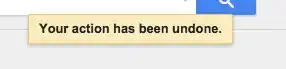
Gmail's 'your action has been undone' alert

I would hate to have to click "OK" every single time that that I send an email in gmail, but it's good to know that the action completed without error.

Is there a standard name for these types of alerts and are there rules as to when I should use them?

alanj
  • 904
  • 6
  • 19

3 Answers3

3

In Android, there is a "Toast" that is a message that is displayed briefly and then automatically disappears.

  • Actually toasts don't always disappear automatically. Google's Material Design spec allows for toasts which have DISMISS, OK-RETRY or other buttons which can dismiss the toast. – tohster Jun 04 '15 at 21:03
  • Yes those are valid option for a toast message. By default though Toast automatically disappears. http://developer.android.com/guide/topics/ui/notifiers/toasts.html This term is also by Microsoft and Adobe. http://ux.stackexchange.com/questions/11998/what-is-a-toast-notification The other term for this is a "pop-up notification" – nightning Jun 05 '15 at 19:21
2

"Notifications" is what you're talking about. As for rules, it's basically the scenario you outlined: use notifications when you just want to tell the user about something and no action is required on his or her part. A separate but related thing are "push notifications" on mobile devices (typically showing up on the phone's message bar).

Rachel9494
  • 1,267
  • 1
  • 8
  • 8
0

I think this is platform dependent. Different platforms have their own ways to name those. I find the names given by Apple for Mac OSX more intuitive.

Banner Appear for a short period of time and then disappear without interrupting what user is doing.

Alert Requires user's action and are important announcements that appear similar to banners

I think notification is too broad term that can contain both banner and alert and even badge.

Find more info here https://support.apple.com/en-gb/HT204079

Krishna
  • 294
  • 1
  • 4