Subdivide a cube and assign 4 faces to a vertex group.
Assign the whole cube to another vertex group.
Select the whole cube with a click on vertex group 2.
Try to deselect the 4 faces with a click on vertex group 1, but a lot more faces are deselected.
Asked
Active
Viewed 639 times
3

-
Related: http://blender.stackexchange.com/q/13856/599 – gandalf3 Aug 12 '14 at 23:48
1 Answers
2
This is because they are vertex groups, not face groups.
Deselecting a vertex group will deselect all the vertices in that group, which will also deselect any faces which those vertices where a part of.
Think of it this way: For a face to be selected, all the vertices which make up that face must also be selected. So by deselecting a single vertex in the subdivided cube example, you actually deselect four faces:
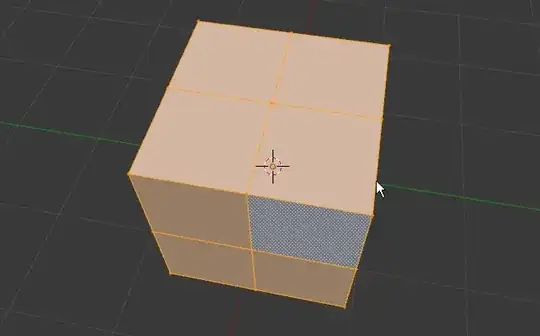
If you deselect the vertices in your group manually, you'll get the same result as clicking the deselect button on the group.
What you want are Face groups, however unfortunately there is no support for these yet. There is a proposal though.

gandalf3
- 157,169
- 58
- 601
- 1,133
-
1you can use materials as face groups however it is a bit limited compared to real face group support. – MarcClintDion Aug 13 '14 at 01:44
-
@MarcClintDion That's quite clever, I hadn't even considered that.. Nice idea! Still, true face and edge groups would be nice. – gandalf3 Aug 13 '14 at 03:10