There are several ways to do this:
Array modifier
You can use an Array modifier to do this. Use multiple modifiers to make the wall, and then model the design (or model the design first and add the array modifiers later, the order doesn't matter):
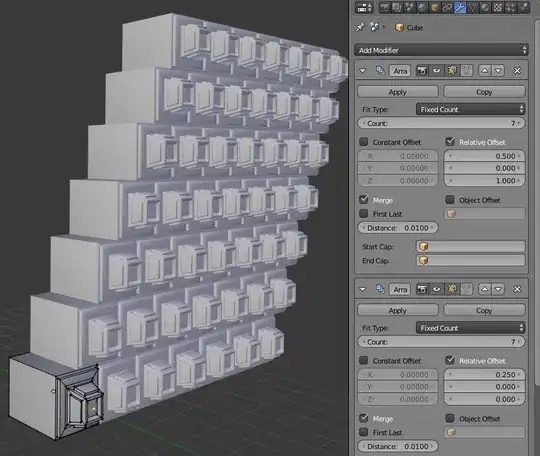
Linked Meshes
You can link the mesh data of two objects together by press CtrlL> Object Data. Note that this will make the mesh data of the objects identical, however you can still transform (scale, rotate, etc.) them independently in object mode.
Related shortcuts:
To quickly duplicate and link objects in one step, you can press AltD
To unlink an object or objects, press U> Object and Data.
Example:

Dupli objects
Dupli objects are used to display instances of an object on the vertices or faces of another object. They can also be used to display duplicates of the object in time (dupliframes) or an entire group of objects. Duplifaces are faster and use less memory than the array modifier, see Applying Array Modifier - Still instance?.
You can also use them to make an instanced array modifier (which does not use instances), giving a performance boost. See this question.
Particles
You can do pretty much the same things with particles as with dupliverts and duplifaces, however you have more control over the orientations of the instances.
Plus you can also do some interesting tricks with hair particles or particles with physics.
Modeling
You can do this to some degree with normal modeling tools (useful for some quick symmetrical actions), however for creating something like a tiled wall the other techniques are probably better.
See Mirror changes to side of cube across all six sides


