11

I want to create a cube with some general extrusions. This should be the same across all sides of the cube. Is there a way to make this mirrored across all six sides? I know that I could delete the rest of the cube, copy my changes, rotate it 90°, move it down and to the side, and repeat for all the sides, then remove doubles, but I'm wondering if there's a way to make this work in real time.

In the below image, all six sides should copy the changes shown here on the one side:

enter image description here

Keavon
  • 8,003
  • 17
  • 48
  • 84

2 Answers2

11

Modifiers:

You could do this with a Mirror modifier and an Array Modifier:

  1. Delete the excess geometry:

    enter image description here

  2. Add a Mirror modifier:

    enter image description here

  3. Add an Array Modifier.

  4. Add an Empty rotated -90°, 0°, 90° (assuming the mirror is mirroring along the X axis):

    enter image description here

  5. Set the empty as the Object offset in the array modifier:

    enter image description here

Result:

enter image description here

Duplifaces:

Another way is with Duplifaces:

  1. Add a cube and a plane.

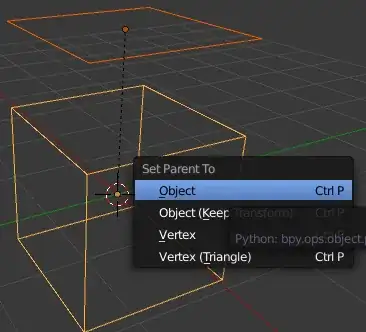
  2. Parent the plane to the cube (CtrlP):

    enter image description here

  3. With the cube selected, enable Duplifaces in the Properties Editor > Object > Duplication:

    enter image description here

  4. Edit the plane object:

    enter image description here

The duplifaces will be displayed in object mode:

enter image description here

Limitations:

  • The array modifier method will not rotate the duplicated faces in the same direction: (this is tweak-able by adjusting the rotation of the empty)

    enter image description here

  • Duplifaces do not display in edit mode.

gandalf3
  • 157,169
  • 58
  • 601
  • 1,133
8
  • You could select all faces in edit mode A
  • Inset I with individual option I

enter image description here

  • Invert selection CtrlI
  • Extrude with E with individual origins

enter image description here

This way you only need to repeat the rotation for all faces.

iKlsR
  • 43,379
  • 12
  • 156
  • 189
stacker
  • 38,549
  • 31
  • 141
  • 243
  • If you set the transform orientation to Normal you can do the rotation all at once too. – gandalf3 Nov 23 '13 at 08:51
  • This is exactly the kind of workflow I was looking for. The rotation probably isn't even that important, but I just included it in my example to make the side more interesting. – Keavon Nov 23 '13 at 19:10
  • @Keavon The rotating issue has been solved by gandalf3 see http://blender.stackexchange.com/questions/5060/how-can-faces-be-rotated-around-their-individual-normals – stacker Nov 23 '13 at 19:20