8

I've seen in older Blender character rigs (such as Big Buck Bunny), character armatures had some floating slide toggles that affected whether a rig appendage was Forward-Kinematic or Inverse Kinematic (FK/IK), but newer rigs (such as Sintel) don't.

What is the current "best practice" way of creating an FK/IK toggle (is it part of the core application?), and what version of Blender did that become available?

Polosson
  • 6,544
  • 8
  • 33
  • 61
MidnightLightning
  • 505
  • 1
  • 6
  • 11

2 Answers2

6

For the former, it was never version specific and can still be done with later versions, people have desisted from doing so since there are several more efficient ways to do so.

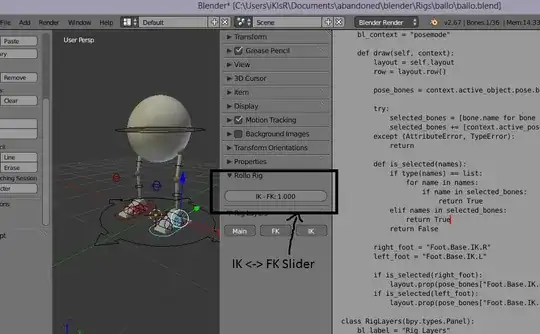
The method I personally use and I think is most people use is a blend of constraints, drivers and a little scripting to create GUI components in the sidebars to toggle from FK <-> IK. I cannot say exactly when this became available but it is a core part of the application.

enter image description here

Timaroberts
  • 12,395
  • 6
  • 39
  • 73
iKlsR
  • 43,379
  • 12
  • 156
  • 189
  • Could you please share with me the .blend file to do this have the script for the silder? – Tak Dec 07 '16 at 00:29
  • @Tak Yikes, 3 years ago, I'll have to poke around. – iKlsR Dec 07 '16 at 00:30
  • Thank you very much. So to do this, I run the script and then select my IK bone then I should find the slider? – Tak Dec 07 '16 at 00:38
  • @Tak It's not plug and play, the bones need to be named accordingly for one, and you need a property on the bone. I don't remember the exact details sorry but this should be way easier to understand than any other example you'll find anywhere I should think. Also you really don't need a script, this looks like a good basic tut https://www.youtube.com/watch?v=rxF45UV1wU0 – iKlsR Dec 07 '16 at 00:45
  • I've adjusted the right_foot = Foot.Base.IK.R to right_foot = IK where IK is my IK bone then modified this part as well layout.prop(pose_bones["Foot.Base.IK.R"] to be layout.prop(pose_bones["IK"] but still the panel is empty. I already watched this tutorial before but I want it to be done with scripting instead of manual process as I have 100's of rigs which I want to apply this to. Any advice please? and Do you reckon I post a new question? – Tak Dec 07 '16 at 00:51
  • @Tak Sorry, I haven't used Blender for rigging in ages, really rusty in that area. A last resort would be this old tutorial I found archived on cgcookie. Patrick explains the steps very well and uses scripts as well as constraints etc. https://cgcookie.com/archive/?fwp_library_search=creating%20fk%20ik – iKlsR Dec 07 '16 at 00:53
4

Ben Dansie's Sintel Lite

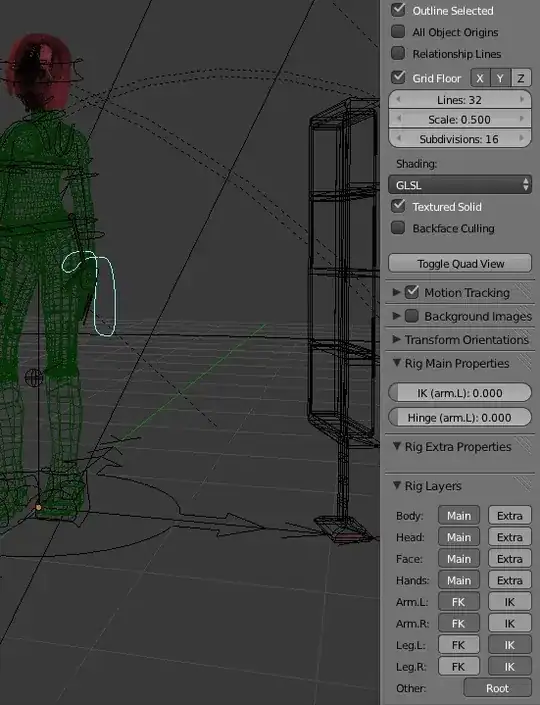
This is from Ben Dansie's Sintel Lite (found here)

Granted, I haven't really rigged that much since Sintel, but the image above captures a convention that has gone on since Sintel. The rig you downloaded probably has IK/FK toggles in the 'Rig Main Properties', or something to that effect. Hit 'N' in the 3d view and see what's there.

Or are you asking about the actual mechanics of rigging the arms? I think they're still done using three separate chains for each arm/leg(possibly 4 if there's a slave rig).

Mike Belanger
  • 1,722
  • 10
  • 14