First, let's make a 'busy' animation
wait =
 DynamicModule[
    {i = 1, b = Import["http://ims.cartoninjas.net/manifoldtemplate/images/BusyAnimation.gif"]},
    Dynamic@Refresh[b[[i = Mod[i + 1, Length[b], 1]]],
                    UpdateInterval -> .1,
                    TrackedSymbols -> {}
    ]
 ]

Now, lets make a radio button bar to control the busy state in this demo:
Column[{"Waiting", RadioButtonBar[Dynamic[waiting], {True, False}]}]

Finally, here's the TabView. I use Overlay to overlay the busy animation in the busy state and prevent selection of the TabView:
g = {"Beethoven", "CastleWall", "Cone", "Cow"};
Overlay[
  {
    TabView[(# -> ExampleData[{"Geometry3D", #}] &) /@ g],
    Dynamic@If[waiting, wait, "", ""]
  },
  {1, 2},
  Dynamic[If[waiting, 0, 1, 1]],
  Alignment -> Top
]
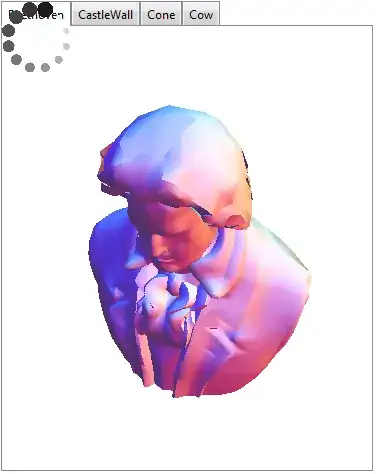
It is the responsibility of your code to set and unset the busy state. Probably somewhere in the beginning and end, respectively, of a Dynamic piece of code in TabView.
Update As of Version 10.0.2 Animator can be used to create the busy animation. There are several kinds available, but one resembling the above can be generated using:
Animator[Appearance -> "Necklace"]


Running... <filename>? Mine does and in addition, also shows a ring around the icon to indicate that it is evaluating something (might be mac only). – rm -rf Sep 06 '12 at 20:42$DynamicEvaluation. It returnsTrueif inside aDynamicandFalseotherwise. ADockedCellmight be a good place to place an indicator – rm -rf Sep 06 '12 at 21:51TabViews run everything at the beginning and always treat the dynamic content on all tabs as if visible. Is it just a delay because of front end rendering or you placed some dynamic code dependent on the current selected tab that has to run when it is changed? – Rojo Sep 07 '12 at 00:42