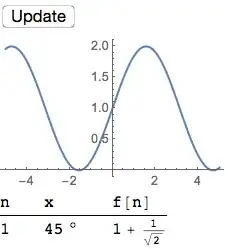
For long running evaluations in Dynamic it is recommended that SynchronousUpdating -> False be used to prevent time-out. However, when this is used a DynamicModule custom interface does not show that it is busy by not allowing user interaction. The user, having no sign that something is evaluating after they click, can continuously click on an evaluate button and inadvertently queue up many expensive calculations.
Thus my question: How to show that the system is busy while evaluating Dynamic with SynchronousUpdating -> False?
I thought of two approaches:
- Set the cursor to busy.
- Disable the evaluate button during evaluation.
I tried MouseApperance and CurrentValue for option 1 but did not get very far. My example is below but it gives the "NoOp" cursor at all times. I'm not certain how to proceed with option 2 given my results with option 1.
DynamicModule[{pl, tbl, n = 1},
 Dynamic[Refresh[
   Pause[7];
   pl = Plot[Sin[n w] + n, {w, -5, 5}];
   tbl = TableForm[{{n, Sin[n x] + n}},
     TableHeadings -> {None, {"n", "f[n]"}}];
   (*Dynamic@MouseAppearance[*)
   Column[{
     Button["Update", n = n + 1, ImageSize -> Large,
      Method -> "Queued"],
     Dynamic@pl,
     Dynamic@tbl
     }]
   (*,
   If[CurrentValue["SynchronousEvaluation"]\[Equal]True,"NoOp",
   "Arrow"]]*)
   ,
   TrackedSymbols -> {n}
   ], SynchronousUpdating -> False]
 ,
 SaveDefinitions -> True
 ]
Uncomment the Dynamic@MouseAppearance and the If to see my attempt at this.
The actual module is large with many calculations, plots, and tables produced. The Pause is set at 7 seconds as the timeout is at 5 seconds. Also, in the module the evaluation time will vary depending on the parameters selected.
I am seeking a solution that allows selection of the text/numbers in tables/grids for copy and paste. Also, tooltips from plots/charts should continue to work when not evaluating.