Consider the following code:
g=Graphics[{EdgeForm[{Black, Thick}],
            {Green,Opacity[0.5],Rectangle[{0,0.5},{1,1}]},
            Red, Polygon[{{0, 0}, {1, 0}, {1/2, Sqrt[3]/2}}],
            White, Disk[{1/2, 1/(2Sqrt[3])}, 1/(2Sqrt[3])]},
           Background->None];
Graphics3D[{{Texture[g],
             Polygon[{{0,0,0},{0,1,0},{1,1,0},{1,0,0}},
                     VertexTextureCoordinates->{{0,0},{1,0},{1,1},{0,1}}]},
            {Texture[g],
             Polygon[{{0,0,1},{0,1,1},{1,1,1},{1,0,1}},
                     VertexTextureCoordinates->{{0,0},{1,0},{1,1},{0,1}}]}},
           Lighting->{{"Ambient", White}},
           ViewPoint->{1,4,7}]
This gives the following graphics:
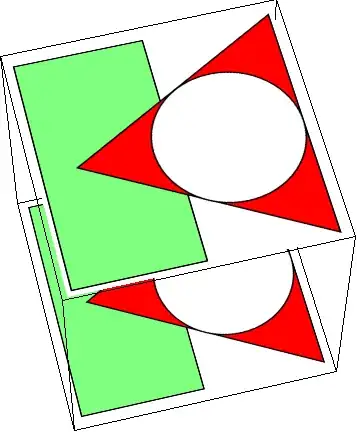
As you can easily see, the part outside of the figures is opaque white, despite of the Background->None option. Also Background->RGBColor[1,1,1,0] didn't help, nor did passing the Graphics through Rasterize with the option Background->None
Here's roughly what I'd want to get (any inaccuracies are caused by my lacking GIMP-fu :-)):
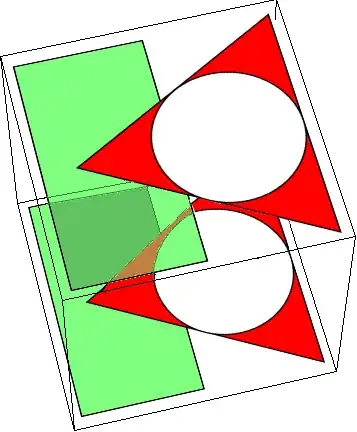
Looking for a solution I found this code but couldn't get it work for my case. Also, if I understand it correctly, it doesn't derive the transparency from the graphics but just replaces a certain colour with fully transparent, which wouldn't work with the semi-transparent green rectangle.
Combining the 2D graphics with another one using Show does respect Background->None and Opacity on the green rectangle, so it's not a problem with the graphics itself.
Therefore my question: Is it possible to embed 2D graphics into 3D while keeping the transparency of the 2D image, and if so, how?


ImageData[Image[g]], replace all the white ({1., 1., 1.}) with transparent ({0., 0., 0., 0.}) components, and then give that as the argument toTexture[]? – J. M.'s missing motivation Oct 04 '12 at 22:54