3

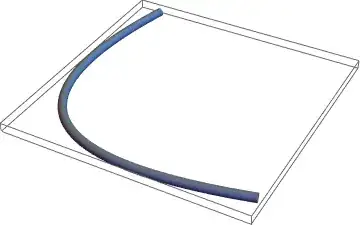
Following up a comment on this question, as part of some image, I want to make a tubular shape and export it for 3d printing like here:

curve = ParametricPlot3D[{a^2, (1 - a)^2, 2*a*(1 - a)}, {a, 0, 1}] /. Line -> (Tube[#, 0.02] &)
Export ["test1.stl", curve]

This works. Now, in a bigger design I need to rotate the curve, so I do this:

curve2 = Graphics3D[Rotate[First@Show[curve],ArcCos[1/Sqrt[3]], {1, -1, 0}, {0, 0, 0}]]
Export["test2.stl", curve2]

which displays the curve rotated, but export now fails:

Export::nodta: "Graphics3D contains no data that can be exported to the \!\(\"STL\"\) format. "

and in indeed, in the bigger design the curve is displayed correctly, but on stl export everything but curve is exported.

Thomas Kahle
  • 153
  • 4
  • My experience is that conversion of Rotate and maybe other geometric transformations is not (yet) fully supported. – Michael E2 Jul 26 '16 at 13:46

1 Answers1

4

I'm surprised that the first example works. There is an issue with converting Tube objects to MeshRegion objects, and in fact DiscretizeGraphics fails on curve1 and curve2 alike. You can use the trick from this page, to convert to a MeshRegion before export as STL.

<< "http://pastebin.com/raw/FQXgqhn3" (*Import the TubeMesh function from pastebin*)

curve2 = Graphics3D[
   Rotate[First@
     ParametricPlot3D[{a^2, (1 - a)^2, 2*a*(1 - a)}, {a, 0, 1}], 
    ArcCos[1/Sqrt[3]], {1, -1, 0}, {0, 0, 0}]];
path = First@Cases[Normal@curve2, Line[l_] :> l, Infinity];
tube = TubeMesh[path, 1/50]

Mathematica graphics

If you still want to combine this with other Graphics3D objects, you can extract the polygons, and what you have is just like the original curve2 from the OP, except that it can be exported to STL easily

curve2G3D = 
 Graphics3D[{ColorData[97][1], EdgeForm[None], 
   MeshPrimitives[TubeMesh[path, 1/50], 2]}]

Mathematica graphics

Jason B.
  • 68,381
  • 3
  • 139
  • 286