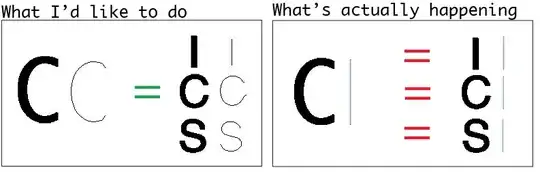
This is a follow up to the OCR question I had earlier.
What I want to do is to use Thinning to create "skeletons" of images of characters and then compare their shapes, utilizing such properties as the slopes/lengths of the edges. The problem is however that I have not been able so far to access the graph Thinning produces. MorphologicalGraph is what I have found in the documentation but this removes a lot of information. And for comparing graphs so far I only have found IsomorphicGraphQ which doesn't seem to offer much customization (tolerances for matching).
The code below demonstrates the problem I have with my current approach. Because MorphologicalGraph reduces the Thinned images to a very similar shape for all these characters, the code will deem a "C" character similar to "I" and "S":
Graphize[u_] := MorphologicalGraph@Thinning@ColorNegate[Import[u]]
whichQ = Graphize["http://i.imgur.com/2Fxyh.gif"] (* C *)
i = Graphize["http://i.imgur.com/SPp7R.gif"]  (* I *)
c = Graphize["http://i.imgur.com/SeXA7.gif"]  (* C *)
s = Graphize["http://i.imgur.com/aguQ6.gif"]  (* S *)
IsomorphicGraphQ[whichQ, i] (* -> True *)
IsomorphicGraphQ[whichQ, c] (* -> True *)
IsomorphicGraphQ[whichQ, s] (* -> True *)


HandIshare a graph (assuming H doesn't have serifs). If a symbol falls in theH/Icategory, then other methods can be used to further discriminate between those symbols. – amr Nov 03 '12 at 20:58EdgeWeights(i.e. skeleton length in pixels) could be compared to the Euclidean distance between two vertices, to estimate how straight or curvy the line is. – Simon Woods Nov 06 '12 at 22:18