14

I am new to Mathematica and trying to figure out whether it is a good tool for algorithmic exploration. So I had the idea of implementing a simple OCR with Mathematica, just using standard algorithms.

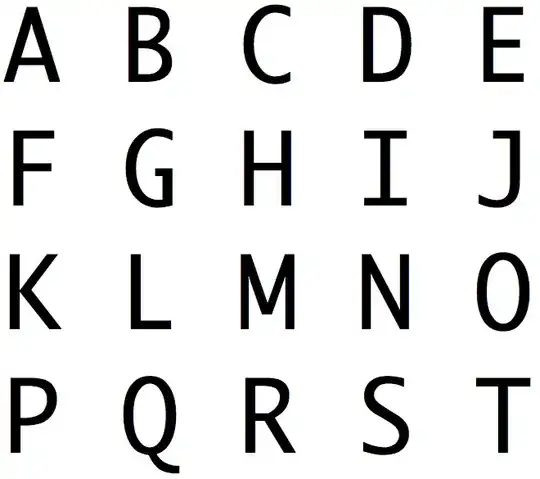
I have this picture: Block of text

I'd like to apply the following steps:

  1. Finding the cells of the picture: Could one use a voronoi algorithm to recognize the grid in the picture?

After having the cells I'd like to apply these steps to each:

  1. Use Thinning to find the skeleton of the character.
  2. Use EditDistance to compare the character to a skeletized version of every possible character and then select the character which is closest.

I have seen in the documentation that Mathematica has all these algorithms I am just not sure whether it would actually be feasible to do what I want.

(If it's impossible to do without knowing the name of the font I used: It's "Osaka, Regular-Mono, 144 pt".)

J. M.'s missing motivation
  • 124,525
  • 11
  • 401
  • 574
Sven K
  • 325
  • 1
  • 9
  • Yes, it's feasible. Can you show us your initial code? – Dr. belisarius Oct 15 '12 at 21:48
  • I have no code, alas. E.g. VoronoiDiagram[] expects a list of points, so I would need to somehow convert all my characters to points. Maybe there is a similar function that works directly on images? (Partition?). Once I have an image for each character, I could loop over them (via Table[]) and then apply Thinning[image]. EditDistance[] expects a vector. I would need to create that vector by making changes to a picture and then comparing for equality, not sure if I could do that in Mathematica on a pixel or vector level (Thinning[] only returns an image right? Not the vector data). – Sven K Oct 15 '12 at 22:00
  • 2
    Look at the help for ImageCorrelate, under Applications http://i.stack.imgur.com/3tjDp.png – Dr. belisarius Oct 15 '12 at 22:09
  • Looks very interesting! Looking at the documentation of NormalizedSquaredEuclideanDistance I see that it only takes vectors as arguments. Yet it seems to be possible to use it with the eyes-image as a parameter (I guess?). Could I just replace the eyes-image with a table of images of all possible characters (thinned)? I think this would get me quite close to a solution. – Sven K Oct 15 '12 at 22:30
  • 3
    @belisarius just hope he's not looking for Schroedinger or Wilson – acl Oct 15 '12 at 23:24
  • 1
    @acl Everybody knows Schrödinger. He is the one with the Cheshire Cat on his lap. – Dr. belisarius Oct 15 '12 at 23:44
  • @belisarius yes; perhaps he's not there because when he had the energy he didn't have time and vice versa – acl Oct 15 '12 at 23:50
  • @acl Is your time quantized? :) – sebhofer Oct 17 '12 at 19:46

1 Answers1

7

Ok, here is a rather raw intent:

(*define a template font*)
i = Rasterize@Style[" A B C D E F G H I J K L M N O P Q R S T U V W X Y Z ",  
                   FontFamily -> "Courier", FontSize -> 24];

(separate characters) cn = ColorNegate /@ Flatten@ImagePartition[i, ImageDimensions[i]/{26, 1}]

(define a function for size adjustment) let[u_] := Function[{x}, ImageTake[x, Sequence @@ Reverse@Transpose@(u + ComponentMeasurements[x, "BoundingBox"][[1, 2]])]][#] & /@ cn;

(set of images for size scaling ) forSize = let[0];

(set of images for matching) forMatch = let[3 {{-1, -1}, {1, 1}}];

(Mean template char size) sz = N@Mean[ImageDimensions /@ forSize]

(----------------------) (Now test it) i1 = ColorNegate@Rasterize[ Style[" M Y L I T T L E H O U S E I N T H E P R A I R I E
W A S A M E S S O F R A T S A N D B A T S ", FontFamily -> "Courier", FontSize -> 25], ImageSize -> 1000]

(* Compute a size factor*) sizeFactor = -Mean[Mean[Subtract@@@(Range@38/. ComponentMeasurements[i1, "BoundingBox"])]/sz];

(* resize the image to match the template's char size*) r = Rasterize[i1, ImageSize -> ImageDimensions@i1/sizeFactor];

(Perform the matching) c[t_] := List @@ (ColorData[60][t[[1]]]); xx = (ImageCorrelate[ r, #, NormalizedSquaredEuclideanDistance] & /@ (Binarize /@ forMatch)); cc = MapIndexed[ImageMultiply[ With[{k = c[#2]}, Image@Array[k &, Reverse@ImageDimensions[#1]]], Dilation[Binarize[ColorNegate@#1, 0.8], DiskMatrix[15]]] &, xx]; rcc = Image[ImageAdd[cc[[#]], r], ImageSize -> {849, 60}] & /@ Range@Length@forMatch; Fold[ImageAdd[#1, #2] &, rcc[[1]], rcc]

As you can see below the results aren't perfect. There are two obvious improvements to test:

  1. Accept a match after comparing the goodness of all other matchings over a character
  2. Refine the sensibility (0.95 in this test)

Mathematica graphics

Mathematica graphics

Dr. belisarius
  • 115,881
  • 13
  • 203
  • 453
  • 1
    looks good, but it may not be copy/pasting correctly: "ImageCorrelate::klcst: The distance function NormalizedSquaredEuclideanDistance is not defined for constant kernels. >>" – cormullion Oct 17 '12 at 08:38
  • @cormullion Believe it or not, the culprit is the window size of the notebbok. I never saw something like this! Trying to fix it. – Dr. belisarius Oct 17 '12 at 10:45