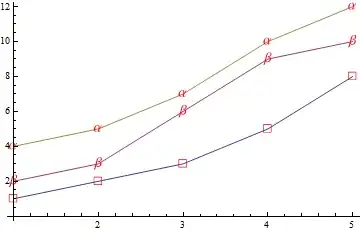
I have a listplot whose plotmarkers I want to change the size of, to no avail.
Using what I see in the related post: Specifying the size of open circle PlotMarkers in ListPlot
I get
 ListPlot[{{1, 2, 3, 5, 8}, {2, 3, 6, 9, 10}, {4, 5, 7, 10, 12}},
  PlotMarkers -> {Graphics[{Red, Thick, Text["\[EmptySquare]"]},
     ImageSize -> 10],
    Graphics[{Red, Thick, Text["\[Beta]"]}, ImageSize -> 10],
    Graphics[{Red, Thick, Text["\[Alpha]"]}, ImageSize -> 10]}]
I cannot get that text to appear larger, whether I put it as a Style option inside the Text function or outside the Graphics. Any ideas? This seems too convoluted too, there has to be a smarter way of specifying what I want each plotmarker to be and what size I want for each plotmarker. That ImageSize option at the end of graphics doesn't do anything either. Any ideas much appreciated.




Textdoes not scale withImageSize. That's the core of your issue. If you wanted to you could get the word as aGraphicsobject. Then it would scale withImageSize. – b3m2a1 Mar 17 '17 at 05:09