1

I have checked all Mathematica color schemes, and I think "Hue" is the most vibrant, beautiful one. However, it has one issue: the two ends of the spectrum are red (though, different reds). I like a spectrum from, say, red to blue. Is that possible to manipulate the Hue and remove the pink and second red?

Consider the following:

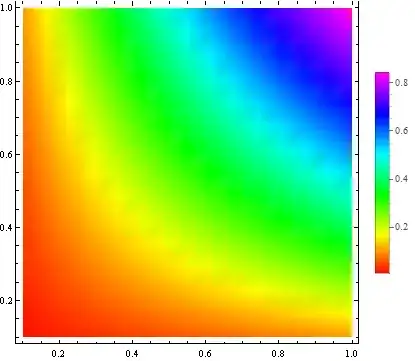
DensityPlot[Sin[x y], {x, 0.1, 1}, {y, 0.1, 1}, PlotLegends -> Automatic, Frame -> True, ColorFunction -> Hue]

The output is enter image description here

As you see, the two extremes are red.

Saeid
  • 801
  • 4
  • 12
  • I would look at the Blend function: Function@Blend[{Red, Yellow, Green, Cyan, Blue}, #] can be passed as a color function that will go from red to blue; alternately, I often pass (Hue[0.67*(1 - #)]&) as a color function argument when I want the color to vary from blue (low values) to red (high values). – nben Jun 19 '17 at 18:19

2 Answers2

2

Your question looks almost a duplicate of this one:

Using the formulation from the answer by J.M. we get:

DensityPlot[Sin[x y], {x, 0.1, 1}, {y, 0.1, 1}, PlotLegends -> Automatic, Frame -> True, 
 ColorFunction -> (Hue[2 (1 - #)/3] &)]

plot

Alexey Popkov
  • 61,809
  • 7
  • 149
  • 368
1

From Documentation >> Hue >> Details

Mathematica graphics

So, we need to rescale the function values (that run from -1 to 1) to the unit interval:

DensityPlot[Sin[x y], {x, 0.1, 1}, {y, 0.1, 1}, 
 PlotLegends -> Automatic, Frame -> True, 
 ColorFunction -> (Hue[Rescale[#, {-1, 1}, {0, 1}]] &)]

Mathematica graphics

Or, using the option ColorFunctionScaling -> False:

DensityPlot[Sin[x y], {x, 0.1, 1}, {y, 0.1, 1}, 
 PlotLegends -> Automatic, Frame -> True, ColorFunction -> Hue, 
  ColorFunctionScaling -> False]

Mathematica graphics

kglr
  • 394,356
  • 18
  • 477
  • 896
  • I tested this, but it works only for simple functions like sin(xy). I'm supposed to draw a plot of a very complicated function. Unfortunately, this approach did not work. – Saeid Jun 14 '17 at 23:13