This is hacky, but it works:
front = Pane[
 Style["this is a test and I hope it works so I need a very long string",
 Background -> Yellow], ImageSize -> 150]

back = Pane[
  Style["this is a test and I hope it works so I need a very long string",
  Background -> Red], ImageSize -> 150, ImageMargins -> 2]
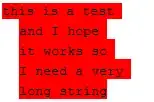
Overlay[{MinFilter[Rasterize@back, 2], front}, Alignment -> Center,
 ImageMargins -> 1]

There are a few artefacts where the text hits the edge of the background in the back copy, and therefore the black color is picked up in the MinFilter. As shown below you can fix this by setting the text color and the background color in the back copy the same.
You could build this up into a function like this:
borderedText[text_String, width_Integer?Positive, {color1_, color2_}] :=
 With[{f = Pane[Style[text, Background -> color1], ImageSize -> width],
   b = Pane[Style[text, color2, Background -> color2], ImageSize -> width, ImageMargins -> 2]},
  Overlay[{MinFilter[Rasterize@b, 2], f}, Alignment -> Center, ImageMargins -> 1]]

borderedText["This is a test that might or might not work", 150,
{Lighter@Yellow, Red}]


