I need a way to get the absolute tick specifications in the form of list of position/label pairs, and have not been able to come up with a robust way.
For the following, I'll be using this test plot:
plt = Plot[x, {x, 0, 1}, Frame -> True, PlotRangePadding -> 0]
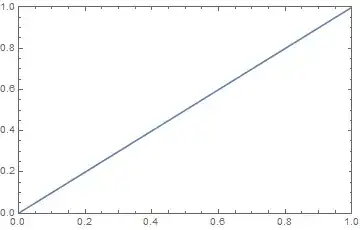
Things I have tried so far include:
Specifying
Charting`ScaledTicks[{Identity,Identity}]:
Notice the missing
1.0tick mark.Using
AbsoluteOptions:InputForm@PlotRange /. Quiet@AbsoluteOptions@plt (* {{0., 1.}, {0., 0.9999999795918367}} *)This probably also explains why the above fails.
PlotRange@plt,Charting`CommonDump`getplotrange@pltandGraphicsInformation@pltall fail similarlyFullGraphicsis also completely broken- I tried to look at the
GraphicsBoxexpression resulting from the plot, but thePlotRangeis still wrong there and theFrameTickshave not yet been expanded. - I also tried to look at the definitions of
Typeset`MakeBoxes, which appears to handle some of the option transformations for graphics, but I couldn't find anything, and they also seem to be unused during normal operation
Is there any way to replicate what the front end is doing? I guess it's just rounding the plot ranges before feeding them into whatever tick-making function it uses internally, but is there a way to tell what exactly is going on?

tt = Charting`ScaledTicks[{Identity, Identity}][0, 3]; {Plot[2 x, {x, 0, 3}, Frame -> True, FrameTicks -> {None, {tt, None}}, PlotRangePadding -> 0], Plot[2 x, {x, 0, 3}, Frame -> True, FrameTicks -> {None, {Automatic, None}}, PlotRangePadding -> 0]}– J. M.'s missing motivation Mar 19 '18 at 03:15Chartingget2DPlotRange[Plot[...]], this gives true plot ranges used by MMA to plot and to place ticks. So for yourpltit gives{{0.,1.},{0.,1.}}. ThenChartingScaledTicks[{Identity,Identity}][<here is plot range>]replicate MMA ticks. – Alx Aug 20 '19 at 07:06Charting`get2DPlotRange@plt // InputForm, $1$ is still excluded from the vertical plot range. – Lukas Lang Aug 20 '19 at 07:13get2DPlotRange[plt], then Plot[x, {x, 0, 1}, Frame -> True, PlotRangePadding -> 0, FrameTicks -> ChartingScaledTicks[{Identity, Identity}][Sequence @@ pr[[2]]]] and all 1s are presented. – Alx Aug 20 '19 at 07:50scaledTicks. As I wrote in previous comment,FrameTicksoption with plot range fromget2DPlotRangegives desired result, but the same ChartingScaledTicks[{Identity,Identity}][Sequence@@pr[[2]]] alone doesn't include 1. It is strange because underlyingN@FindDivisions[pr[[2]],{6,6}]includes 1. And the full form Charting`ScaledTicks["Linear", {Identity, Identity}, "Nice"][Sequence @@ pr[[2]]] also shows 1. – Alx Aug 20 '19 at 09:20Plotsilently (for some reason) discards the invalidFrameTicksspecification and uses the default. If you specifyFrameTicks->{Automatic, Charting`ScaledTicks[…][…]}, it gives the wrong result as expected. And for the other part: It looks likeFindDivisionsis not used for that particularScaledTickscall, only for the"Nice"version, which probably explains why that one works – Lukas Lang Sep 17 '19 at 20:17FrameTicks. But this can be fixed either by removingPlotRangePadding -> 0option, or addingPlotRange -> pr, wherepr = Charting``get2DPlotRange[plt]. This works for my needs (I use this when I need custom ticks), but I have no such experience in MMA as you have and this may work just by a fluke. – Alx Sep 18 '19 at 00:43