How do I plot the content of a directory and all its subdirectories into infinity using TreeForm? I've tried using a mix of FileNames, StringSplit and GatherBy but in the end I couldn't find even a promising start.
Asked
Active
Viewed 1,064 times
17


3 Answers
12
The following is a slight modification to @amr's code.
It shows a directory tree using TreeForm[], with a button at each vertex. When the button is pressed, it opens a dialog with the list of the files contained in that directory.
ellipsizeMax = 8;
ellipsize[str_] :=
  If[StringLength[str] > ellipsizeMax,
   StringTake[str, ellipsizeMax] <> "\[Ellipsis]", str];

readDir[currentDirectory_, 0] := ellipsize[FileNameTake[currentDirectory]];
readDir[currentDirectory_, level_] :=
  Module[{joinedFiles, perFile}, SetDirectory[currentDirectory];
   joinedFiles = FileNameJoin[{currentDirectory, #}] & /@ FileNames[];
   perFile[file_] :=
    If[DirectoryQ[file], file @@ readDir[file, level - 1],
     Sequence @@ {}]; perFile /@ joinedFiles];


treeDir[dir_] := Module[{k},
                TreeForm[dir @@ readDir[dir, 5],
                     VertexRenderingFunction ->
                         (Inset[Button[#2,
                                If[(k = FileNames["*.*", #2]) == {},
                                        CreateDialog["No Files", WindowTitle -> #2],
                                        CreateDialog[k, WindowTitle -> #2]]], #1] &)]]

treeDir["C:\\ff2"]
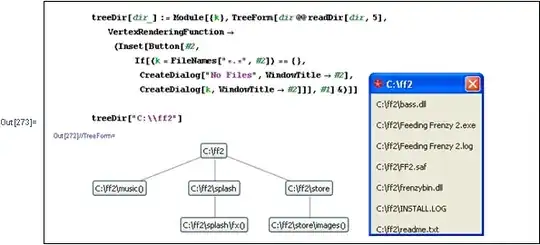

Dr. belisarius
- 115,881
- 13
- 203
- 453
10
Here's a relatively straightforward "first version":
ellipsizeMax = 8;
ellipsize[str_] := If[StringLength[str] > ellipsizeMax, StringTake[str, ellipsizeMax] <> "\[Ellipsis]", str];

readDir[currentDirectory_, 0] := ellipsize[FileNameTake[currentDirectory]];
readDir[currentDirectory_, level_] := Module[{joinedFiles, perFile},
   SetDirectory[currentDirectory];
   joinedFiles = FileNameJoin[{currentDirectory, #}] & /@ FileNames[];

   perFile[file_] := If[DirectoryQ[file],
     FileNameTake[file] @@ readDir[file, level - 1],
     ellipsize[FileNameTake[file]]];

   perFile /@ joinedFiles
   ];

treeDir[dir_] := TreeForm[dir @@ readDir[dir, 5]];

treeDir["C:/blah/blah"]
This has a very poor display capacity if there are more than a certain number of files in a directory level.
It would need a lot of work to make the presentation reasonable in the general case. But this form of tree presentation of a file system also has a lot of potential. For example, you could build a graphical navigation system based on this (though not necessarily with TreeForm).

amr
- 5,487
- 1
- 22
- 32
-
I posted an answer shamefully stealing your code. Hope you don't mind – Dr. belisarius Jan 07 '13 at 11:57
-
1@belisarius Absolutely not. Plus, a lot of my answers (such as this one) are more rough sketches than complete answers. I'm more interested in the "conversation," so to speak. :) – amr Jan 07 '13 at 20:19
3
Here is the code required to implement Hypnotoad's solution (see comment to the question). I've copied Leonid's code over from its original thread.
The one problem I had with this solution was that FileNames["*", {"*"}, ∞] doesn't include empty directories. I replaced it with FileNames["*", Directory[], ∞], which solves that. But Directory[] is an absolute path so all those folders leading up to your current folder will be shown in the graph. I don't know how to solve that, one would have to find a replacement to {"*"} which includes directories but at the same time produces relative paths.
ClearAll[makeTree];
makeTree[wrds : {__String}] := makeTree[StringSplit[wrds, "/"]];
makeTree[wrds_ /; MemberQ[wrds, {}]] :=
  Prepend[makeTree[DeleteCases[wrds, {}]], {} -> {}];
makeTree[wrds_] :=
 Reap[If[# =!= {}, Sow[Rest[#], First@#]] & /@
    wrds, _, #1 -> makeTree[#2] &][[2]]

ClearAll[getSubTree];
getSubTree[word_String, tree_] :=
 Fold[#2 /. #1 &, tree, Characters[word]]

ClearAll[inTreeQ];
inTreeQ[word_String, tree_] :=
 MemberQ[getSubTree[word, tree], {} -> {}]

ClearAll[getWords];
getWords[start_String, tree_] :=
  Module[{wordStack = {}, charStack = {}, words},
   words[{} -> {}] := wordStack = {wordStack, StringJoin[charStack]};
   words[sl_ -> ll_List] := Module[{}, charStack = {charStack, sl};
     words /@ ll;
     charStack = First@charStack;];
   words[First@
     Fold[{#2 -> #1} &, getSubTree[start, tree],
      Reverse@Characters[start]]];
   ClearAll[words];
   Flatten@wordStack];
SetDirectory["~/dirtest"];

TreeForm[
 DeleteCases[
   makeTree@Select[
     FileNames["*", Directory[], \[Infinity]], DirectoryQ
     ], {} -> {}, {0, Infinity}] //. {Rule[a_, {}] :> a,
   Rule[b_, c_] :> Apply[b, c]},
 VertexRenderingFunction -> (Style[Text[#2, #1], 14,
     Background -> White] &)
 ]

makeTreefunction in Leonid's answer on implementing Tries. By redefining the RHS of the first line in the definition asmakeTree[StringSplit[wrds, "/"]], you can get a good structure for the directory tree withmakeTree@FileNames["*", {"*"}, ∞](you'll have to clean up the{{} -> {}}). While this can't be plugged in a built-in graph function likeGraphorTreePlot, it can be easily converted to a graph using some custom code. – rm -rf Jan 07 '13 at 04:48