From the documentation for ItemSize:
{w,h} make all items the specified width and height
and
In Grid, w is measured in ems, and h in line heights.
This implies that a specification ItemSize->{4,2} means the item is 4ems wide and 2 line heights high, which in turn suggests that the item size in pixels will be CurrentValue["FontMWidth"]*4 wide and CurrentValue["FontLineHeight"]*high. Therefore to make grids that render to a fixed number of pixels across various platforms you presumably should do (for an item of pixel dimension w,h = 100,20):
ItemSize:>{100/CurrentValue["FontMWidth"],20/CurrentValue["FontLineHeight"]}
If this is not correct stop reading now and let me know!
The problem I have is that from Mac to Windows I am unable to get the same dimensions:
img1 = Rasterize[Grid[RandomInteger[{1, 100}, {10, 8}],
   Alignment -> {Center, Center},
   Background -> None,
   BaseStyle ->
    Directive[FontFamily :> CurrentValue["PanelFontFamily"],
     FontSize :> CurrentValue["PanelFontSize"],
     RGBColor[0, 0, 0.25]],
   Frame -> All,
   FrameStyle -> Directive[AbsoluteThickness[0.5], GrayLevel[0.7]],
   ItemSize :> {{80, 260, {130}}/CurrentValue["FontMWidth"],
     22/CurrentValue["FontLineHeight"]},
   Spacings -> {0, 0}]]

ImageDimensions[img1]
Mma 8.0.4 on Mac 10.6.8
(* {751, 224} *)
Mma 8.0.4 on on Windows 7
(* {983, 274} *)
And when we check the em widths and line heights on both systems:
Mma 8.0.4 on Mac 10.6.8
{CurrentValue["FontMWidth"], CurrentValue["FontLineHeight"]}
(* {12.9621, 9.875} *)
Mma 8.0.4 on Windows
{CurrentValue["FontMWidth"], CurrentValue["FontLineHeight"]}
(* {12.6, 10} *)
In other words similar em widths and line heights. The upshot is that I have had problems creating a grid on a Mac that doesn't go offscale when viewed on Windows.
The screen resolutions (SystemInformation["Devices", "ScreenInformation"]) are 72 for Mac and 96 for Windows. The ratio of Windows image width for Mac width is close to 96/72 but the heights are not close to that ratio at all -- but in any case there is no mention of screen resolutions in the documentation.
Does anyone have any thoughts on what is happening here and how I can get a grid of the same size on both Mac and Windows?
Edit
I think this example by @SjoerdC.deVries nails it:
Grid[{{"MMMMMMMMMMM", "MMMMMMMMMMMMMMMMMMMM"}}, ItemSize -> 5,
 Spacings -> {0, 0}]
If the item size is in ems then you should expect only 5 "M" characters to fit in a grid cell ...right?
Following the comment from @Silvia I have tested Serif, Sans-serif and monospace fonts:
Sans-serif -- Helvetica gives 4Ms

Serif -- Times gives 4Ms

Monospace -- Monaco gives many Ms
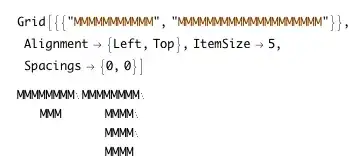
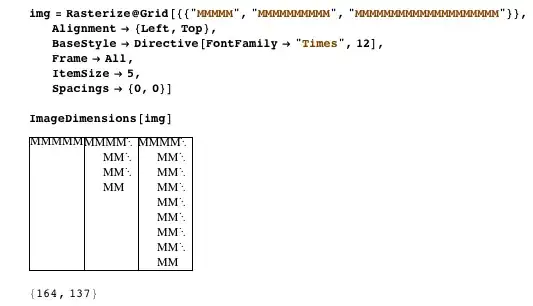
Note that using lower case "m" made no difference. Note that further investigation shows that the word wrapping has an effect here. With just 5Ms the item size almost works.

Initial summary: So either the documentation is wrong, or it is incomplete, or the implementation is broken.
Subsequent summary: the problem seems to reside with how Mathematica determines the font being used when doing the size calculations. It clearly responds when StandardForm is changed but does not respond to local font usage (apparently). Otherwise an item size of x/CurrentValue["FontMWidth"] should surely deliver an item xMs wide.
Edit #2
Confirmed as a bug by WRI tech support.



Attributes[Grid] == {Sadistic || Bugged}– Mr.Wizard Jan 15 '13 at 04:25CurrentValuein your code I get {804,254} and {707, 254}, respectively. – Sjoerd C. de Vries Jan 15 '13 at 11:13CurrentValue["FontMWidth"]also varying? – Mike Honeychurch Jan 15 '13 at 19:33{CurrentValue["FontMWidth"], CurrentValue["FontLineHeight"]}takes up 829 pixels in v8 and 948 in v9. Their ratio is precisely that of their respective em values. So, it seems that the standard font differs between those versions. – Sjoerd C. de Vries Jan 15 '13 at 20:29ItemSizeis a strange beast. Check the first example on the help page and count the item size there in terms of number of characters and see if you understand that. I don't. Could also tryGrid[{{"MMMMMMMMMM", "MMMMMMMMMMMMMMMMMMMM"}}, ItemSize -> 5]. – Sjoerd C. de Vries Jan 15 '13 at 20:43"StandardForm"in the stylesheet to any (I guess) serif font, the output looks indeed 5Mwidth! But any sans-serif font would behave strange! (A screen capture) – Silvia Jan 16 '13 at 00:15StandardForm, otherwise there would be no chance for me to notice that:) – Silvia Jan 16 '13 at 01:33\[Continuation]symbols. If there are no more than 5 Ms, they will be placed in the same row. (See my screen grab please.) And I agree with you that it's not about sans-serif or serif but something else, which makes it more confusing.. – Silvia Jan 16 '13 at 10:03FontMWidthis exactly twiceFontNWidthfor all fonts I tested on my Mac. Surely this will all be ironed out when Mathematica goes HiDPI. – duozmo Nov 05 '13 at 23:11