This is only a possible explanation, so read with care. First, we should try to reduce the problem. What I was curious about was that it's exactly 1024 when the graph drops. Therefore I assumed it must be connected to the Log and the 2^x inside, and indeed look at this
Plot[1/Log[2^2^x], {x, 9.5, 10.5}]
(I used 2^x so that the critical point is at 10.0)
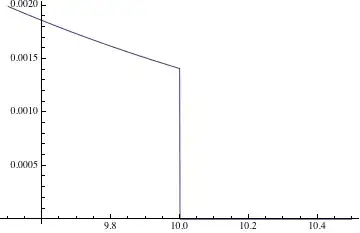
What I assume is that Mathematica compiles the expressions if possible. One could look at the Trace of such a Plot to see how many checks are done to find out, what kind of function is supplied and whether it has discontinuities etc. Beside other things, one can find options for Compile in the trace too. Let's try it
f = Compile[{{x, _Real}}, 1/Log[2^2^x]]
Table[f[x], {x, 10 - 10^-6, 10 + 10^-6, 10^-7}]
(*
  {0.00140888, 0.00140888, 0.00140888, 0.00140888,
   0.00140888, 0.00140888, 0.00140888, 0.00140888, 0.00140888,
   0.00140888, 0., 0., 0., 0., 0., 0., 0., 0., 0., 0., 0.}
*)
This confirms the assumption and of course the plot of f[x] has the same drop.
The conclusion could be that Mathematica compiles expressions if possible. Obviously, defining a function with g[x_]:=.. or using the Evaluated option does prevent this from happening.
As an additional note, @sebhofer mentioned in the first comment
Try Plot[s12,{x,0,2000},WorkingPrecision->20].
The question is, why does this work? Real numbers as used in compiled expressions have $MachinePrecision which is a value around 16. Try to set WorkingPrecision to 5 and you see that it's working anyway. The reason is in my opinion, that setting WorkingPrecision to any other value than MachinePrecision does prevent the call to Compile. Try it yourself
Plot[1/Log[2^2^x], {x, 9.5, 10.5}, WorkingPrecision -> #] & /@ {5, 20, MachinePrecision}


Plot[s12,{x,0,2000},WorkingPrecision->20]. Also, please look through the editing help to learn how to format your code correctly. – sebhofer Jan 20 '13 at 21:58s12to be a function dependent on some argumentxand in turn plotting the new function results in a graph that does not drop to 0 without specifying the working precision. – VF1 Jan 20 '13 at 22:00WorkingPrecision->15works, which is normally smaller than$MachinePrecision. That's because arbitrary precision arithmetic is taking over which is apparently able to handle this at low precision. In general one has to experiment a bit and see what value works... – sebhofer Jan 20 '13 at 22:06x*Log[2]- which is equivalent to yourLog[2^x]- fixes the problem too. – Vitaliy Kaurov Jan 20 '13 at 22:13f[x_]=s12and doPlot[f[x],{x,0,1030}]. – Jens Jan 20 '13 at 22:48f[x_]works buts12doesn't leads me to suspect that it's important forPlotto not evaluate the expression too early. E.g., if I replacef[x]byEvaluate[f[x]]inPlot, the error re-appears. But what is happening with the unevaluated expression? One thing it could be doing is some pre-processing forPlotLegends. And coincidentally, that's exactly what has changed in version 9. So I'm inclined to blamePlotLegends. Again!? Or should I blame units support... I like that idea too... – Jens Jan 20 '13 at 23:00Evaluated->False– Rojo Jan 20 '13 at 23:22Plot[s12/.x->y,{y,0,1030}]– Jens Jan 20 '13 at 23:38