Trying to install the Wolfram Workbench plugin into Eclipse Juno fails. How is it possible to install in into Eclipse Kepler ? Or Eclipse Neon?
Asked
Active
Viewed 7,032 times
41
-
It is actually possible to install it in Juno, I've done it before. I didn't like Juno though so I never tested it thoroughly... it might be unstable. – sebhofer Jan 21 '13 at 18:16
-
So what I meant to say was, if you really want to try then I'll probably be able to remember :) – sebhofer Jan 21 '13 at 18:21
-
Maybe others care? For me it does not matter that much. Kepler seems to work fine. – Rolf Mertig Jan 21 '13 at 18:25
-
Could somebody comment on what the benefit is of installing into Eclipse vs. using the standalone (branded) version of WB? (This is probably not a big/interesting enough question for the main site, this is why I'm asking in the comments) – Ajasja Jan 22 '13 at 09:12
-
1@Ajasja Afaik, there have been no updates to the standalone version of Workbench. On the other hand Eclipse is actively being developed. So you can benefit from using newer Eclipse versions together with the plugin. – sebhofer Jan 22 '13 at 13:42
-
2@Ajasja One reason to look into this was I did not succeed to install the git plugin EGit into the standalone version of Workbench. – Rolf Mertig Jan 22 '13 at 17:58
-
This works fine on OS X 10.8.2, thanks Rolf. But what are the advantages of this version of Eclipse for Mathematica development? – Verbeia Jan 25 '13 at 22:58
-
For example you don't have to work around that strange update error you ran into (it's possible, but not nice). Also I just like the look of Kepler much more. And you can install Egit and other plugins which might not install well with Indigo (the Eclipse version WWB is based on). – Rolf Mertig Jan 25 '13 at 23:11
1 Answers
43
Update October 2016: As mentioned here it is officially documented how to install WWB into Eclipse Neon (64 bit)! Great! Thanx WRI.
This is tested on Windows and Linux:
- Download and install a 32bit version of Eclipse Kepler from http://www.eclipse.org/downloads/
On Linux x86_64 make sure to have 32bit Java installed and configured, and, e.g. on Fedora do: yum install glibc.i686 libgcc.i686 gtk2.i686 libXtst.i686
Start Eclipse and go to Help/Install New Software
- Click Add
- Enter http://download.eclipse.org/releases/indigo for Location, Indigo for Name
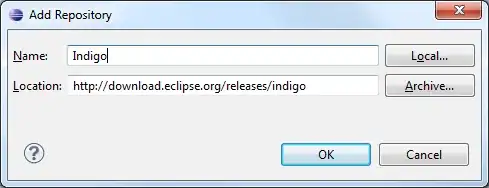
- Click OK and again Add and enter http://workbench.wolfram.com/update
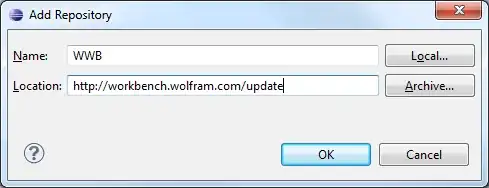
- Wait a bit until you see

- Install WWB core (and possibly WWB webMathematica), hit ok a couple of times
- Don't forget to eventually adjust your location of Mathematica:
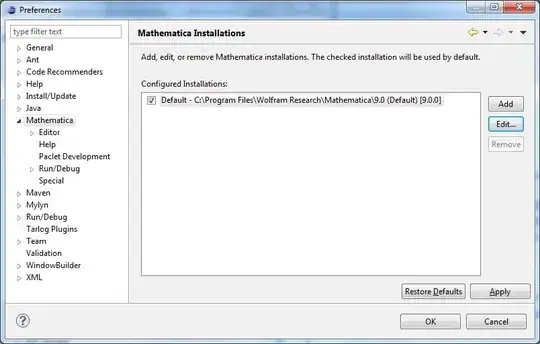
- Here the About Eclipse box

- And here the proof that it works:

- One big productivity boost for me to use Eclipse is that there are various vi plugins. One free possibility to use is vrapper , another one (non-free) is viplugin I also personally like this plugin which enables font-size changing by Crl++ and Ctrl+-

Rolf Mertig
- 17,172
- 1
- 45
- 76
-
3Maybe worth stressing that "The workbench 2.0 plugins will install into eclipse 3.4 - 3.8, but are not compatible with 4.2" according to WRI. – b.gates.you.know.what Jan 21 '13 at 18:32
-
This worked on OS X 10.8.2. However, the About box says 4.3.0, while the splash screen says "Juno" (which is 4.2) – rm -rf Jan 21 '13 at 18:36
-
Thanks for documenting this! Just to clarify, are you using the 3.x or the 4.x series? (It seems they're being developed in parallel at the moment. I used 3.8 for Workbench. If I understand it correctly, "Juno" could be either 4.2 or 3.8.) – Szabolcs Jan 21 '13 at 19:24
-
(or even if both are not named Juno, they should have the same functionality) – Szabolcs Jan 21 '13 at 19:32
-
@b.gatessucks As I said in a comment above, you can install the plugin in 4.x, you just have to jump through some hoops. – sebhofer Jan 21 '13 at 23:29
-
@sebhofer Could you please mention how to do it ? I use Fedora, which ships Eclipse 4.2; the Workbench plugin doesn't work out of the box. – b.gates.you.know.what Jan 22 '13 at 08:03
-
@sebhofer Following your walkthrough on Win 7 I get the following error: An internal error occurred during: "FrontEnd Job::Open Notebook". com.wolfram.jlink.NativeLink.MLOpenString(Ljava/lang/String;[Ljava/lang/String;)J – Markus Roellig Jan 22 '13 at 09:54
-
@b.gatessucks I did this a while ago and unfortunately I didn't make notes :( The point is that the workbench plugin requires 3 bundles which are not included in the new release. They are listed on the release page. 1 one of them is just a dummy package which does nothing, the others can be installed if I remember correctly. I will try to remember what I did, but I don't have the time right now. I think the error messages during the install give a starting point. – sebhofer Jan 22 '13 at 10:34
-
@MarkusRoellig Even if you are on 64bit Windows you have to download the 32bit Eclipse version. Otherwise you get that NativeLink.MLOpenString error. Sorry, should have mentioned that earlier. Corrected now in the instructions. – Rolf Mertig Jan 23 '13 at 14:46
-
What about in OS X (currently at 10.8.2): must one use the 32-bit Eclipse rather than he 64-bit version? – murray Jan 23 '13 at 15:32
-
Although WRI lists just version 2.0 of Workbench, curiously the MacKeeper app has for some time indicated that it's out of date and that there's a version 2.1.6 available. Is the latter perhaps an internal-to-WRI version not yet released, or abandoned? – murray Jan 23 '13 at 15:34
-
@murray I had to use the 32bit one too. The 64 bit just gave me a "file broken" error (or something like that). – rm -rf Jan 23 '13 at 18:59
-
@rm-rf Thanks so much for the clear instructions. (worked like a charm on Win7 machine). Am I correct in assuming the 32 vs 64 bit version of eclipse is really of little consequence? (it's really just whether or not eclipse itself is 32 or 64 bit, and has NO bearing on your ability to program/compile 64 bit programs, of course assuming you have the right 64 bit JDK installed.) I believe VS2012 is still only a 32 bit program. I mention/ask about this because I get the sense people are defaulting to a "64 bit is better mentality", when it really make no difference. – telefunkenvf14 May 26 '13 at 03:46
-
-
@rm-rf - I'm always amused by these little data points about myself... Apparently my short term memory lasts about as long as this particular comment thread. :) Sooo... Thanks Rolf! – telefunkenvf14 May 26 '13 at 08:31
-
@telefunkenvf14 It does make a difference here. 32-bit Eclipse is mandatory. – Rolf Mertig Jul 09 '13 at 10:27
-
@rm-rf I think something may have gotten fixed between then and now, because on Mac OS X 10.9.2 I was able to install Workbench into a 64 bit Eclipse Kepler. – Pillsy Mar 21 '14 at 13:07
-
With 4.x, you may have to first copy org.eclipse.core.boot and org.eclipse.update.ui jars to your eclipse/plugins/ folder. Get them from a 3.x release. – Frederik Orellana May 29 '14 at 21:55
-
For Windows 7 64 bit, Java 1.7.24 64bit, I've installed eclipse 3.6.2 32bit and installed mathematica plugin as 'Rolf Mertig' described and everything is working perfect now. If you've problems with other versions of eclipse try eclipse 3.6.2 – aark May 31 '14 at 01:00
-
What is the difference between Wolfram Workbench and this one which can be installed on eclipse? – MOON Jul 03 '14 at 12:42
-
Great post, thank you for sharing with us. May I add the following :
If you are looking on how to install and configure 32 bit Java on a 64bit Ubuntu 14.04 (trusty) machine, read the following comment
http://mathematica.stackexchange.com/a/97161/18906
if you are looking on how to configure your 32 bit java execute the following command
sudo update-alternatives --config java
– Athanassios Oct 16 '15 at 14:17 -
@RolfMertig Did you get .nb files work in Eclipse Wolfram Workbench? I extended the thread to Ubuntu 16.04 here http://askubuntu.com/q/766993/25388 – Léo Léopold Hertz 준영 May 03 '16 at 17:40
-
@Masi Yes. But Wolfram Research helped. Please contact the official Wolfram support. They are very friendly and helpful. I think a Wolfram Workbench 3 version will come to light soon. At least this has been the rumor for a couple of years. – Rolf Mertig May 03 '16 at 19:34
-
Will the latest version of the plugin, dated 28 October 2016, work with the 64-bit version of Eclipse (Neon)? This is under macOS Sierra 10.12.1, which is of course a 64-bit OS. – murray Nov 02 '16 at 15:02
-
-
@murray I've been running Neon on macOS 10.10.5 since before the conference. It is a nice upgrade. :) – rcollyer Nov 02 '16 at 15:52