44

Mathematica 9.0 looks a bit fuzzy on the retina screen, how can I increase the resolution?
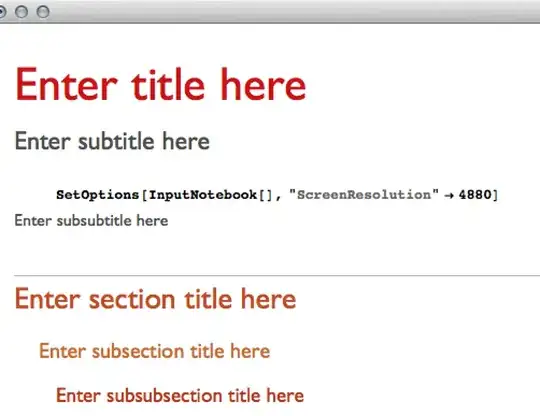
enter image description here

Here another screenshot showing a direct comparison between the browser and Mathematica

enter image description here

Szabolcs
  • 234,956
  • 30
  • 623
  • 1,263
Tom Wellington
  • 1,539
  • 1
  • 12
  • 19

8 Answers8

21

Another option is the free app Retinizer, which I used for a while with Mathematica 8. It cleaned up the text, but I found caused visual glitches with the documentation and added some instability throughout. That said, it made the text look beautiful which helped the eyes when reading a lot of code.

You can turn it on and off, and it works on other applications. Worth a try, with the pros and cons in mind.

canadian_scholar
  • 3,754
  • 1
  • 27
  • 45
  • 1
    This doesn't work. Retinizer says to uncheck the "Open in low resolution" in the app info in the finder. But the box to uncheck this is greyed out which that means the application does not have HiDPI graphics, oh well :( – M.R. Jan 28 '13 at 05:52
  • 1
    @M.R. I just re-checked it on my system and it works. You drag the application icon (not the shortcut from your dock) onto the program, and it'll retinize or de-retinize. – canadian_scholar Jan 28 '13 at 13:31
  • @M.R. No unchecking or checking that box needed... – canadian_scholar Jan 28 '13 at 13:32
  • 1
    I'm interested in what sort of problems people experienced when using Retinizer, especially serious ones. So far I saw none in v9, but v8 shows partially blank (black) dialog boxes occasionally. Also, it doesn't seem to be possible to "retinize" 9 while keeping 8 low resolution. Retinizer affects both simultaneously. – Szabolcs Jan 29 '13 at 03:07
  • 1
    @Szabolcs I've started using it again with v9, since this has jogged my memory, and no issues whatsoever after using it pretty intensively over the last few days (lots of graphics & a presentation). v8 broke my find dialogues and occasionally documentation. – canadian_scholar Jan 29 '13 at 03:28
  • 1
    @ian.milligan Thanks! I was using an older verison of retinizer, my mistake :) – M.R. Jan 29 '13 at 16:23
  • 1
    It seems it cannot be applied to v9.0.1 any more, but if it was applied to 9.0.0, the setting is still in effect. – Szabolcs Feb 07 '13 at 23:56
  • Why would anyone upgrade to 9.0.1? No amount of bug fixes can compare to the benefit of having a retinized frontend! – Tom Wellington Mar 12 '13 at 19:29
  • See Vincent Lee's answer (and its comments) below for how to make Mathematica 9.0.1 work with Retinize. – Taiki Dec 19 '13 at 15:44
21

Mathematica 10.0 and later now support retina resolutions on OS X.

Szabolcs
  • 234,956
  • 30
  • 623
  • 1,263
Arnoud Buzing
  • 9,801
  • 2
  • 49
  • 58
  • I have installed the newest prerelease version and retina display seems to be missing. – Michal Nov 07 '13 at 13:00
  • Retina displays have been introduced in June 2012, i.e. 18 months ago. Nowadays, almost all new MacBook Pro laptops come with Retina display. And yet it's still not supported by Mathematica, and not date has been given for when it will actually be supported… To give you an idea of how bad that is: Microsoft updated its entire Office suite more than a year ago. (Yeah: Microsoft.) – F'x Nov 18 '13 at 13:23
  • It would be great to hear whether Wolfram has any real plans to address this issue. There are good alternatives to Mathematica that have many advantages over it, and things like this make them look more and more attractive. – orome Nov 25 '13 at 03:03
14

Here's how to do it for more recent versions of Mathematica (specifically, 9.0.1):

  1. Get Retinizer, mentioned in other posts
  2. Show Package Contents of Mathematica, navigate to ../Mathematica/Contents/ and open Info.plist for editing.
  3. Delete the lines for NSHighResolutionCapable:True.
  4. Save the plist.
  5. Open Retinizer and drop Mathematica onto it as instructed. It should succeed instead of throwing an error.
Vincent Lee
  • 141
  • 2
  • I noticed just a few days ago that they had set NSHighResolutionCapable to True in 9.0.1... I hope that means 9.0.4 will have native retina support (my app worked fine because I had retinized version 8 and that carried over to 9.0.1 too) – rm -rf Mar 12 '13 at 16:43
  • 1
    I use 9.0.1 and for me NSHighResolutionCapable is set to false. But still, after I deleted these lines in Info.plist, Retinizer worked. Thanks! – Guy Gur-Ari Jul 25 '13 at 12:46
  • In my friend's Mathematica 9.0.1 Info.plist, <key>NSHighResolutionCapable</key> is without :True. Adding :True (instead of deleting the whole line as suggested) makes her Mathematica Retinize-able. – Taiki Dec 19 '13 at 15:41
  • @Taiki: It damages the .app and sends to trash? What am I missing. I added the this ":True" right after Capable – Ali Gajani Jan 20 '14 at 12:06
  • @Ali: I'm sorry I don't quite understand what you mean. Could you please explain again your situation? – Taiki Jan 20 '14 at 17:11
  • "Show Package Contents" means "Use Finder to navigate to the /Applications folder, find the icon for 'Mathematica.app," right click (two-finger tap or control-click) and you should see "Show Package Contents" in the resulting menu. – Reb.Cabin May 02 '14 at 04:40
11

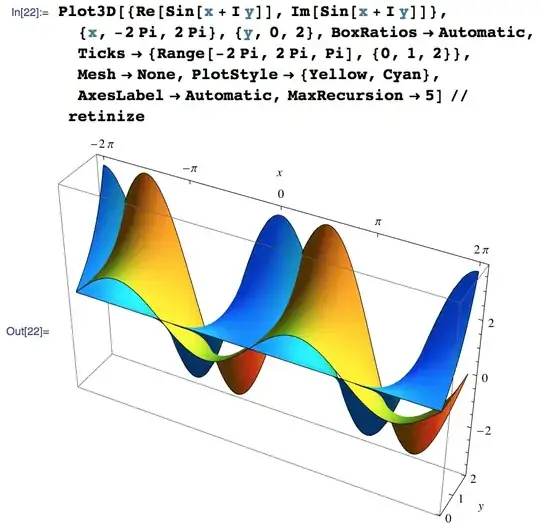
This answer is complementary to Ian's. Retinizer appears to work very well with Mathematica 9. It increases even the resolution of Graphics, but not Graphics3D.

To get a prettier view of a Graphics3D, one can use the following function:

retinize[g_, n_: 2] := 
   Image[Rasterize[g, "Image", ImageResolution -> n 72], Magnification -> 1/n]

Here's an example from the docs, processed like this:
Szabolcs
  • 234,956
  • 30
  • 623
  • 1,263
5

The situation as far as I can guess (that's the operative word) is this: In order to supports Retina's high dpi, one has to compile the application using the Cocoa framework which has for long been the default application framework on Mac OS X anyway. Unfortunately, I don't think Mathematica does that. It uses the legacy Carbon framework. So in order to support Retina, they will probably have to rewrite a whole lot of front-end code.

By the way, this isn't just a display issue. The resolution of screen shots from Mathematica is also wrong. So if I paste a screen shot into Preview (a high-dpi application) and save it there, the result looks especially blurry when you embed it in a web page (or upload to StackExchange, for that matter). So I now try to avoid taking screen shots and instead use Export to PNG inside Mathematica. I also have a script that repairs the resolution for pasting into my Xemacs editor that I use to write web pages, but that's probably too specialized for this answer.

Jens
  • 97,245
  • 7
  • 213
  • 499
  • A small correction:
    They only use Qt on Linux since version 6, not on Win/Mac. But that doesn't make your point invalid.
    – Szabolcs Jan 25 '13 at 20:57
  • @Szabolcs Oh, I'm living in the past again... I won't mention Qt then (it's been on my mind because other Qt applications are having the same upgrading problems). – Jens Jan 25 '13 at 21:10
4

You can use one of the resolution setting utilities like switchResX to change the mode to 2880x1800. Then set the magnification in Mathematica to 200%. It works, but the menu bar is very small. Probably more trouble than it is worth.

Brett Champion
  • 20,779
  • 2
  • 64
  • 121
wundram
  • 41
  • 1
2

Retinizer works, but beware that complex 2d graphics cause the rotating beachball to appear, and Mathematica might hang for quite some time.

hippo3773
  • 1,246
  • 6
  • 10
1

Retinizer is the only option to solve this, as in programming_historian answer. I just wanted to add that for version 9.0.1.0 of Mathematica the only way to "retinize" is to use Retinizer's "global mode": launch Retinizer and pres Alt-Cmd-G. Retinizing by dropping Mathematica icon on Retinizer doesn't work for 9.0.1.0.