When my daughter asked me help with her spelling homework, for me the obvious thing to do was to write a Mathematica program for it.
The words:
words = {"lightning", "thunder", "cloudy"};
The code:
Grid[
 Module[{x = 0, t = 0},
    {
     #,
     Button["Start", t = Hold@AbsoluteTime[] - AbsoluteTime[]],
     Button[Style["\[Checkmark]", Darker@Green], t = ReleaseHold[t]; x++],
     Button[Style[    "\[Times]",        Red  ], t = ReleaseHold[t]; x--],
     Dynamic[x],
     Dynamic[Clock[]; ReleaseHold[t]]
     }
    ] & /@ words]
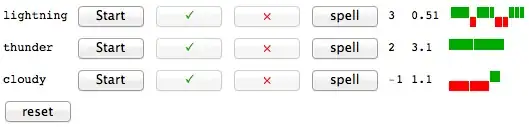
Which produces this output:

So when I ask her a word, I click "start". Then I click ✔ or × if her answer is right or wrong respectively. I plan to keep track of time to answer, so the timer now shows how much time it took to answer.
So my question is: Why do I have to use Module instead of DynamicModule? For some reason the Grid command does not work if I use DynamicModule. On the other hand, if I use Module (as it is shown), then the syntax highlighter shows my "t" and "x" variables in red as if I am doing something wrong:

Update: I have just realized that using Module instead of DynamicModule is not a viable option as the scores are lost when you reopen the notebook.
Update 2: For the record, this is the finished program incorporating the advice from Mr.Wizard and kguler
DynamicModule[{x, t, status, h},
 x[_] = 0;
 t[_] = 0;
 status[_] = False;
 h[_] = {};
 Column[{Grid[
    MapIndexed[{
       #,
       Button["Start",
              Speak@#; status[#2] = True;
              t[#2] = Hold@AbsoluteTime[] -AbsoluteTime[],
              Enabled -> Dynamic[! status[#2]]],
       Button[Style["\[Checkmark]", Darker@Green],
              t[#2] = ReleaseHold[t[#2]]; x[#2]++; AppendTo[h[#2], t[#2]];
              status[#2] = False,
              Enabled -> Dynamic[status[#2]]],
       Button[Style["\[Times]", Red],
              t[#2] = ReleaseHold[t[#2]]; x[#2]--; AppendTo[h[#2], -t[#2]];
              status[#2] = False,
              Enabled -> Dynamic[status[#2]]],
       Button["spell", Speak@StringJoin[Riffle[Characters[#], ","]]],
       Dynamic[x[#2]],
       Dynamic[Clock[]; ReleaseHold[NumberForm[t[#2], 2]]],
       Dynamic@
        If[Length@h[#2] > 0,
         Module[{z = Transpose[{Abs[#], Sign[#]} & /@ h[#2]]},
          Graphics[
           (Rectangle @@@
            (Partition[{Accumulate[First@z],Last@z}\[Transpose],2,1,{2,2},{{0, 0}}] /.
             {{x1_, y1_Integer}, {x2_, y2_Integer}} -> {{x1 + 0.2, 0}, {x2, y2}})) /.
             {Rectangle[{x1_,0}, {x2_, 1}] -> {Darker@Green, Rectangle[{x1, 0}, {x2, 1}]},
              Rectangle[{x1_,0}, {x2_,-1}] -> {Red, Rectangle[{x1,0}, {x2, -1}]}},
           ImageSize -> {Automatic, 20},
           PlotRange -> {-1, 1}]],
         ""
        ]
    } &, words],
    Alignment -> Left],
    Row[{Button[
      "reset", (x[{#}] = 0; t[{#}] = 0; h[{#}] = {}) & /@
       Range@Length@words], Spacer[10]}]}]]


Beepis perhaps going too far, but ...SpeakandCharactersmight come handy in this task:Speak["potatoes"]andStringJoin[Riffle[Characters["potatoes"], " "]]. – kglr Feb 16 '12 at 18:36RuleDelayed. For exampleRectangle[{x1_,0}, {x2_,-1}] -> {Red, Rectangle[{x1,0}, {x2, -1}]should be writtenRectangle[{x1_,0}, {x2_,-1}] :> {Red, Rectangle[{x1,0}, {x2, -1}]to protectx1andx2. – Mr.Wizard Feb 14 '13 at 19:52