Let's try to explain this: The Dynamic never goes away and just because you don't see it on screen, doesn't mean that it isn't still there. So let's assume you have a similar function which doesn't act in such a special way as Dynamic does and let's call it freakyFunc. This function has no definition and when you use it, it is not further evaluated.
The question is now, what do you expect as result when you call
Quantity[freakyFunc[1], freakyFunc["feet"]]
(* Quantity[freakyFunc[1], freakyFunc["feet"]] *)
or when you call something like
Plot[freakyFunc[a] x, {x, 0, 1}]

Right, it just won't work because you cannot calculate or plot something, when you have this freakyFunc wrapped around an expression in the wrong place.
But let's assume that freakyFunc will evaluate everything that you give as argument, which is the usual behavior anyway:
a = 1;
freakyFunc[a]
(* freakyFunc[1] *)
Nothing spectacular so far. Now, we will give freakyFunc a very important meaning: It will only display its arguments when you call it, but it will stay there, invisible but alive. Furthermore, when you call something like freakyFunc[a], then it will display the value of a and track all chances of a from now on.
If you have followed me so far, it should become obvious that freakyFunc inside your Quantity won't work. Instead, you want the whole Quantity expression tracked and dynamically updated. So let's try this with Dynamic, because if you understood freakyFunc, then you understood how Dynamic works in general:
Slider[Dynamic[b]]
SetterBar[
 Dynamic[lengthUnit], {"feet", "inches", "centimeters", "meters"}]
Dynamic[Quantity[b, lengthUnit]]
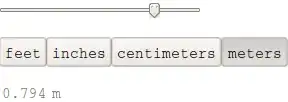
And of course you see now, that you have to dynamically update the whole Plot instead of the function only
Slider[Dynamic[a], {1, 5}]
Dynamic[Plot[a x, {x, 0, 1}, PlotRange -> {Automatic, {0, 1}}]]
There are limits and exceptions to my explanation, but it should help you to get on the right track. Btw, one of those exceptions is that options of functions can have (often, always, rarely, I don't know) dynamic content on their right side. Therefore, this works
Slider[Dynamic[a], {1, 5}]
Plot[x, {x, 0, 1}, PlotLabel -> Dynamic[a]]


