You want ElementwiseLayer. For example, here's how to define a leaky ReLU activation layer:
leakyRelu[α_] := ElementwiseLayer[
  If[# > 0, #, α #] &
  ]
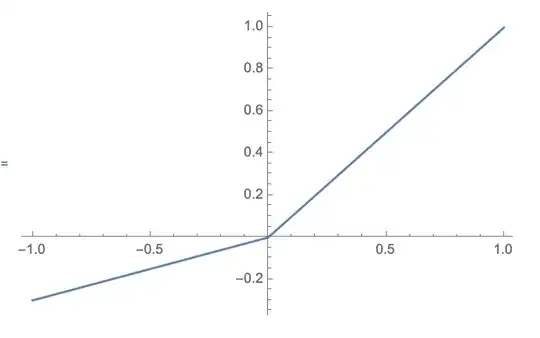
We can see that this works:
Plot[leakyRelu[.3][x], {x, -1, 1}]
You might use it like so in your network:
net = NetChain[{10, leakyRelu[.3], 10, leakyRelu[.3], 10, leakyRelu[.3], 10, leakyRelu[.1], 1}, "Input" -> "Scalar", "Output" -> "Scalar"]]
You can add a reasonable amount of logic within the ElementwiseLayer, though there are a lot of symbols that won't work (for instance, you can't use ImageIdentify within your activation layer, but you can use Ramp, LogisticSigmoid, Tanh, ArcTan, ArcTanh, Sin, Sinh, ArcSin, ArcSinh, Cos, Cosh, ArcCos, ArcCosh, Log, Exp, Sqrt, Abs, Gamma, LogGamma...
An incomplete list is in the documentation for ElementwiseLayer.
Regarding your comment with more information: Assuming you want to have a b and c configurable, you can do:
yourActivation[a_, b_, c_] := ElementwiseLayer[
  a #^2 + b # + c &
  ]
and then you can use it in a NetChain like so:
net = NetChain[{10, yourActivation[.3, .4, .1], 10, 1},
  "Input" -> "Scalar", "Output" -> "Scalar"]


ElementwiseLayer. In v12, it also supports common activation functions like SELU etc. – Niki Estner May 01 '19 at 05:13