3

I have this question: Suppose I have some two dimsensional graphic element, say "flower" (i.e. a picture of a flower) in a Mathematica notebook. I want to insert this figure, say at a specific point such as (1,1,2) in a 3-dimensional plot such as given by

Plot3D[x^2+y^2,{x,-2,2},{y,-2,2}]

I tried Epilog command with inset within the above Plot3D command, but was not succesful. For example, I tried:

Plot3D[x^2+y^2,{x,-2,2},{y,-2,2},Epilog->{  Inset[flower,{1,1,2}]  } ].  

The problem is possibly that Inset command only allows 2D coordinates.

Can someone please help me to achieve this task?
Thank you for any help in advance

Best Regards, Tim

kglr
  • 394,356
  • 18
  • 477
  • 896
user6009
  • 151
  • 5

1 Answers1

5

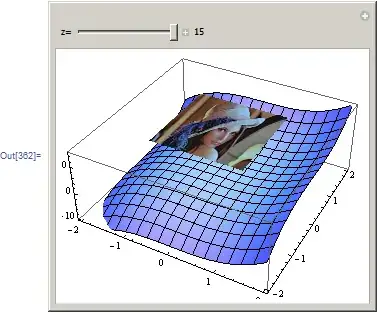
Just to make sure I understand what you want first. Do you want like this:

enter image description here

With the help of this post here is an example of the above. This allows you to change the z coordinate of the 2D image into the 3D image. You can do the same for the other coordinates if needed.

Manipulate[
 Module[{p2g},
  p2g = Graphics3D[
    {
     EdgeForm[],
     Texture[p2],
     Polygon[{{-1, -1, z}, {1, -1, z}, {1, 1, z}, {-1, 1, z}},
      VertexTextureCoordinates -> {{0, 0}, {1, 0}, {1, 1}, {0, 1}}
      ]
     },

    Lighting -> "Neutral",
    BoxRatios -> {1, 1, .1},
    Axes -> True
    ];
  Show[p1, p2g, PlotRange -> {{-2, 2}, {-2, 2}, {-10, 15}}]
  ],

 {{z, 15, "z="}, -3, 15, .1, ImageSize -> Small, 
  Appearance -> "Labeled"},

 SynchronousUpdating -> True,
 ControlPlacement -> Top,
 Alignment -> Center,
 ImageMargins -> 0,
 FrameMargins -> 1,

 Initialization :> {
   p1 = Plot3D[x^3 + y^3, {x, -2, 2}, {y, -2, 2}, 
     PerformanceGoal -> "Quality", ImagePadding -> 5, 
     ImageSize -> 300];
   p2 = Import["ExampleData/lena.tif"];
   }
 ]

Mathematica graphics

Nasser
  • 143,286
  • 11
  • 154
  • 359