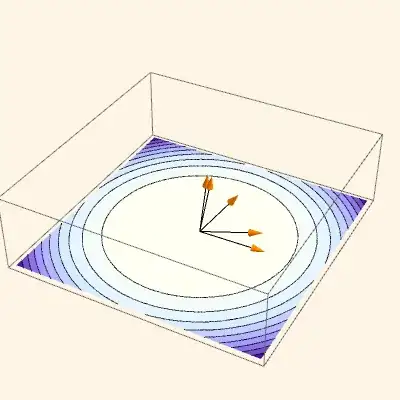
I don't know what your ultimate objective is here and what the arrows are to represent. Since no one has given a specific answer yet I'm going to do it using the Presentations Application, which I sell. First I'm going to change your arrow data so there are more or less evenly spaced angles between the arrows and the xy-plane. I decided to draw the arrows directly in 3D. (Maybe they should also be randomly rotated around the z axis?)
polarPoints = Table[{1/2, RandomReal[{0, \[Pi]/2}]}, {5}];
cartesianPoints =
  CoordinateTransform["Polar" -> "Cartesian",
    polarPoints] /. {x_, z_} -> {x, 0, z};
Then here is a plot with the contour drawing in the z = 0 plane and the arrows at the origin. RaiseTo3D[0&] raises the 2D ContourDraw graphics to the zero plane. Then we draw the arrows directly in 3D. NeutralLighting is similar to Lighting -> Neutral but with much more control. We want neutral lighting to preserve the colors of the contour plot.
<< Presentations`

Draw3DItems[
 {ContourDraw[
    Cos[x^2 + y^2], {x, -Sqrt[Pi]/2, Sqrt[Pi]/2}, {y, -Sqrt[Pi]/2,
     Sqrt[Pi]/2}] // RaiseTo3D[0 &],
  Orange, ,
  Arrowheads[0.05],
  Arrow[Tube[{{0, 0, 0}, #}]] & /@ cartesianPoints},
 NiceRotation,
 NeutralLighting[0, 0.3, 0.5],
 PlotRange -> {-0.01, 0.55},
 BoxRatios -> Automatic,
 ImageSize -> 400]
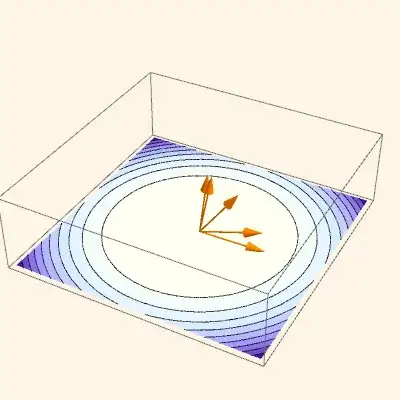
Presentations also has a legacy Arrow3D function, which predated the Mathematica function, and has a few different features. For example it is easier to separately control the directives for the shaft and arrowheads.
Draw3DItems[
 {ContourDraw[
    Cos[x^2 + y^2], {x, -Sqrt[Pi]/2, Sqrt[Pi]/2}, {y, -Sqrt[Pi]/2,
     Sqrt[Pi]/2}] // RaiseTo3D[0 &],
  Arrow3D[{0, 0, 0}, #, {0.1, 0.5, 20, "Absolute",
      PlotStyle -> {Orange}}, {AbsoluteThickness[1], Black}] & /@
   cartesianPoints},
 NiceRotation,
 NeutralLighting[0, 0.3, 0.5],
 PlotRange -> {-0.01, 0.55},
 Axes -> False,
 BoxRatios -> Automatic,
 ImageSize -> 400]