Sorry, I didn't mentioned clearly in my earlier post.
I want to build a transparent Rectangle, within which I want to diffuse a certain color of my choice which is also transparent. After this, any objects that I place inside the transparent building should be visible in its assigned color. One of the things that I tried to do after making a rectangle shape with light colored walls was to place Points with ImageSize-> {20, 20} and different colors. For that purpose I wrote the following code.
w = 100;
l = 200;
h = 30;
f = Graphics3D[{Transparent,Polygon[{{0, 0, 0}, {w, 0, 0}, {w, 0, h}, {0, 0, h}}]},
      Lighting -> {LightBlue}, Boxed -> False];
b = Graphics3D[{Transparent,Polygon[{{0, l, 0}, {w, l, 0}, {w, l, h}, {0, l, h}}]},
      Lighting -> {LightBlue}, Boxed -> False];
s1 = Graphics3D[{Transparent,Polygon[{{0, 0, 0}, {0, 0, h}, {0, l, h}, {0, l, 0}}]},
       Lighting -> {LightBlue}, Boxed -> False];
s2 = Graphics3D[{Transparent,Polygon[{{w, 0, 0}, {w, 0, h}, {w, l, h}, {w, l, 0}}]},
       Lighting -> {LightBlue}, Boxed -> False];
sur = Graphics3D[{Transparent,Polygon[{{0, 0, 0}, {w, 0, 0}, {w, l, 0}, {0, l, 0}}]},
         Lighting -> {LightBlue}, Boxed -> False];
top = Graphics3D[{Transparent,Polygon[{{0, 0, h}, {w, 0, h}, {w, l, h}, {0, l, h}}]},
        Lighting -> {LightBlue}, Boxed -> False];
Show[{f, b, s1, s2, sur, top}]
I tried to set Lighting options for the 3D objects. However that does not seem to work. Can anyone help me?
One another option that I was thinking of was to have something similar to a heat map.


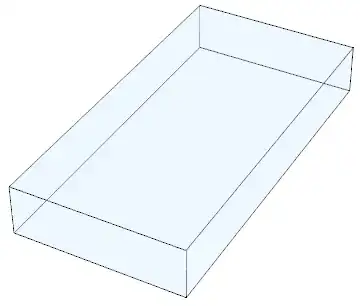


Rectanglewas fine... – subbu Feb 25 '13 at 14:03