14

In my calculus 3 course, we're studying gradients and have a project that takes a combination of 3D Gaussian radial surfaces and a basic parametric path $r(t) = \{x(t),y(t)\}$ to see how the gradient changes and so forth with respect to the coordinates of $r(t)$ on the path. I need to figure out a way to plot the surface and path together. I've got both of them figured out, just can't combine them. Any ideas?

So here's what I have so far: 6 Gaussian radials $\lambda e^{-(\epsilon r)^2}$ where $r=||x-x_i||.$ All six are added up to form a "mountain range". A group of hikers are hiking the path

$$r(t)=(2.5 + 1.8 \sin(4t),2 - 1.2 \cos(4 t))$$

which is just a simple ellipse.

I'm trying to figure out a way to "lay" the path on the surface.

rm -rf
  • 88,781
  • 21
  • 293
  • 472
kellrandy
  • 141
  • 1
  • 4

4 Answers4

24

Some programming principles help us make short work of this. The key principle is to encapsulate what's going on.

First, the surface. It depends on some parameters, so let's be explicit about that, rather than letting those parameters run around loose as "global" variables. To illustrate, I begin by generating some (reproducible) random values for these parameters:

n = 6;
SeedRandom[17];
λ = RandomReal[GammaDistribution[4, 1/5], n];
ϵ = RandomReal[GammaDistribution[3, 1/4], n];
x0 = RandomVariate[BinormalDistribution[{2.5, 2}, {2, 1}, 1/2], n];

I am going to change the meaning of the $\epsilon$ a little, though: it is more natural that they be proportional to the widths of the "hills," so they will appear in the denominator below. Here is the "Gaussian radial" function:

f[x_, {λ_, ϵ_, x0_}] := Sum[λ[[i]] Exp[-(Norm[x - x0[[i]]]/ϵ[[i]])^2], {i, 1, Length[λ]}];

Its first argument is an $(x,y)$ coordinate pair and its second is a list of the parameters. It computes the topographic elevation at $(x,y)$ by summing the values of the Gaussians at $(x,y)$. We can make a pretty pseudo-3D plot of the topography (and store it in a variable for later display):

dem = Plot3D[
  f[{x, y}, {λ, ϵ, x0}], {x, -1, 5}, {y, -1, 5}, PlotRange -> {Full, Full, Full},
    PlotStyle -> Opacity[0.9], MeshFunctions -> {#3 &}, MeshStyle -> GrayLevel[0.7]]

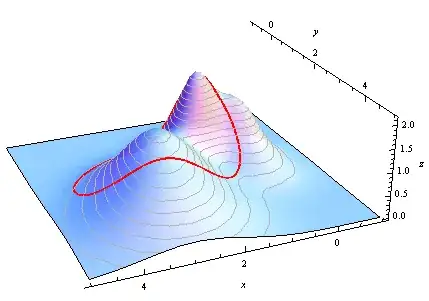
Second, the key Calculus idea is that the hikers' path is parameterized by their base curve $t\to \gamma(t) = (x(t), y(t))$; it merely needs to be "lifted" to the proper height given by $f(\gamma(t), \ldots)$. (The dots represent values of the parameters controlling the shape of $f$.) The fully parameterized hike therefore is

$$t \to (x(t), y(t), f((x(t), y(t)), \ldots)).$$

Because we have encapsulated the key functionality, this is easy and straightforward to code:

γ[t_] := {5/2, 2} + {9 Sin[4 t], -6 Cos[4 t]}/5;
path[t_, {λ_, ϵ_, x0_}] := With[{x = γ[t]}, Append[x, f[x,  {λ, ϵ, x0}]]];

(For a general-purpose solution you might want to make γ and f arguments of path, too, in keeping with the idea that everything a function like path depends on should be explicitly exhibited, within reason.)

ParametricPlot3D takes care of the graphical display:

hike = ParametricPlot3D[path[t, {λ, ϵ, x0}], {t, 0, π/2}, PlotStyle -> Directive[Thick, Red]];

Finally, use Show to assemble the plots of the surface and the path and control the final appearance:

Show[dem, hike, Boxed -> False, BoxRatios -> Automatic, AxesLabel -> {x, y, z}]
Plot

Edit

If you wish to study the hike in more detail, you may introduce a second parameter to path to fill it in vertically: let it multiply the $z$ value and range from $0$ to $1$. I will leave the implementation as an exercise and just show the result:

Filled hike

This also shows how the technique is capable of accurately drawing a hike which is not a closed loop.

whuber
  • 20,544
  • 2
  • 59
  • 111
  • @rm-rf Thank you for the edits. Is there a simple or convenient way to render MMA's Greek letters without having to make such edits? Am I overlooking some cut-and-paste technique? – whuber Mar 03 '13 at 23:14
  • 1
    Not that I know of... This post shows some external program based circumventions, but they are very clumsy. I paste the whole post in vim, source my replacement script that converts \[foo] to the appropriate Greek letter (and a few other math symbols) and copy the whole post back to the clipboard and paste it here. I used to do such edits quite a lot on this site, so I have it all bound to a single keystroke :) I've been planning on writing a simple JS script to do this from within the SE editor... I'll try to do that soon (or bribe someone). – rm -rf Mar 03 '13 at 23:46
  • 1
    @rm-rf A script or macro is a good idea. It would be ideal to do it directly within MMA, though! – whuber Mar 04 '13 at 15:35
  • Wow, just got home and saw this, thank you all for your help. It's greatly appreciated. I'll edit my original post with the final code. Thanks again. – kellrandy Mar 05 '13 at 00:51
  • 1
    This is nice! For a touch of realism on the "hills", one can add the option ColorFunction -> "AlpineColors". in the plot for dem. – J. M.'s missing motivation Apr 21 '13 at 12:47
  • I just came across our comment exchange above and wanted to alert you to this userscript that we have been using for quite a while now. It works very well and you can easily convert mma's Greek letters to unicode with a click of a button (it has some other features too). You might find it useful for here and your mma-based answers on [stats.se]. On an unrelated note, I do hope you find the time to participate here like you used to. I learn a lot from your answers (and your approach to problem solving) and have been missing it for a while :) – rm -rf Feb 06 '14 at 19:53
  • 1
    @rm-rf Thank you for the tip and the kind words. I am over-extended moderating two other SE sites. Although both have elected two more moderators in the interim, the work is still too much. I hope to return here at some point. – whuber Feb 06 '14 at 21:14
13
f[{a_, b_, r0 : {x0_, y0_}}, r : {x_, y_}] := a Exp[-(b Norm[r - r0])^2];
a = Range@6;
b = (1/Reverse@Range@6)^2;
r0 = Array[{#, #} &, 6];

u[{x_, y_}] := Total[f[#, {x, y}] & /@ Transpose@{a, b, r0}]
p[t_] := {2.5 + 1.8 Sin@(4 t), 2 - 1.2 Cos[4 t]}
Show[Plot3D[u[{x, y}], {x, -10, 15}, {y, -10, 15}, Mesh -> False], 
     ParametricPlot3D[Flatten[{p[t], u[p[t]]}], {t, 0, 2 Pi}]]

Mathematica graphics

Edit

Another possible plot:

Mathematica graphics

Show[
 Plot3D[u[{x, y}], {x, -10, 15}, {y, -10, 15}, 
  PlotStyle ->Directive[Orange,Opacity[.95],Specularity[White, 10]],MeshFunctions -> {#3 &}],
 ParametricPlot3D[Flatten[{p[t], z}], {t, 0, 2 Pi}, {z, 0, 20}, Mesh -> None, 
                  PlotStyle -> Directive[Blue, Opacity[.2]]], 
 ParametricPlot3D[Flatten[{p[t], u[p[t]]}], {t, 0, 2 Pi}, PlotStyle-> Directive[Thick, Red]],
 ParametricPlot3D[Flatten[{p[t], 19.8}], {t, 0, 2 Pi}, PlotStyle -> Directive[Thick, Red]]]
Dr. belisarius
  • 115,881
  • 13
  • 203
  • 453
  • 2
    +1 This does it in a nutshell. One possible improvement would be not to double-compute p[t] in ParametricPlot3D, anticipating applications where this could be an expensive function. That's not an issue for this example, of course. I wonder, though, whether a little more explanation of how this solution was developed--and a less condensed presentation of the code--might not be more appropriate for this question given the stated background and needs of the O.P. :-). – whuber Mar 03 '13 at 22:50
  • @whuber Thanks. Good observations. I usually write Mma trivial code like this one much faster than a few English lines. So, my explanations have been, and almost always will be, terse. Language barrier, they call it. – Dr. belisarius Mar 04 '13 at 05:10
  • 1
    No barrier with the MMA language, though :-). – whuber Mar 04 '13 at 15:26
10

Silvia beat me to using MeshFunctions, but here's another way to use it. Similarly it works for this path, but not arbitrary paths, like some of the others.

f = Sum[i j E^(-4 ((x - i)^2 + (y - j)^2)), {i, 1, 4}, {j, 1, 3}];
Plot3D[f, {x, 0, 5}, {y, 0, 4}, Mesh -> {{0}}, 
 MeshFunctions -> 
  Function[{x, y, z}, 
   Evaluate[Subtract @@ 
     Quiet@Eliminate[{x == 2.5 + 1.8 Sin[4 t], y == 2 - 1.2 Cos[4 t]}, t]]],
 MeshStyle -> Thick]

Path on graph

Michael E2
  • 235,386
  • 17
  • 334
  • 747
9

Using belisarius's u[{x, y}], the surface can be re-parameterized according to the path:

p[r_, t_] := {2.5 + 1.8 r Sin[4 t], 2 - 1.2 r Cos[4 t]}

ParametricPlot3D[
 Evaluate@Flatten[{p[r, t], u[p[r, t]]}],
 {t, 0, Pi/2}, {r, 0, 6},
 MeshFunctions -> Function[{x, y, z, t, r}, r],
 Mesh -> {{1}} ]

enter image description here

Silvia
  • 27,556
  • 3
  • 84
  • 164
  • 1
    This is very clever. Because it is offered without much explanation, it may be worth pointing out that the technique is specific to this particular problem. It will not work for general paths (such as those that are self-intersecting or do not form loops), because these cannot be extended to 2D coordinate systems. It is necessary that the image of the path be a submanifold of $\mathbb{R}^2$, in which case one can use a coordinate system for a tubular neighborhood. – whuber Mar 04 '13 at 15:30
  • 1
    @whuber Thanks, and yes you're right. But I'm not that familiar with differential geometry language and was afraid of writing something wrong, so I just threw a quick solution which I guess may fit for the calculus 3 course level. Thank you for your explanation :) – Silvia Mar 05 '13 at 13:57