21

Here is a downsampled input image I converted to greyscale.

enter image description here

To select the rectangular region of interest we first preform preprocessing:

binarizedImage = 
 Dilation[Erosion[
   Dilation[Binarize[FillingTransform@ColorNegate@resizedGreyImage], 
    3], 4], 3]

And then find the relevant components and corners

regions = 
 SelectComponents[
  DeleteSmallComponents[binarizedImage, 
   Method -> "Mean"], {"Rectangularity"}, 1]

corners = 
 ImageCorners[regions, 4, 0, 10, MaxFeatures -> 4, 
  "MaxRefinement" -> 0]

Here is the result:

Show[input, 
 Graphics[{Opacity[0.5], PointSize[.05], Yellow, 
   Polygon[corners[[ConvexHull[corners]]]], Thickness[0.4], Blue, 
   Point /@ corners, White, Text[ToString@#, #] & /@ corners, Green, 
   Point /@ centers, EdgeForm[{Red, Thick}], FaceForm[Opacity[0]], 
   Rectangle @@ # & /@ boundingBoxes}], ImageSize -> 600]

enter image description here

I'd like this to be more robust. I'm not sure that "Rectangularity" is the best measure, for instance, in this picture, selecting the component with highest "Rectangularity" doesn't always work:

![enter code here][3]

DeleteSmallComponents[
     ImageForestingComponents[ImageResize[input, 300]]]

% // Colorize
regions = SelectComponents[%%, {"Rectangularity"}, 1] // Colorize

enter image description here

Also, I'm coding this in opencv, I'm only using mathematica to prototype so if you know the underlying methods used that would be very helpful.

Here are some test images:

enter image description here enter image description here enter image description here enter image description here enter image description here enter image description here enter image description here

Szabolcs
  • 234,956
  • 30
  • 623
  • 1,263
M.R.
  • 31,425
  • 8
  • 90
  • 281
  • I wonder how do you distinguish your "rectangular" ROI from other "rectangular" items in your picture – Dr. belisarius Mar 11 '13 at 16:04
  • Probably center screen, greater area, better edge contrast. – M.R. Mar 11 '13 at 16:43
  • What's making it hard to answer this question is that we don't have a good idea of the scope of the kinds of rectangles that you really want to identify. If it really is just this one, then you can do so by clicking on four points! Do you have a collection of images where we can see the target rectangle(s). – bill s Mar 20 '13 at 17:39
  • Yes, I'll add them. – M.R. Mar 20 '13 at 17:49
  • Also, I don't think downsampling and color conversion as a first step is a good idea. You may be losing useful info. – Dr. belisarius Mar 20 '13 at 17:54
  • Maybe not, speed is important and we can save a copy of the original to compare against. – M.R. Mar 20 '13 at 17:56
  • You should look at nikie's answers here and here for some ideas... – rm -rf Mar 20 '13 at 18:07
  • I've seen that, but her method fails in the second step on all on my images, the heuristic of taking the largest filled binary region is waaaaay too simplistic to work somewhat generally. – M.R. Mar 20 '13 at 18:18
  • 1
    (a) you're not planning to code this in Mathematica eventually, and (b) "Rectangularity" seems poorly defined. Kind of hard to find a good starting point. – Jens Mar 20 '13 at 20:08
  • Finding four straight (-ish) lines with angles that add to approximately 360 degrees might be fruitful.... – geordie Mar 20 '13 at 23:14
  • 3
    @geordie But how to tell apart a rectangle with parallax from a planar parallelogram? Or how to distinguish a rectangle in a 3D scene with perspective vanishing points from a trapezoid in 2D? And how rounded are the corners allowed to be? I think this problem isn't a good fit for this forum. – Jens Mar 21 '13 at 03:39
  • @Jens Fair point. I was assuming that the goal was to find 'potential' rectangles not just actual rectangles. I realise this is a somewhat idiosyncratic distinction... "Ceci n'est pas une pipe" – geordie Mar 21 '13 at 11:04
  • @M.R. Do you know what SelectComponents' equivalent function is in opencv? Do you have a reference suggestion? – rm -rf Jan 17 '14 at 03:04
  • I wonder if SelectComponents convex hull properties, Opening with a BoxMatrix or DiamondMatrix, and perhaps the number of convex hull points could be of use – Sterling Feb 24 '21 at 21:38

2 Answers2

13

It's more a region-of-interest detection than a rectangle identification algorithm and still half-baked, but anyway: (using Mma 8.0 on WinXP)

l = {"https://i.stack.imgur.com/t95sV.jpg", "https://i.stack.imgur.com/MVP47.jpg", 
     "https://i.stack.imgur.com/QpiLb.jpg", "https://i.stack.imgur.com/pHHZ4.jpg", 
     "https://i.stack.imgur.com/wlFpH.jpg", "https://i.stack.imgur.com/x7YO9.jpg", 
     "https://i.stack.imgur.com/zCHSm.jpg"};

i = ImageResize[#, 500] & /@ (Import /@ l);
i1 = ColorSeparate[#, "HSB"][[2]] & /@ i;
ie1 = EdgeDetect /@ ImageAdjust /@ (LaplacianGaussianFilter[#, 2] & /@ i1);
dc1 = DeleteSmallComponents[#, 100] & /@ ie1;
lines1 = ImageLines[#, .15, .611] & /@ dc1;
slope[{p1_, p2_}] := (p2[[2]] - p1[[2]])/(p2[[1]] - p1[[1]])
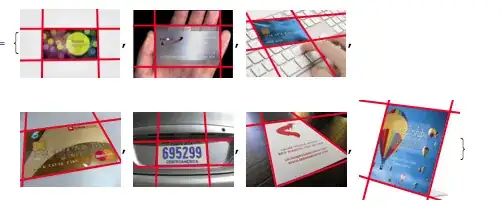
Show[#[[1]], Graphics[{Thick, Red, Line /@ #[[2]]}], 
      ImageSize -> 100] & /@ Transpose[{i, lines1}]

Mathematica graphics

The next step is to discard those lines whose slopes are not paired/grouped within a tolerance. I need only some spare time ...

Dr. belisarius
  • 115,881
  • 13
  • 203
  • 453
13

At his request, this is how I would edit @belisarius's answers (using 9.0.1):

l = {"https://i.stack.imgur.com/t95sV.jpg", 
     "https://i.stack.imgur.com/MVP47.jpg",
     "https://i.stack.imgur.com/QpiLb.jpg",
     "https://i.stack.imgur.com/pHHZ4.jpg",
     "https://i.stack.imgur.com/wlFpH.jpg",
     "https://i.stack.imgur.com/x7YO9.jpg",
     "https://i.stack.imgur.com/zCHSm.jpg"};

i = ImageResize[Import@#, 500] & /@ l;
i1 = Flatten[ColorSeparate[#, "Saturation"] & /@ i];
ie1 = EdgeDetect[#, 6, .04] & /@ i1;
dc1 = DeleteSmallComponents[#, 100] & /@ ie1;
lines1 = ImageLines[#, 0, .2, MaxFeatures -> 4] & /@ dc1;

Show[#[[1]], Graphics[{Thick, Red, Line /@ #[[2]]}], ImageSize -> 100] & /@ Transpose[{i, lines1}]

enter image description here

It still looks a bit fragile though. With grayscale images, the saturation channel is black. In these cases (ImageMeasurements[saturation, "Max"] == 0.), one just goes ahead using the actual image, not the saturation map.

Matthias Odisio
  • 1,246
  • 9
  • 11
  • Yeah, it's very fragile. I get very different results using 9.0.0 on OS X. It works on only two of the images :/ – C. E. Mar 26 '13 at 20:14
  • I meant fragile with respect to the input images, not to software bugs (Upgrade to 9.0.1 if possible). I have not tried this method on other images, and I'm pretty sure it's not the silver bullet, but it provides a good result under some circumstances. – Matthias Odisio Mar 26 '13 at 22:59