From a 3d x-ray scan, I have many similar slices to analyze.
Is there a way to determine the position of the three rectangles and the inner circle?


From a 3d x-ray scan, I have many similar slices to analyze.
Is there a way to determine the position of the three rectangles and the inner circle?

This is how I did it:
(* These can be compounded into one expression *)
img = Binarize[Import["https://i.stack.imgur.com/EY2EG.png"], 0.2];
img = DeleteSmallComponents[img, 20];
img = DeleteBorderComponents@ImageCrop@img;
m = MorphologicalComponents[img];

(* Identify circles versus rectangles using Eccentricity *)
{rectangles, circles} = GatherBy[ComponentMeasurements[m, "Eccentricity"], #[[2]] > 0.5 &][[All, All, 1]];

(* Visualize result *)
Show[
 m // Colorize,
 Graphics[{
   PointSize[Large],
   White,
   Point /@ (circles /. ComponentMeasurements[m, "Centroid"]),
   Gray,
   Point /@ (rectangles /. ComponentMeasurements[m, "Centroid"])
   }]
 ]

White spots are the center of mass of rectangles. Gray spots are the center of mass of circles. There are a few values that might need to be tweaked for some images, like the size of small components, i.e. noise. Eccentricity is a very good measurement to figure out which are circles and which are rectangles. The rectangles have > .99 and circles have a very small eccentricity (in theory zero).

One way to proceed is to binarize the image and find the constituent components:
img = Import["https://i.stack.imgur.com/EY2EG.png"];
objects = MorphologicalComponents[Binarize[img, 0.21]];
Colorize[objects]
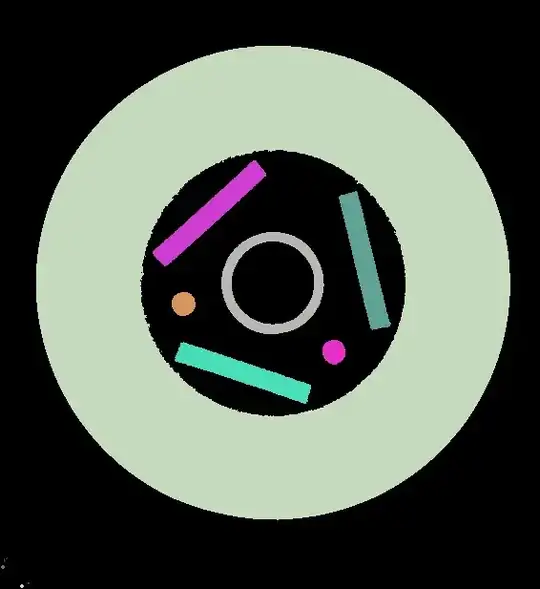
Examine the various components (that are colored differently)
ComponentMeasurements[objects, "Area"]
{1 -> 133874., 2 -> 3085.75, 3 -> 3063.75, 4 -> 3226.75, 5 -> 505.5, 6 -> 503.5,
 7 -> 3074.13, 8 -> 2.25, 9 -> 2.25, 10 -> 6., 11 -> 13., 12 -> 4.5, 13 -> 13.}
We can see that the rectangles are the three objects of nearly identical size: objects 2, 3, and 7. The bounding boxes of these rectangles are:
ComponentMeasurements[objects, "BoundingBox"][[{2, 3, 7}]]
{2 -> {{160., 338.}, {279., 449.}}, 3 -> {{355., 271.}, {410., 417.}},
 7 -> {{183., 194.}, {326., 259.}}}
To locate the circles, use the eccentricity:
ComponentMeasurements[objects, "Eccentricity"]
{1 -> 0.0694129, 2 -> 0.989404, 3 -> 0.989675, 4 -> 0.0816974, 5 -> 0.116954, 6 -> 0.33685,
 7 -> 0.989536, 8 -> 0.866025, 9 -> 0.935414, 10 -> 0.924176, 11 -> 0., 12 -> 0., 13 -> 0.}
The largest (greenish) circular object #1 and the inner (greyish) circle is object #4. The center and radius of this inner circle is:
ComponentMeasurements[objects, {"BoundingDiskCenter", "BoundingDiskRadius"}][[4]]
4 -> {{285.875, 320.543}, 53.9322}
