20

Set of 2D-points connected by a polyline B-spline function:

p = RandomReal[{-1, 1}, {20, 2}];
f = BSplineFunction[p,
   SplineDegree -> 1,
   SplineClosed -> True];

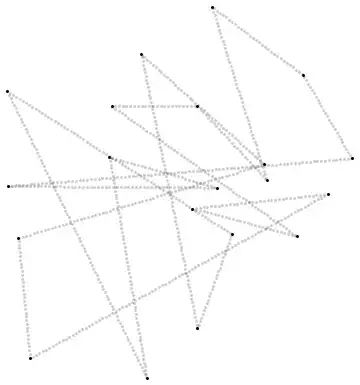
This is neatly defined polyline function. However, as the spline parameter goes from 0 to 1 with some constant step, calculated points are somewhere denser than at other regions. (I can see the density decreases with distance between points.)

Graphics[{
  Point[p], Opacity[.2],
  Point[f /@ Range[0, 1, .001]]}]

enter image description here

Me I need a function that returns equidistant points for equidistant parameter values.

Graphics[{
  Point[p], Opacity[.2],
  Point[g /@ Range[0, 1, .001]]}]

enter image description here

Where g I constructed like this:

g[t_] := Evaluate[
  With[{u = With[{
       d = EuclideanDistance @@@ Partition[p, 2, 1, 1]},
      Accumulate[d]/Total[d]]},
   Piecewise[Table[{
      p[[i]] + (t - If[i > 1, u[[i - 1]], 0])/
         (u[[i]] - If[i > 1, u[[i - 1]], 0])*
        (p[[If[i != Length@p, i + 1, 1]]] - p[[i]]),
      t <= u[[i]]}, {i, Length@p}]]]]

This can be made more elegantly, right, with Mathematica? With some option that samples equidistant points? Because say I have some smooth curve function. I don't know how I would tackle this then. I guess one would have to integrate and findroot some.

BoLe
  • 5,819
  • 15
  • 33

2 Answers2

11

You need what is sometimes called a reparametrization by arc length. Since the velocity is piecewise constant, it might done as follows:

p = RandomReal[{-1, 1}, {20, 2}];
f = BSplineFunction[p, SplineDegree -> 1, SplineClosed -> True];
arclengths = Accumulate[Norm /@ Subtract @@@ Partition[p, 2, 1, 1]];
totalarclength = Last[arclengths];
t = Interpolation[
      Transpose@{Prepend[arclengths, 0.], Range[0, 1, 1/Length[p]]},
      InterpolationOrder -> 1];

Graphics[{Point[p], Opacity[.2], 
  Point[(f[t[#]]) & /@ Range[0, totalarclength, totalarclength/1000]]}]

Plot of points

Or one could use calculus to find t as in the link in Vitaliy Kaurov's comment that I just noticed, or in this alternative way:

v[t_?NumericQ] := Norm[f'[t]];
t = NDSolveValue[{tt'[s] == 1/v[tt[s]], tt[0] == 0}, tt, {s, 0, totalarclength}];
J. M.'s missing motivation
  • 124,525
  • 11
  • 401
  • 574
Michael E2
  • 235,386
  • 17
  • 334
  • 747
9
p = RandomReal[{-1, 1}, {5, 2}]; 
f = BSplineFunction[p, SplineDegree -> 1, SplineClosed -> True];

A very simple approach:

np[u_, dt_] := u + dt/ Norm[D[f[t], t]] /. t -> u;
ListPlot[Table[f[t], {t, NestWhileList[np[#, .03] &, 0, # < 1 &]}], AspectRatio -> 1]

Mathematica graphics

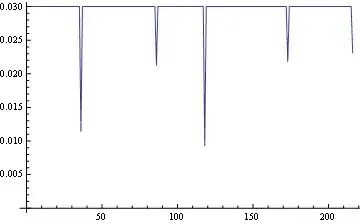
Testing that the points are equidistant:

ListLinePlot[EuclideanDistance @@@ 
          Partition[Table[f[t], {t, NestWhileList[np[#, .03] &, 0, # < 1 &]}], 2, 1],
          AxesOrigin -> {0, 0}]

Mathematica graphics

The only small exceptions are at the original points, as expected.

Edit

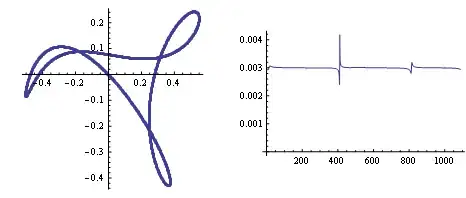
For a higher degree interpolation:

p = RandomReal[{-1, 1}, {7, 2}];
f = BSplineFunction[p, SplineDegree -> 5, SplineClosed -> True]; 
GraphicsRow@{
  ListPlot[Table[f[t], {t, NestWhileList[np[#, .003] &, 0, # < 1 &]}], AspectRatio -> 1], 
  ListLinePlot[EuclideanDistance @@@ 
               Partition[Table[f[t], {t, NestWhileList[np[#, .003] &, 0, # < 1 &]}], 2, 1], 
               AxesOrigin -> {0, 0}, PlotRange -> All]}

Mathematica graphics

Dr. belisarius
  • 115,881
  • 13
  • 203
  • 453
  • 1
    Basic-calculus approach, clean and tiny. Thank you. The jumping around the original point parameter values isn't noticeable in my animation -- and I can decrease the step size which diminishes the jumping, and then Take only every second, third or so point since there are probably too many for my purpose. – BoLe Mar 25 '13 at 12:57
  • @BoLe Yep. The idea was to keep it simple :) – Dr. belisarius Mar 25 '13 at 14:04