12

I would like to put a dot on the point of a curve that has a specific y value but I don't know the x value.

A simple example of my code is

eqns = {y''[t] + y[t] == 3 a Sin[y[t]], y[0] == y'[0] == 1};
pfun = ParametricNDSolveValue[eqns, y[1] + y[2], {t, 0, 5}, {a}];
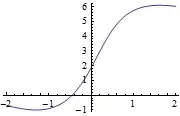
Plot[pfun[a], {a, -2, 2}]
enter image description here

So say I want to find the x at which y=3. How? Once I have the two coordinates I know how to add the dot. I guess I'm confused because the interpolating function gives you the y given the x, and I can't figure out how to do the inverse. Also any suggestions of tutorials on how to use interpolating functions would be great. Thanks!

Oscillon
  • 1,231
  • 10
  • 21
LiaChica
  • 359
  • 3
  • 12

2 Answers2

17

One way is to use FindRoot

FindRoot[pfun[x] == 3.0, {x, 0}]

Another way is InverseFunction which can be utilised like this

InverseFunction[pfun][3.0]
halirutan
  • 112,764
  • 7
  • 263
  • 474
  • 1
    Thanks for responding so quickly. I tried the InverseFunction and it gave me InverseFunction[ParametricFunction[<>]][3] – LiaChica Jun 08 '13 at 12:01
  • 2
    @Lia, ah, that means ParametricFunction[] is not invertible. Stick with hal's first proposal, then. – J. M.'s missing motivation Jun 08 '13 at 12:07
  • 1
    @LiaChica The initial x in FindRoot is sometimes crucial to find the correct solution. Always remember that FindRoot is a local method with stepsize approximations etc where all kinds of bad things can happen. E.g. FindRoot[Sin[x], {x, Pi/2}] gives -8.0*Pi here. So you should have a good understanding of your function. – halirutan Jun 08 '13 at 15:38
  • I managed to make FindRoot work once I gave it a specific domain to look in, e.g. FindRoot[pfun[x]==3.0,{x,0,5}] Many thanks! – LiaChica Jun 09 '13 at 09:37
4

If you do want to use InverseFunction you could make interpolating function via FunctionInterpolation:

f = FunctionInterpolation[pfun[a], {a, -2, 2}];

InverseFunction[f][3]

(* 0.206407 *)
BoLe
  • 5,819
  • 15
  • 33