22

How to create custom Graphics primitive?

It should have the following properties, resembling properties of built-in geometric figures, like Circle etc:

  1. Has constant head, say RoundedRectangle. It should not evaluate to the list of lines, so as normal Rectangle.

  2. Can serve as a subject for GeometricTransformation

Kuba
  • 136,707
  • 13
  • 279
  • 740
Suzan Cioc
  • 2,023
  • 1
  • 16
  • 21
  • 2
    Rectangle is a function turning some parameters into a graphics object. Such a function for rounded rectangles can be found in this post: http://mathematica.stackexchange.com/questions/1882/rectangle-with-rounded-edges – C. E. Jun 18 '13 at 08:19
  • Suzan, I don't understand what you are looking for in this question. Can you be a bit more explicit about what you are looking for? – bill s Jun 18 '13 at 10:05
  • Are you asking how to define an object that Mathematica will treat as a graphic primitive such as Disk or Circle? – m_goldberg Jun 18 '13 at 10:14
  • @m_goldberg, yes it can be said this way – Suzan Cioc Jun 18 '13 at 10:17
  • @Anon thanks! didn't knew about this parameter for rectangle; but the general question persists – Suzan Cioc Jun 18 '13 at 10:18
  • So if your geometric object (let's call it myShape) was defined so that myShape[] was a valid form (as it is for Circle, you would expect evaluating Graphics[myShape[]] to draw it, and not produce the message: "myShape is not a Graphics primitive or directive."? – m_goldberg Jun 18 '13 at 10:31
  • 1
    You might want to look into the old packages Graphics`Arrow` or Graphics`Spline` to see how they implemented primitives that were once not built-in. – J. M.'s missing motivation Jun 18 '13 at 10:49
  • @0x4A4D how to see the code? :) – Suzan Cioc Jun 18 '13 at 11:02
  • Well, look for the packages in your Mathematica installation... – J. M.'s missing motivation Jun 18 '13 at 11:16
  • 1
    It seems that you are under a common misconception. As far as the kernel is concerned, Graphics is inert, i.e. it has no DownValues. It is only in the formatting end of things that it is turned into an image. The same applies to the primitives, like Rectangle, but they are only formatted when found within a Graphics(3D) object. So, Rectangle remains a Rectangle and GeometricTransformation can be applied to it. – rcollyer Jun 18 '13 at 12:31

2 Answers2

28

Try this:

SetAttributes[createPrimitive, HoldAll]

createPrimitive[patt_, expr_] := 
 Typeset`MakeBoxes[p : patt, fmt_, Graphics] := 
  Typeset`MakeBoxes[Interpretation[expr, p], fmt, Graphics]

Example:

createPrimitive[face[x_: 0.1],
 {Circle[{0, 0}, 1], Circle[{-0.3, 0.5}, x],
  Circle[{0.3, 0.5}, x], Line[{{-0.4, -0.2}, {0.4, -0.2}}]}]

It works as expected in Graphics:

g = Graphics[face[]]

enter image description here

face has no DownValues so it remains as face in InputForm:

InputForm[g]
(*  Graphics[face[]]  *)

enter image description here

(*  Graphics[face[], ImageSize -> {63., Automatic}]  *)

It works with GeometricTransformation:

Graphics[GeometricTransformation[face[0.2], ShearingTransform[Pi/4, {1, 0}, {0, 1}]]]

enter image description here

A note about colours

A commenter asked "How would you rewrite this function to color the different components differently?" The answer is that colours can be used in the definition of the custom primitive just as in any other graphics expression, but note that the expression that goes into Typeset`MakeBoxes must be something that the Front End understands, e.g. RGBColor[1,0,0] rather than Red. If you want to use named colours like Red you will need to let the kernel evaluate the expression to convert them to RGBColor directives.

So for example you could:

Manually specify the colours as RGBColor directives:

createPrimitive[myprim[x_], {RGBColor[1, 0, 0], Circle[{0, 0}, x]}]

Use named colours and override the hold attribute with Evaluate:

createPrimitive[myprim[x_], Evaluate @ {Red, Circle[{0, 0}, x]}]

Or just remove the hold attribute completely:

ClearAttributes[createPrimitive, HoldAll];
createPrimitive[myprim[x_], {Red, Circle[{0, 0}, x]}]

In the last two cases you should guard against x already having a value, e.g. with Block or by using \[FormalX] instead of x

Simon Woods
  • 84,945
  • 8
  • 175
  • 324
  • 2
    +1. What does Typeset`MakeBoxes do exactly? (lazy to start a spelunking battle) – Rojo Dec 13 '13 at 18:56
  • 2
    @Rojo, I don't understand the details, but it's used internally by MakeBoxes to convert graphics primitives to boxes. I don't think it's possible to give definitions for creating graphics boxes directly with MakeBoxes, you have to use Typeset`MakeBoxes instead. – Simon Woods Dec 13 '13 at 19:17
  • That's nice, thanks – Rojo Dec 13 '13 at 22:19
  • I don't quite get the whole MakeBoxes yet, but it is beautiful. – nilo de roock Aug 21 '20 at 13:48
2

I don't see how to do what you are asking for without modifying the built-in definition of Graphics, something I would be extremely reluctant to do. In my own work, the closest I have come to meeting your requirements is to define functions that define shapes by returning lists consisting of graphics directives and primitives. This has worked well enough to satisfy me so far.

Here is an example.

dashedPoly[pts : {{_, _} ..}, 
           fill : (_RGBColor | _GrayLevel | _Hue) : Transparent] :=
    {fill, EdgeForm[Dashing[Small]], Polygon[pts]}

And here are two examples of the function in use.

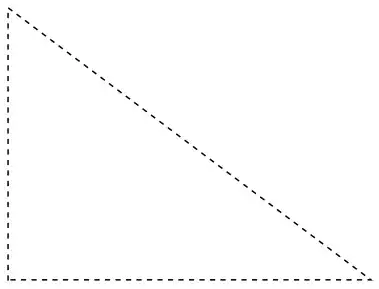
Module[{A, B, C},
  A = {0., 0.}; B = {0., 3.}; C = {4., 0.};
  Graphics[dashedPoly[{A, B, C}]]]

triangle1.png

With[{blue = ColorData["HTML", "DeepSkyBlue"]}, 
  Module[{A, B, C},
    A = {0., 0.}; B = {0., 3.}; C = {4., 0.};
    Graphics[dashedPoly[{A, B, C}, blue]]]]

triangle2.png

m_goldberg
  • 107,779
  • 16
  • 103
  • 257