The Simplest way is to use Graphics and put the points.
dat = Table[{x, Sin[x], Cos[x]}, {x, 0., 4 \[Pi], \[Pi]/10.}]; (*trial data set*)
(*column 1 and 2 is for data and 3 is for colour*)

ndata = Length[dat];
min = Min[dat[[All, 3]]];max = Max[dat[[All, 3]]];
col = (dat[[All, 3]] - min)/(max - min);
(*to scale the colour index between 0 and 1*)

Graphics[Table[{ColorData["NeonColors"][col[[i]]], PointSize -> Large,
Point[{dat[[i, 1]], dat[[i, 2]]}]}, {i, 1, ndata}], Axes -> True, AspectRatio -> .5]
Simplified Version [courtesy Anon and belisarius]
col = Rescale[dat[[All, 3]]]; pts = dat[[All, 1 ;; 2]];
Graphics[Table[{ColorData["NeonColors"][col[[i]]], PointSize -> Large,
Point[pts[[i]]]}, {i, ndata}], Axes -> True, AspectRatio -> .5]
For drawing with Line
Graphics[Table[{ColorData["NeonColors"][col[[i]]], Thick,
Line[{pts[[i]], pts[[i + 1]]}]}, {i, ndata - 1}], Axes -> True, AspectRatio -> .5]

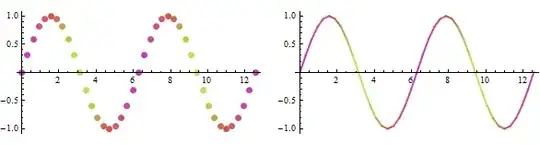
Using ColorScheme as legend
Needs["PlotLegends`"]
(*create legendbox*)
legend = Graphics[Legend[ColorData["NeonColors"][1 - #1] &, 10, " Max", " Min",
LegendShadow -> None, LegendBorder -> Automatic]];

(*put it in inset*)
lps = {11.0, .5}; (*legend position*)
Graphics[{Table[{ColorData["NeonColors"][col[[i]]], Thick,
Line[{pts[[i]], pts[[i + 1]]}]}, {i, ndata - 1}],
Inset[legend, lps, Automatic, {1, 1}]},
Axes -> True, AspectRatio -> .5, ImageSize -> 500]
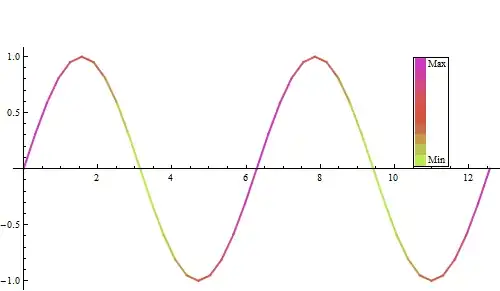


ListDensityPlot,ListPlot,Graphics/Point– Kuba Jul 03 '13 at 12:44