but I can't get the correct result…
I'd argue it's mainly caused by careless mistake… Anyway, we don't have much post solving PDE via FFT (Is this the only one?), so let me do a favor.
2 issues here:
You haven't correctly translated those uts and vts in original MATLAB code. There actually exist 2 different types of ut&vt in the code: one is for storing initial conditions, one is the independent variable of function wave1D. Since you've coded the system as an explicit list of symbolic equation in Mathematica, they need to be identified.
After the FFT via Fourier, we need to inverse it. OP simply doesn't code this part.
The following is a fix with minimal modification for the original code:
L = 80;
N0 = 256;
x = L/N0*Range[-N0/2, N0/2 - 1];
k = (2*Pi/L)*Join[Range[0, N0/2 - 1], Range[-N0/2, -1]];
u = 2*Sech[x];
ut = Fourier[u, FourierParameters -> {-1, 1}];
vt = ConstantArray[0, N0];
uvt = Join[ut, vt];
a = 1;
ufl0 = Table[uf[i][0], {i, 1, N0}];
vfl0 = Table[vf[i][0], {i, 1, N0}];
ufl = Table[uf[i][t], {i, 1, N0}];
vfl = Table[vf[i][t], {i, 1, N0}];
dufl = Table[D[uf[i][t], t], {i, 1, N0}];
dvfl = Table[D[vf[i][t], t], {i, 1, N0}];
eqs1 = Thread[Equal[dufl, vfl]];
eqs2 = Thread[Equal[dvfl, -a^2  k^2  ufl]];
int1 = Thread[Equal[ufl0, ut]];
int2 = Thread[Equal[vfl0, vt]];
rs = NDSolveValue[{eqs1, eqs2, int1, int2}, {ufl, vfl}, {t, 0, 20}];
mat = Table[rs[[1]], {t, 0, 20, 0.5}];
ListLinePlot3D[Chop@InverseFourier[#, FourierParameters -> {-1, 1}] & /@ mat,
 PlotRange -> All, DataRange -> {{-L/2, L/2}, {0, 20}}]
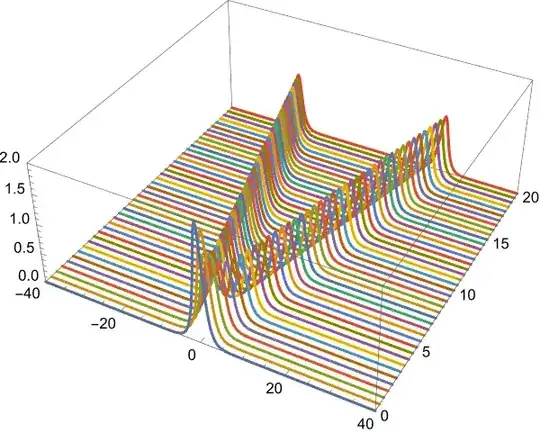
The code above can of course be simplified, but I'm too lazy to continue. Let me end this answer with a fully NDSolve-based solution for the problem as comparison:
sys = With[{u = u[t, x]},
           {D[u, t, t] == a^2  D[u, x, x],
           {u == 2 Sech[x], D[u, t] == 0} /. t -> 0,
            (u /. x -> -L/2) == (u /. x -> L/2)}]
sol = NDSolveValue[sys, u, {t, 0, 20}, {x, -L/2, L/2}]
Plot3D[sol[t, x], {t, 0, 20}, {x, -L/2, L/2}, PlotRange -> All, PlotPoints -> 100]

Update
…If you insist on solving the problem based on the same logic as that of MATLAB, then we need a solver similar to ode45 i.e. an ODE solver taking the right hand side of ODE in standard form as the input. Luckily I've already written one here. Let's use it:
L = 80;
N0 = 256;
x = (L Range[-(N0/2), N0/2 - 1])/N0;
k = (2  π )/L Join[Range[0, N0/2 - 1], Range[-(N0/2), -1]];
u = 2 Sech[x];
ut = Fourier[u];
vt = ConstantArray[0, N0];
uvt = Join[ut, vt];
a = 1;
t0 = 0;
tend = 20;
dt = 1/20;
t = Range[t0, tend, dt];
wave1D = With[{n = N0, a = a, k = k},
   Function[{t, uvt},
    Module[{ut, vt}, {ut, vt} = Partition[uvt, n]; Join[vt, -a^2  k^2  ut]]]];
(* Definition of rk4stepfunc is not included in this post,
   please find it in the link above. *)
step = (rk4stepfunc /. (Verbatim[_Real]) :> (_Complex))@wave1D;
solmat = FoldList[step[#2[[1]], #, #2[[2]]] &, uvt,
    Transpose@{Most@t, Differences@t}]; // AbsoluteTiming
ListDensityPlot[Chop[InverseFourier /@ solmat[[;; ;; 10, 1 ;; N0]]],
 DataRange -> {{-L/2, L/2}, {t0, tend}}, PlotRange -> All]

Update 2
If what you want is to convert the wave1D to Mathematica code and use it in NDSolve, define a black-box function. I'll show a somewhat advanced way for defining it just for fun:
L = 80;
N0 = 256;
x = (L Range[-N0/2, N0/2 - 1])/N0;
k = 2 π/L Join[Range[0, N0/2 - 1], Range[-N0/2, -1]];
u = 2 Sech[x];
ut = Fourier[u];
vt = ConstantArray[0, N0];
uvt = Join[ut, vt];
a = 1;
t0 = 0;
tend = 20;
wave1Dcompiled =
 With[{n = N0, a = a, k = k},
  Compile[{t, {uvt, _Complex, 1}},
   Module[{ut, vt}, {ut, vt} = Partition[uvt, n]; Join[vt, -a^2  k^2  ut]],
   RuntimeOptions -> EvaluateSymbolically -> False]]
solmat = NDSolveValue[{vec'[t] == wave1Dcompiled[t, vec[t]], vec[0] == uvt},
    vec /@ Range[0, tend, 1/2], {t, 0, tend}]; // AbsoluteTiming
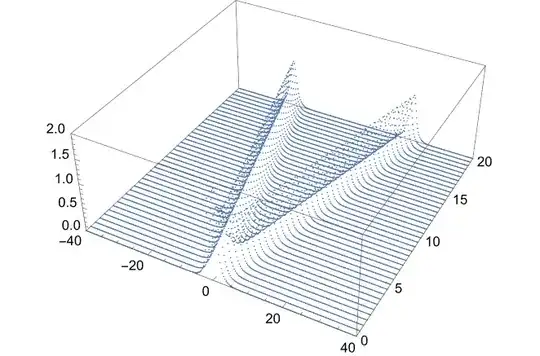
ListPointPlot3D[Chop[InverseFourier /@ solmat[[All, ;; N0]]], PlotRange -> All,
 DataRange -> {{-L/2, L/2}, {t0, tend}}]


[t,uvtsol]=ode45('wave1D',t,uvt,[],N,k,a); Error using feval Unrecognized function or variable 'wave1D'.what is wave1D your code does not run for me on Matlab. Do you have some special toolbox installed that defines this? Any way, asking folks here to translate Matlab code to Mathematica is probably not covered by the mission of this forum, as this forum is really for Mathematica programming questions. – Nasser Dec 04 '23 at 01:59ode45function is the RHS of the ODE system in standard form, read this post for more info: https://mathematica.stackexchange.com/a/158519/1871 – xzczd Dec 04 '23 at 02:10wave1Dis function name in the code given but it should be defined before using it. When I run their code, I run it from top to bottom one line at time, that is why I got the error from Matlab about udefinedwave1D– Nasser Dec 04 '23 at 02:12wave1Din his post but doesn't format it properly. Just tried editing it a bit. Hopefully I haven't made it worse. – xzczd Dec 04 '23 at 02:18endto close the Matlab functionwave1D;) Looking at history, it looks like OP did not have an end there. Strange, because Matlab needs an end to close function. Anyway, I had enough Matlab for one night I think. – Nasser Dec 04 '23 at 02:32uflt = Table[uf[i][t], {i, 1, N0}]; vflt = Table[vf[i][t], {i, 1, N0}]; dufl = D[uflt, t]; dvfl = D[vflt, t]; eqs1 = Thread[Equal[dufl, vflt]]; eqs2 = Thread[Equal[dvfl, -a^2 k^2 uflt]];? – Goofy Dec 04 '23 at 03:09