37

Note: Cross-posted at Wolfram Community

I want to include a Mathematica animation in PowerPoint presentation. My code is:

poskus = Manipulate[
  Graphics3D[
   Dynamic@{{GrayLevel[.3], Line[space[[1 ;; t]]]}, {Blue, 
      PointSize[.015], Point[space[[t]]]},}, Axes -> True, 
   AxesStyle -> Directive[FontSize -> 20, FontFamily -> "Helvetica"], 
   AxesLabel -> {"x [nm]", "y [nm]", "z [nm]"}, 
   BoxRatios -> {1, 1, 1}, ImageSize -> 700, 
   BoxStyle -> Directive[Dashed, Thick], 
   PlotRange -> {{-2620, 1600}, {-1700, 1450}, {-3500, 350}}, 
   SphericalRegion -> True], 
  Row[{Control[{t, 1, Length[data], 1, Animator, ImageSize -> Small, 
      AnimationRunning -> False, AnimationRate -> 50, 
      AnimationRepetitions -> 1}], Spacer[10], 
    Dynamic["time = " <> ToString[data[[t, 1]]]]}], FrameMargins -> 0]

I want to place the animation into the PowerPoint slide so that the first frame is shown. Then I want to start it by mouse click. It should stop in the end position and wait for my next mouse click (for next slide). How can I achieve it?

The best I could get was when exporting to swf. But the problem is that it runs immediately after I reach the slide. And it doesn't stop at the end, but it goes in reverse direction and then forward ... It is also very fast. And my computer becomes slow. The file size (test.swf) is 146 KB.

Some things I would like to know:

  • How to export without the sliders showing
  • which format best to use
  • how to influence the frame rate, length and direction of the animation
  • how to most conveniently integrate the animation into PowerPoint

Edit

Sample of my data: first column is time multiplied by a factor, the others are coordinates.

data={{0.146, -160.582, 125.712, 20.1735}, {0.288, -192.582, 182.712, 
  58.1735}, {0.431, -207.582, 237.712, 201.174}, {0.576, -250.582, 
  134.712, 162.174}, {0.723, -234.582, 226.712, 
  292.174}, {0.877, -259.582, 236.712, 175.174}, {1.02, -303.582, 
  241.712, 61.1735}, {1.16, -362.582, 282.712, 
  17.1735}, {1.3, -448.582, 268.712, 114.174}, {1.45, -309.582, 
  188.712, 87.1735}, {1.58, -275.582, 193.712, 
  31.1735}, {1.73, -142.582, 182.712, -67.8265}, {1.88, -296.582, 
  257.712, -41.8265}, {2.02, -412.582, 
  307.712, -80.8265}, {2.16, -389.582, 
  366.712, -119.826}, {2.31, -337.582, 
  402.712, -273.826}, {2.46, -470.582, 
  499.712, -179.826}, {2.6, -432.582, 
  546.712, -208.826}, {2.76, -386.582, 
  539.712, -339.826}, {2.9, -467.582, 
  429.712, -377.826}, {3.05, -479.582, 
  462.712, -338.826}, {3.18, -514.582, 
  383.712, -239.826}, {3.32, -592.582, 
  279.712, -169.826}, {3.46, -574.582, 
  313.712, -134.826}, {3.61, -575.582, 
  262.712, -198.826}, {3.74, -542.582, 
  269.712, -241.826}, {3.89, -570.582, 
  201.712, -179.826}, {4.04, -637.582, 
  156.712, -128.826}, {4.19, -784.582, 155.712, 
  30.1735}, {4.33, -837.582, 212.712, 31.1735}, {4.48, -750.582, 
  144.712, -121.826}, {4.62, -858.582, 110.712, 
  58.1735}, {4.76, -880.582, 41.7125, -70.8265}, {4.89, -884.582, 
  117.712, -171.826}, {5.04, -874.582, 
  56.7125, -209.826}, {5.2, -924.582, -11.2875, -228.826}, {5.35, \
-896.582, -38.2875, -270.826}, {5.5, -869.582, -44.2875, -317.826}, \
{5.64, -915.582, -132.288, -221.826}, {5.8, -971.582, -51.2875, \
-349.826}, {5.94, -992.582, -95.2875, -377.826}, {6.08, -1060.58, \
-5.2875, -266.826}, {6.23, -1054.58, 
  3.7125, -431.826}, {6.38, -1099.58, 
  31.7125, -505.826}, {6.53, -1211.58, 
  85.7125, -477.826}, {6.68, -1203.58, 
  108.712, -508.826}, {6.83, -1001.58, 
  67.7125, -649.826}, {6.98, -1051.58, -1.2875, -675.826}}
xzczd
  • 65,995
  • 9
  • 163
  • 468
Luka
  • 475
  • 1
  • 6
  • 9
  • There used to be a commercial product M for ActiveX from Episoft that allowed the inclusion of M in PP. Don't know if it's still around. – Andreas Lauschke Sep 01 '13 at 19:27
  • Related: http://stackoverflow.com/questions/7473799/can-we-show-some-dynamics-cdf-in-powerpoint-or-keynote – Michael E2 Sep 01 '13 at 21:04
  • 1
    Related to the SWF speed concerns: http://mathematica.stackexchange.com/questions/16107/ – bobthechemist Sep 01 '13 at 21:09
  • 1
    Adding to @Vitaliy Kaurovs suggestions, I can recommend MP4 (.mov) animations, the export of which is described here: http://mathematica.stackexchange.com/a/4236/131 . These work nicely in PowerPoint, offer the full color range and even display basic play/pause controls on mouseover. – Yves Klett Sep 01 '13 at 21:09
  • can power point be converted to PDF? if so, it is easier to insert animations in PDF files. Then the final PDF file can be used instead of PPT for presentation. – Nasser Sep 01 '13 at 23:21
  • Is this on Windows or Mac? – Szabolcs Sep 02 '13 at 01:53
  • @Nasser PowerPoint can be easily converted to PDF. I use Windows. – Luka Sep 02 '13 at 05:48
  • Without you supplying data or a minimum working example reproducing your animation is impossible. – Yves Klett Sep 04 '13 at 13:44
  • How can I upload my file animacija.txt here? – Luka Sep 04 '13 at 13:47
  • Best would be to come up with a small test sample that can be pasted here. Or host your file somewhere and insert the file link directly in your code. – Yves Klett Sep 04 '13 at 13:59
  • 1
    Please do format your data in a useable form (e.g. as a list with the correct structure). Think: How would I like a question to look like to make me want to spend time to answer? – Yves Klett Sep 04 '13 at 16:04
  • 1
    I edited your question to make it easier to browse. Since it seem you also posted the same question on Wolfram Community, it is a good idea to include this information in your question to avoid redundancy. – Yves Klett Sep 05 '13 at 07:17

2 Answers2

28

Read comments to your post - many good links there. Additionally, are a few thoughts on the topic.

1) Avoid PPT, - use built-in Mathematica slideshow templates, they were recently updated and are beautiful. Advantage is - you preserve computations and native graphics (like rotations in 3D, etc.). You can read more in this post: Best way to give presentations with Mathematica

2) If you must use PPT, then Export to .GIF file. I see you tried .SWF, this may work too, but you had some problems. Here are solutions with .GIF file

3) The last exotic option is to make a CDF file, embed it into a web page and then use LiveWeb ( tutorial ) to display the webpage in PPT. Very experimental, no guarantees, I did not try it myself.

Vitaliy Kaurov
  • 73,078
  • 9
  • 204
  • 355
  • 3
    Thank you very much. Now I need some time to go through all the suggestions and find the one which fits my needs the best. – Luka Sep 02 '13 at 05:51
  • GIF has the advantage that animated gifs are actually embedded in ppt. For Any other format ppt links to an external file, resulting in unending headaches should you ever move your files around. The downside to the gif is that it just plays with no control even to pause etc. – george2079 Sep 03 '13 at 20:51
  • The ppt works fine with imported swf. It is fast .. – Luka Sep 03 '13 at 21:03
  • @george2079 movs are also embedded. The onyl issue is that you need e.g. the correct quicktime player (32/64bit etc.). – Yves Klett Sep 04 '13 at 11:28
  • 1
    I didn't try with LiveWeb, but I can confirm that a WebBrowser object will display a functioning CDF embedded into a web page. – Simon Woods Sep 04 '13 at 16:54
  • +1 I always use GIFs for animations in ppt. Works on every computer without codec hassel. Dithering may be a problem though if many colors are present. – Ajasja Sep 04 '13 at 22:13
  • @Ajasja GIFs tend to bloat for non-uniform images / backgrounds. For my example compare 3.3MB GIF to 600kB MOV. – Yves Klett Sep 06 '13 at 13:08
  • @YvesKlett Indeed, but that is usually not a problem (I've used 200MB gifs in my presentations without any drawbacks). The lack of playback control is irks me much more. – Ajasja Sep 06 '13 at 13:58
  • @Ajasja I shudder when I imagine the Export time for a 200MB gif. And then reducing true color to indexed... but what sold me on the .mov is the smooth playback control. – Yves Klett Sep 06 '13 at 14:06
15

My preferred embedding option is to export to MP4 Quicktime (.mov). Taking a few bovine lines from the 2012 Oneliner competition:

{g, p} := {ExampleData@{"Geometry3D", "Cow"}, g[[1, 2, 1]]};
ani = Table[
   g /. g[[1, 2, 3]] -> VertexColors -> (Hue@Random[] & /@ p) /. 
    p -> (# (x - (1 - x)/Sqrt[#.#]) & /@ p), {x, 0, 1, .01}];    
framerate = 10;

ListAnimate[ani, framerate, AnimationRepetitions -> 1] (*preview*)

Mathematica graphics

Now for exporting (note the direct export of the separate frames):

 Export["mooo.mov", ani, "VideoEncoding" -> "MPEG-4 Video", "FrameRate" -> framerate]

("mooo.mov")

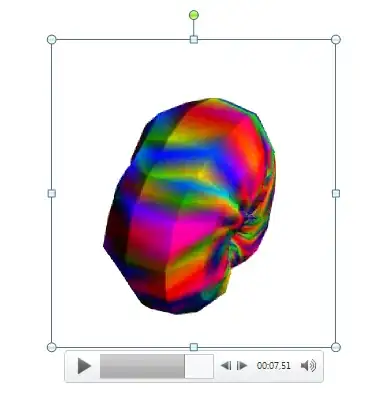
The resulting movie imports and embeds nicely into PowerPoint (via Insert->Video->Video from file), and you get the full set of play/pause... controls during animation, see e.g. this screenshot:

Mathematica graphics

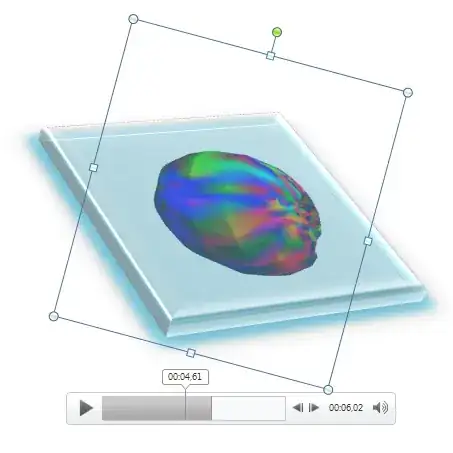
You can also use all kinds of PPT format mumbo-jumbo:

Mathematica graphics

Your code has some other issues too, but with slight modifications this seems to work:

frames = Table[
   Graphics3D[{{GrayLevel[.3], Thick, Line[space[[1 ;; t]]]}, {Blue, 
      PointSize[.015], Point[space[[t]]]},}, Axes -> True, 
    AxesStyle -> Directive[FontSize -> 20, FontFamily -> "Helvetica"],
     AxesLabel -> {"x [nm]", "y [nm]", "z [nm]"}, 
    BoxRatios -> {1, 1, 1}, ImageSize -> 700, 
    BoxStyle -> Directive[Dashed, Thick], 
    PlotRange -> {{-2620, 1600}, {-1700, 1450}, {-3500, 350}}, 
    SphericalRegion -> True], {t, 1, Length[space]}];

Export["test.mov", frames, "VideoEncoding" -> "MPEG-4 Video", 
 "FrameRate" -> 1]
Yves Klett
  • 15,383
  • 5
  • 57
  • 124
  • If I export it to MP4 Quicktime the controls (slider) are there. It is not the same as in your example ... – Luka Sep 04 '13 at 13:41
  • @Luka to be expected - why not generate a set of frames (like shown above) and export those? – Yves Klett Sep 04 '13 at 13:42
  • I don't know how to create a set of frames from 3D data (x, y, z coordinates), because I also need "the pointer"- a ball that is showing the path. I want to show the random walk of an electron, so the location of the electron must be shown through all the animation. – Luka Sep 04 '13 at 13:46
  • 1
    @Luka Your Manipulate already works. You take the Graphics3D part of that and generate t values e.g. in a Table to get your frames. But without your example working helping you is difficult. – Yves Klett Sep 04 '13 at 14:06
  • it is exactly what I need. Thank you very much. Now I need just a codec because PowerPoint cannot import the movie. It says that 64-bit codec for this media format must be installed. – Luka Sep 04 '13 at 17:59
  • 1
    @Luka Try installing an appropriate QuickTime player, that worked for me in several cases. – Yves Klett Sep 04 '13 at 19:26